
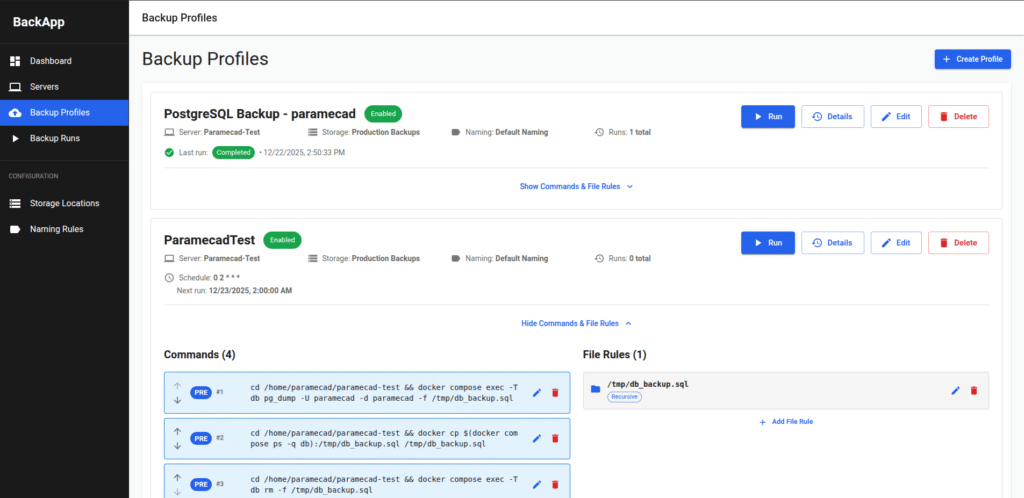
In many self-hosted and sysadmin setups, backups often start the same way: a couple of bash scripts, some rsync/tar, and a set of cron jobs that work… until they don’t. BackApp targets that exact pain point with a very specific promise: a small web interface to schedule and inspect backups of remote servers over SSH, packaged as a lightweight server you can run locally or on a dedicated machine.
What BackApp is (and why it’s interesting)
BackApp is an open-source Go + React application designed to schedule and audit backups of remote hosts via SSH. The project emphasizes simplicity and footprint: a lightweight server (the repo claims a binary under 50 MB) that provides a web dashboard to manage backup profiles and review runs.
It’s not trying to be an “enterprise backup suite.” Instead, it’s meant to replace the common pattern of scattered scripts and cron entries by giving you one place to manage hosts, paths, exclusions, and logs.
Core features: profiles, rules, scheduling, and logs
BackApp’s workflow is centered around Backup Profiles. From the README, key capabilities include:
- Add multiple remote servers via SSH using password or key authentication.
- Define local storage locations and naming rules for backup folders.
- Build profiles using a template engine or from scratch, including pre- and post-backup commands that run on the remote server.
- Configure include/exclude path rules.
- View detailed logs for each backup run (success/failure + command output).
- Schedule backups using cron expressions.
For configuration, BackApp supports simple CLI flags: -port (default 8080) and -db for the SQLite DB path (default /data/app.db).
Two warnings you should take seriously: command injection and plaintext secrets
BackApp’s README includes prominent security warnings, and they’re not “fine print”:
- Command/path injection risk: the project warns that commands, file paths, and variables entered in the UI may not be escaped and are injected into commands “as is.”
- Plaintext storage/logging: it also warns that text entered in the UI is saved in plaintext, and if you enter passwords or secrets, they may be shown in logs in plaintext.
In practical terms, this places BackApp firmly in the “use in controlled environments” category.
Reasonable baseline mitigations if you run it for real:
- Keep the UI reachable only from a private network, VPN, or bastion host.
- Avoid passwords; use SSH keys and a least-privilege backup user.
- Treat everything entered as potentially executable and review paths/commands carefully.
- Put it behind a reverse proxy with authentication (SSO/basic auth) and limit exposure.
Clear limitations: what it does NOT do (yet)
BackApp is explicit about what it doesn’t support:
- Deleting backups
- Incremental backups
- Backup deduplication
- Restoring from backups
So the realistic positioning is: BackApp is a visual scheduler + run inspector for SSH-based backups—not a full backup platform with restore workflows, incrementals, or dedupe.
Deployment options: native binary or containers
The project offers two main ways to get started:
- Native binary (recommended for smaller setups): download the latest release and open the UI at
http://localhost:8080(or change port via-port). - Docker / Docker Compose: pull from GHCR and use the provided
docker-compose.yml.
You can also build from source (Go 1.24+ and Node.js), which is useful if you want to audit the build, modify the UI, or integrate changes internally.
As a freshness indicator, the repo shows a “Latest” release (v0.5.2) dated December 29, 2025.
FAQ
Does BackApp replace Proxmox Backup Server, Borg, or Restic?
Not really. BackApp is a UI and orchestration layer for SSH backups with profiles, scheduling, and logs. It explicitly does not provide incrementals, dedupe, or restore features.
Is it safe to store credentials in the UI?
The project warns that UI input is stored in plaintext and secrets may appear in logs. In practice, avoid passwords and restrict UI access.
What kind of backups fit BackApp best?
Common sysadmin tasks: backing up specific directories (web roots, configs, exports) with include/exclude rules and a clear schedule, where having run history and logs in a web UI is valuable.
What does it require infrastructure-wise?
Very little: a web service (port 8080 by default) and a SQLite database (default /data/app.db). The rest depends on your SSH access and the local storage where backups are written.