
For years, OCR has been a necessary evil: fine for “getting text out,” but infuriating the moment a document looks like real life… meaning dense tables, multi-column layouts, forms with checkboxes, handwritten notes, or low-quality scans. That’s the territory where Chandra is trying to play in a different league.
Published as an open-source project, it’s positioned as an OCR model built to reconstruct documents with structure, not just transcribe characters. The promise is ambitious: convert images and PDFs into HTML, Markdown, or JSON while preserving layout, with strong support for tables, forms, math, and handwriting—plus extraction of images and diagrams with captions and structured output.
In other words: it’s not aiming for “plain text,” it’s aiming for reusable documents.
Not just OCR: “OCR + structure + pipeline-ready output”
Chandra’s core idea is that the real value isn’t reading letters—it’s producing outputs that can feed automation: documentation, internal enterprise search, permissioned RAG, legal archiving, contract analytics, or migrating PDFs into knowledge bases, etc.
That’s why it doesn’t stop at a .txt. Chandra is designed to:
- Reconstruct tables (instead of turning them into a messy soup of misaligned cells).
- Preserve forms, including elements like checkboxes.
- Respect layout in complex documents (multi-column, headers/footers, long tiny text).
- Extract images and diagrams with organization and metadata.
- Deliver structured output as HTML/Markdown/JSON.
For technical teams, that’s the big shift: OCR that returns “structure” can dramatically reduce downstream cleanup, normalization, and parsing work.
Two inference modes: local or remote (vLLM)
Chandra offers two practical ways to run:
- Local (Hugging Face)
For teams that want on-prem/local processing and full environment control. - Remote (vLLM server / container)
A more production-friendly path for batch workloads. Typical flow: bring up the server and point the CLI at that API.
Either way, the entry point is straightforward: install the package and use the CLI, with real-world options (page ranges, parallel workers, per-page token limits, image extraction, etc.).
What it generates when it processes a PDF
The output design feels product-minded (not just a demo):
- One directory per document.
- A
.mdwith the Markdown output. - A
.htmlwith the reconstructed HTML. - A
*_metadata.jsonwith processing details (pages, token counts, etc.). - An
images/folder for extracted visual elements.
This is especially useful if the destination is an indexing pipeline (e.g., searching by sections/anchors in HTML, or versioning Markdown as a “living source”).
Benchmarks: where it aims to stand out
The repo includes a comparison table on the olmocr bench, with scores by category (arXiv, tables, old scans, headers/footers, multi-column, long tiny text, etc.). More important than the overall score is the approach: measuring by document type. In OCR, global averages can be misleading.
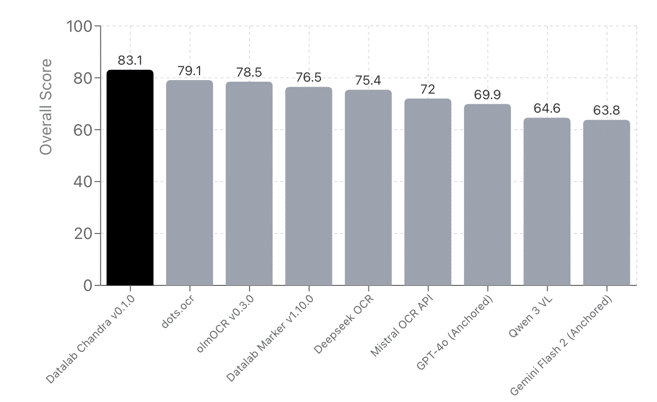
In the published table, Chandra appears particularly strong in areas that typically break general OCR systems, such as tables and hard layout, while remaining competitive across a wide range of document types.
The detail legal teams will notice first: the model weights license
There’s an important split:
- The code is under a permissive license (Apache 2.0).
- The model weights use a modified OpenRAIL-style license with conditions: research/personal use is allowed and certain startup scenarios under specific thresholds are covered, but there are restrictions for broader commercial use and for competitive usage relative to their hosted API—unless separately licensed.
In plain company terms: it’s not enough to hear “open source.” If you plan to embed it in a product, you’ll want to review the licensing terms carefully.
Why this matters going into 2026: OCR as a foundation for “useful AI”
Enterprise AI is (again) swinging toward the practical: fewer fireworks, more automation that actually ships. And there’s a stubborn reality across departments: a huge share of valuable knowledge still lives in PDFs.
Without OCR that understands structure:
- Internal search fails.
- RAG systems hallucinate because the document got flattened into text without hierarchy.
- Forms lose semantics.
- Tables degrade into something unusable.
In that sense, models like Chandra target a very specific pain point: turning document chaos into data and knowledge you can reliably use, without teams rebuilding everything by hand.
FAQs
Does Chandra handle complex tables in scanned PDFs without losing columns?
That’s one of its core goals: layout-aware reconstruction with strong table support—exactly where classic OCR often fails.
Which output format is best for pipelines: HTML, Markdown, or JSON?
It depends on the destination: HTML is great for preserving structure and anchors; Markdown is convenient for versioning and readability; JSON fits deterministic parsing and downstream enrichment.
Can it be deployed for production batch processing?
The vLLM server + CLI approach is designed for repeatable, parallelizable workflows that look more like an internal service.
Is it “commercially free” with no caveats?
Not necessarily: the code is permissive, but the model weights have specific conditions. For companies, this typically requires a licensing review if it’s going into a product or service.
Sources: GitHub repository datalab-to/chandra (README and benchmark table), chandra-ocr package documentation, and the model/weights licensing notes.