
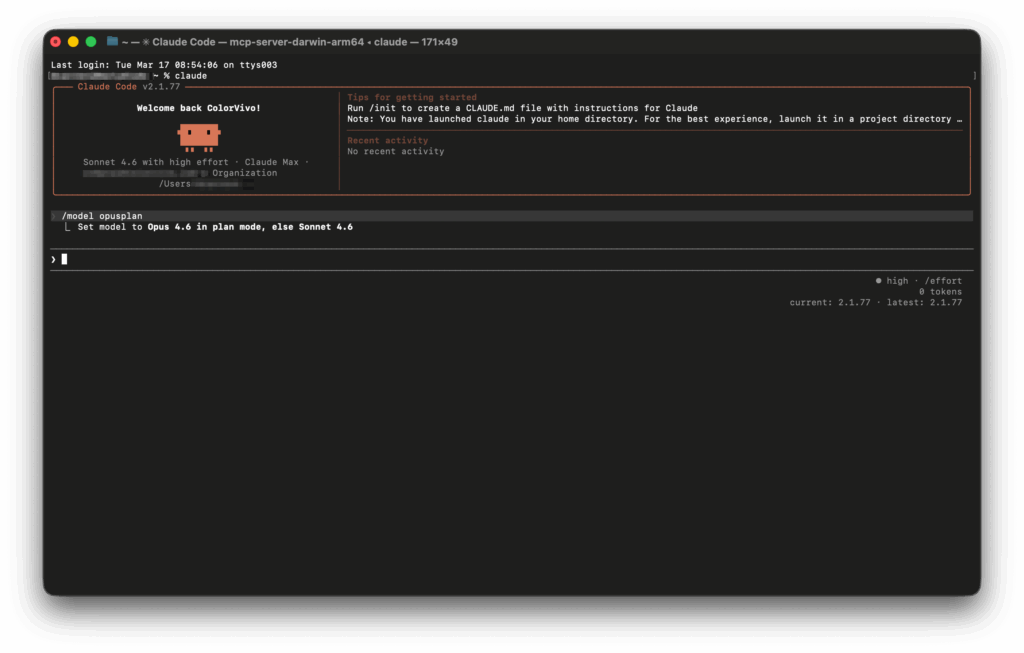
Claude Code now includes an option that could meaningfully change how many developers use Anthropic’s coding assistant day to day. It is called opusplan, and according to the product’s official documentation, it works as a hybrid alias that combines two different models within the same workflow: Opus 4.6 for planning and Sonnet 4.6 for execution.
The idea is straightforward, but powerful. Developers often face the same trade-off when working with coding assistants: use the strongest model for everything and accept higher cost and slower responses, or rely on a faster and cheaper model even when the task really needs deeper reasoning. Claude Code’s new opusplan mode is designed to reduce that friction. Instead of manually switching back and forth between models, users can activate a single alias and let Claude Code handle the split between planning and implementation.
In practice, the command is simple: /model opusplan. Once enabled, Claude Code uses Opus 4.6 in Plan Mode and Sonnet 4.6 in Execution Mode. That distinction matters. This is not being presented as a brand-new standalone model, but as an official hybrid configuration inside Claude Code. Anthropic’s own documentation describes it as a way to combine Opus’s stronger reasoning for planning with Sonnet’s efficiency for execution.
For developers, that could be especially useful in real-world workflows where not every step requires the same level of reasoning. Large architectural decisions, debugging tricky issues, analysing an unfamiliar codebase, or deciding how to restructure a system may benefit from a more capable model. Writing implementation code, applying file changes, and carrying out routine edits often benefit more from speed and lower cost. Opusplan is meant to divide that work more intelligently.
Why the hybrid approach matters
Anthropic positions Claude Opus 4.6 as its most capable model, particularly for advanced software engineering, long-running agentic workflows, and demanding reasoning tasks. The company says Opus 4.6 plans more carefully, performs better on large codebases, and is more reliable in review and debugging-heavy scenarios. That makes it the natural fit for moments when a developer wants the system to think before it acts.
Claude Sonnet 4.6, by contrast, is presented as a high-performance model with a stronger balance between speed, capability, and cost. Anthropic highlights its improvements in coding, long-context reasoning, and professional workloads, while several published customer testimonials emphasise its practical efficiency in everyday development tasks.
That is what makes opusplan more than a branding exercise. It reflects a broader product design choice: one model does not need to do everything. Instead, Claude Code can now align different models with different phases of work. In that sense, opusplan is not only a convenience feature. It is also a sign of how AI coding tools are evolving, moving away from the idea that one general-purpose model should handle every stage of the workflow equally well.
There is also a technical reason why this matters more now than it might have a year ago. Anthropic documents support for up to 1 million tokens of context in Claude Code with both Opus 4.6 and Sonnet 4.6, depending on plan availability. For developers working across large repositories, long conversations, or complex multi-file changes, that kind of context window makes a hybrid setup more useful. Planning and execution are both more effective when the model can see a substantial part of the project.
What opusplan does, and what it does not do
It is worth being precise here, because some early descriptions risk overstating how automatic the feature is. Anthropic’s official documentation ties the hybrid behaviour specifically to Plan Mode and Execution Mode. That means the split is structured around the product’s workflow modes, not described as a hidden, continuous system that dynamically swaps models on every turn without user awareness.
Plan Mode in Claude Code is intended for safe, read-only exploration of a codebase and for working out a strategy before making changes. According to Anthropic, users can switch into it during a session with Shift+Tab or start a new session with --permission-mode plan. Execution Mode is then used when it is time to implement changes. In other words, opusplan works best when paired with the intended Claude Code workflow, not as a magic layer that silently decides everything in the background.
That does not make it less useful. In fact, it arguably makes it more transparent. Developers still know what mode they are in, can still check status with /status, and can still control model behaviour through the interface. The automation is real, but it is not opaque.
A pricing story as much as a product story
The other major reason opusplan is likely to attract attention is cost. Anthropic’s official API pricing lists Claude Opus 4.6 at $5 per million input tokens and $25 per million output tokens, while Claude Sonnet 4.6 is priced at $3 per million input tokens and $15 per million output tokens. That means there is a clear financial incentive to reserve Opus for the tasks where it adds the most value.
For individual developers, the difference may be modest in a short session. For teams, heavy users, or longer-running coding workflows, it can add up quickly. That makes the promise behind opusplan easy to understand: spend Opus tokens where they matter most, and let Sonnet handle the bulk of implementation work.
Seen in that light, opusplan is not just a model shortcut. It is a workflow decision built into the product. It reflects a practical assumption that many developers already understand instinctively: the hardest part of software work is often not writing code, but deciding what code should be written in the first place.
Frequently Asked Questions
How do you enable opusplan in Claude Code?
Use the command /model opusplan. Anthropic documents it as an official hybrid model alias inside Claude Code.
When does Claude Code use Opus 4.6 and when does it use Sonnet 4.6?
According to Anthropic, opusplan uses Opus 4.6 in Plan Mode and Sonnet 4.6 in Execution Mode.
How do you activate Plan Mode in Claude Code?
Anthropic says users can switch into Plan Mode during a session with Shift+Tab, or start a new session with --permission-mode plan.
Is opusplan cheaper than using Opus 4.6 for everything?
It can be more cost-efficient because Opus 4.6 is priced above Sonnet 4.6 in Anthropic’s official API pricing. The point of opusplan is to use Opus for planning and Sonnet for execution.