
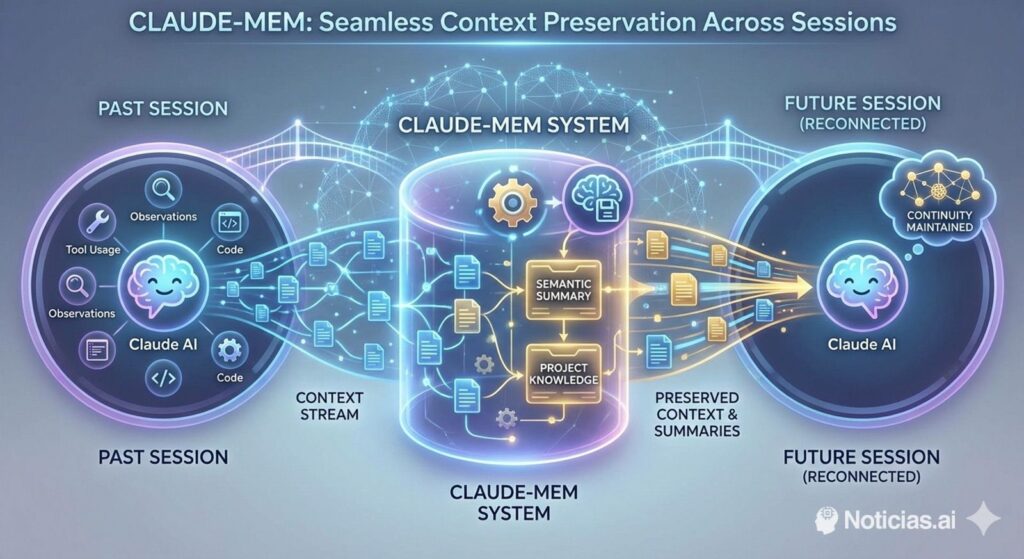
For sysadmins and developers running Claude Code in a real project, the biggest productivity killer is rarely “model quality” — it’s context loss. You hit a token limit, restart a session, and suddenly the assistant no longer knows your repo conventions, the last deployment fix, or why you chose that particular approach. Claude-Mem tries to solve this in a very ops-friendly way: it records what Claude does during coding sessions, compresses it into structured summaries, and injects relevant context back into future sessions.
Instead of relying on fragile “remember what I said yesterday” prompts, it behaves more like a local audit trail for AI-assisted work: tool actions become observations; observations become summaries; summaries become searchable memory.
What it actually captures (and why it matters)
Claude-Mem focuses on tool usage: file reads/writes/edits, command executions, searches, and other actions Claude triggers while you work. The plugin then produces semantic summaries that can be pulled back later, so the next session starts with “here’s what happened last time” rather than “teach me the repo again.”
The operational win is consistency:
- Fewer repeated explanations of architecture decisions
- Less drift in coding style and conventions across sessions
- Faster “return to task” after restarts or reconnects
- A path toward traceability (“why did we do this?”) without digging through chat history
Architecture at a glance (from an ops perspective)
Claude-Mem is not just a prompt trick — it’s a local system with familiar moving parts: lifecycle hooks, a worker service, and local storage.
| Component | What it does | Why sysadmins care |
|---|---|---|
| Lifecycle hooks | Trigger capture/summarization at key session events | Automation without manual steps |
| Worker service + web UI | Serves memory stream + search endpoints | A local service that must be stable and observable |
| SQLite database | Stores sessions/observations/summaries | Simple persistence, easy backup policy decisions |
| Search layer | Retrieves context efficiently (progressive disclosure) | Keeps token cost under control and reduces noise |
One detail that keeps popping up in real usage: the worker runs on port 37777 by default, and port collisions can break startup (especially on Windows setups), so it’s something you’ll want to monitor in rollouts.
How to install it in Claude Code (plugin marketplace)
Claude-Mem’s “Quick Start” installation is done directly inside Claude Code via the plugin marketplace.
/plugin marketplace add thedotmack/claude-mem
/plugin install claude-mem
Then restart Claude Code. After that, it should automatically:
- install dependencies,
- configure hooks,
- auto-start the worker service,
- and begin injecting context from previous sessions.
If you want to verify the local web viewer is reachable, it’s typically here:
http://localhost:37777
Code language: JavaScript (javascript)
(If it fails to start, the first thing to check is whether something else is already bound to that port.)
Practical rollout notes for sysadmin teams
1) Treat the memory store like dev telemetry
Even if it’s local, this is still a persistence mechanism. Decide up front:
- whether the SQLite DB is included in workstation backups,
- what qualifies as sensitive content,
- and whether certain repos/projects should be excluded.
Claude-Mem includes a privacy mechanism intended to let users exclude sensitive content from storage (via tags), but org policy still needs to define what’s acceptable.
2) Watch the “local service” failure modes
Because there’s a worker service involved, you get classic issues:
- port conflicts,
- intermittent local connectivity,
- startup timing problems,
- and environment mismatches.
The GitHub issue tracker shows multiple reports around “worker failed to start on port 37777”, which is exactly the kind of thing you’d want in a standard internal troubleshooting runbook.
3) License implications (don’t skip this)
Claude-Mem is licensed under AGPL-3.0, and the repo notes that a subdirectory (ragtime/) uses a separate PolyForm Noncommercial license. That combination can matter a lot if you plan to modify and redeploy parts of it internally or embed it in a broader toolchain.
Why this category is gaining traction now
As models get better at executing multi-step tasks, the bottleneck shifts from “can it write code?” to “can it stay aligned with the project over time?” Persistent memory systems are essentially context infrastructure: not glamorous, but the difference between a demo and a workflow.
Claude-Mem’s design choice — capture actions, summarize, then retrieve progressively — matches how experienced engineers already think: start with an index, then drill down only where needed.
Quick FAQ
Is Claude-Mem mainly for developers, or does it help sysadmins too?
Both. Developers get continuity in coding tasks; sysadmins get a more inspectable “what happened” trail around tool usage, changes, and repeated operational fixes.
What’s the most common operational failure?
Worker service startup issues, often tied to port conflicts on 37777.
Can you deploy it broadly in an enterprise?
Technically yes, but you’ll want to review data retention/privacy handling and the AGPL-3.0 implications before treating it as a standard internal platform component.