
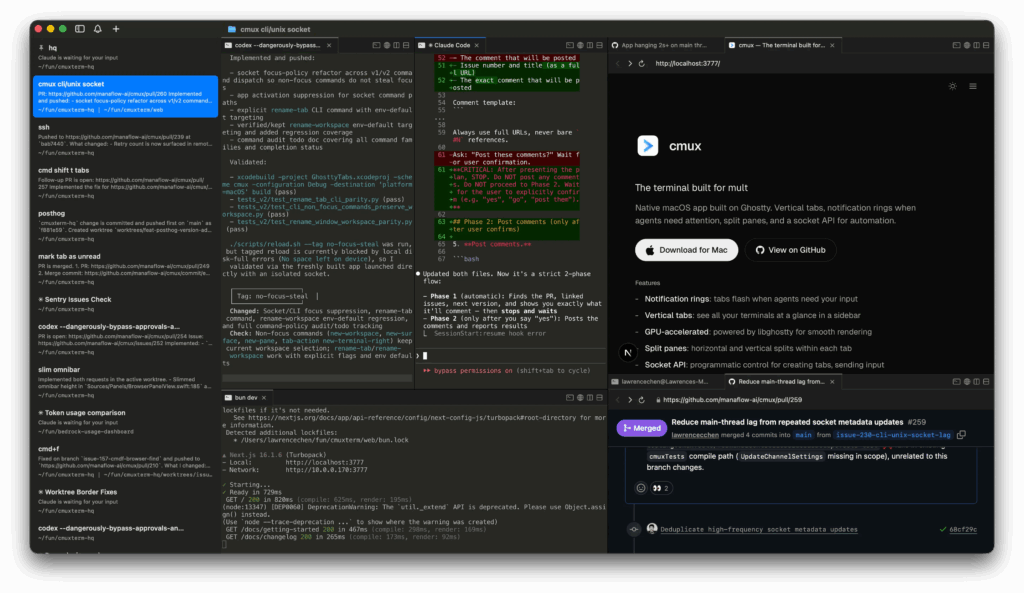
Working with multiple coding agents at the same time is quickly becoming normal for many developers. One Claude Code session may be reviewing a branch, another may be fixing a bug, a third may be watching logs, while a browser window sits nearby with the pull request, docs, or a local app. In that kind of setup, the bottleneck is no longer just the model. It is often the terminal itself. That is exactly the problem cmux is trying to solve on macOS.
cmux is presented as a native macOS terminal app built on top of libghostty, the rendering engine behind Ghostty. Its pitch is straightforward: adapt the terminal to modern agent-heavy workflows with vertical tabs, split panes, notification rings when agents need attention, an integrated browser, and a socket API for automation. It does all of that in Swift + AppKit, without Electron, while keeping GPU-accelerated rendering. For developers who already spend hours inside Claude Code, that combination is easy to understand.
What makes cmux interesting is that it is not trying to replace the terminal with a fully opinionated coding product. Instead, it adds structure around the way developers already work. The sidebar can show useful context such as the Git branch, working directory, listening ports, and the latest notification text for each workspace. That matters because once multiple agent sessions are running in parallel, standard macOS notifications often stop being useful. A generic “Claude is waiting for your input” alert does not help much if there are six active panes on screen.
A terminal designed for real multitasking
The most visible part of cmux is its vertical tab layout. Unlike traditional terminal tabs, which quickly become unreadable when too many are open, the sidebar is designed to behave more like a task switcher for active development work. Each workspace carries enough metadata to make it easier to jump back into context without hunting through several terminal windows.
cmux also supports horizontal and vertical pane splits, which means a single workspace can hold multiple related surfaces at once. That makes it possible to keep Claude Code on one side, a second agent or shell on another, and perhaps logs or a dev server in a third pane. In practical terms, it tries to make agent-driven development feel less scattered.
This is one of the main differences between cmux and older approaches like tmux. tmux is a multiplexer that runs inside any terminal. cmux, by contrast, is a native GUI app for macOS with visual navigation, notification layers, and built-in browser support. It is less about prefix keys and terminal tricks, and more about giving developers a cleaner operating surface for parallel work.
Built-in browser and automation hooks
One of the most distinctive features is the integrated browser. cmux lets users split a browser next to the terminal and control it through a programmable API. According to its project documentation, agents can inspect accessibility trees, click elements, fill forms, and execute JavaScript. That opens up a useful pattern: Claude Code in one pane, and the application, staging site, dashboard, or PR view in another.
The automation layer goes beyond that. cmux includes both a CLI and a socket API so developers can create workspaces, split panes, send keystrokes, and open URLs programmatically. The project’s own philosophy is that cmux is a primitive, not a full solution. In other words, it gives developers terminal rendering, browser integration, tabs, splits, notifications, and automation controls, then leaves the workflow design to them.
That design choice is one of the reasons it has attracted so much attention. Many developers working with agents do not want a closed GUI orchestrator that forces them into a predefined flow. They want flexible building blocks they can combine with their own tools, repos, scripts, and habits.
Ghostty-compatible, but not Ghostty
There is one technical point worth clarifying. cmux is not a Ghostty fork. Its documentation explains that it uses libghostty as a rendering library, much like other applications use WebKit for web views. That means Ghostty users can often carry over parts of their setup, since cmux reads the existing ~/.config/ghostty/config for things like themes, fonts, and colors.
At the same time, cmux does have limitations. It is macOS-only for now. It can restore layout, workspaces, directories, browser state, and some scrollback after relaunch, but it does not yet restore live terminal process state. So active Claude Code, tmux, or vim sessions are not resumed automatically after a restart. That is an important distinction for anyone expecting full session persistence.
Free, open source, and clearly aimed at the AI coding era
cmux is free, open source, and distributed under AGPL-3.0-or-later. Its GitHub repository has already gathered strong attention, and its own site positions it very directly around the growing world of terminal-based coding agents. It is not limited to Claude Code either. The project explicitly mentions compatibility with Codex, OpenCode, Gemini CLI, Kiro, Aider, Goose, Amp, Cline, Cursor Agent, and essentially anything else that runs in a terminal.
That broader compatibility matters because cmux is really about workflow infrastructure, not model loyalty. It is trying to become the place where developers manage multiple agent sessions, not the place where they choose which model to use.
It will not be essential for everyone, and it will not magically fix poor habits or messy project management. But it does point to something important: as agent-driven development grows, the terminal itself is being redesigned to match. Less monolithic IDE, more programmable, organised, context-rich terminal workspace. For developers on macOS who already live inside Claude Code, cmux looks less like a novelty and more like a serious productivity layer.
Frequently Asked Questions
What exactly is cmux?
cmux is a native macOS terminal application built on libghostty, designed for developers running multiple coding agents in parallel. It adds vertical tabs, split panes, visual notifications, and a built-in browser.
Is cmux a fork of Ghostty?
No. cmux uses libghostty for terminal rendering, but it is a separate application built in Swift and AppKit.
Does it only work with Claude Code?
No. cmux is a terminal, so any coding agent or CLI tool that runs in a terminal should work with it, including Claude Code, Codex, Gemini CLI, Aider, and others.
Is cmux available on Windows or Linux?
Not at the moment. The project currently supports macOS only.