
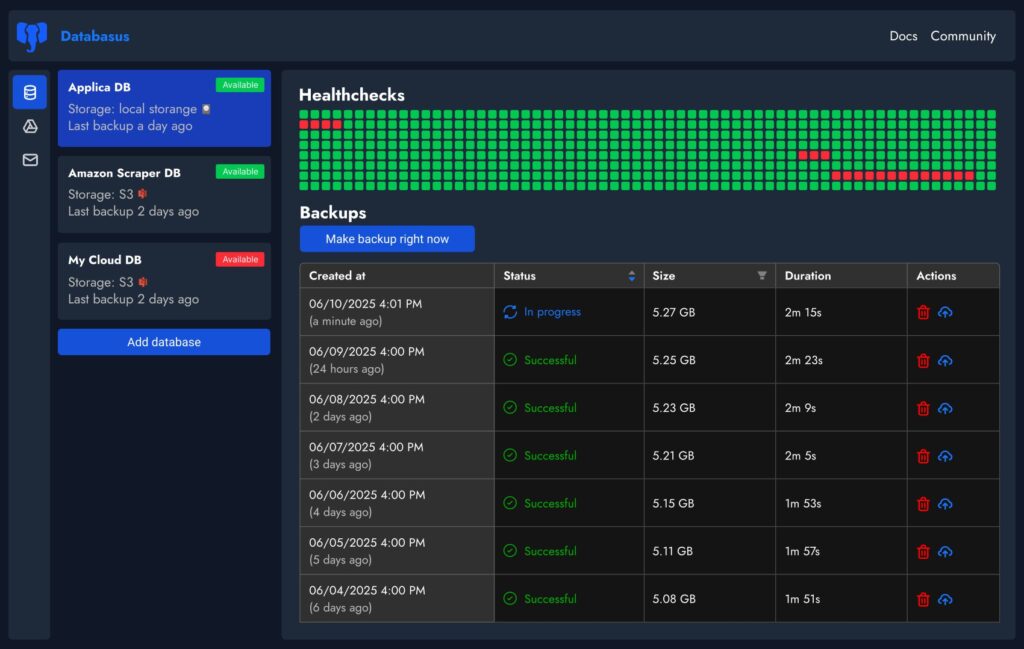
Every sysadmin has seen the same pattern: backups start out as a clean pg_dump job, a couple of cron entries, and a bucket. Six months later it’s a fragile web of scripts, secrets scattered across servers, inconsistent retention, and “we’ll test restores later” hanging over everyone’s head.
Databasus is trying to break that cycle with a pragmatic pitch: a free, open-source, self-hosted backup tool for PostgreSQL (its main focus), MySQL/MariaDB, and MongoDB, with a web UI that centralizes scheduling, storage targets, encryption, and notifications—without forcing teams into heavyweight enterprise backup suites.
What it is (and what it isn’t)
Databasus is best understood as a backup management layer that orchestrates logical backups and wraps them in the operational features sysadmins actually need: schedules, destinations, alerts, access control, and auditability.
It’s not positioning itself as a full PITR/WAL-archiving system for PostgreSQL. The project explicitly states it doesn’t target PITR, arguing that managed cloud services already provide native PITR, and that external PITR workflows often can’t be restored into managed database offerings anyway. Instead, Databasus emphasizes practical recovery granularity via hourly/daily logical backups.
Coverage: versions and engines that show up in real environments
Databasus advertises support across a wide spread of versions—useful in shops where “latest” is aspirational:
- PostgreSQL: 12 through 18
- MySQL: 5.7, 8, and 9
- MariaDB: 10 and 11
- MongoDB: 4 through 8
That breadth matters because backup tools fail in the gaps—where a minor version difference breaks auth methods, dumps, or feature compatibility.
Deployment: Docker-first, but with a clear path to Kubernetes
Databasus is designed to be straightforward to deploy:
- Automated install script (Linux)
- Single
docker run - Docker Compose
- Kubernetes via Helm
The default UI is exposed on port 4005, and state is persisted to a mounted data directory, which is important when treating the tool itself as production infrastructure (backups don’t matter if the backup manager is cattle without state).
The official install docs also publish modest resource requirements—1 vCPU, ~500 MB RAM, and ~5 GB disk (plus space for backups)—which makes it realistic for smaller teams and lab environments.
Scheduling and retention: the part that usually gets messy
Where Databasus aims to reduce toil is in schedule management. It supports hourly/daily/weekly/monthly cadence and cron-style scheduling, encouraging teams to run backups during low-traffic windows without hand-editing cron files across hosts.
That’s also where centralized policy helps: consistent timing, consistent rotation rules, and fewer “this one DB is special” snowflakes that slip through.
Storage backends: S3, Drive, SFTP—and the operational reality of “multiple copies”
Databasus supports multiple storage destinations, including local storage and common external targets such as S3-compatible object storage, Cloudflare R2, Google Drive, Dropbox, NAS, SFTP, and rclone-based backends.
For sysadmins, the biggest practical benefit is not that it can talk to yet another provider—it’s that it normalizes the workflow of sending the same backup set to multiple places. That’s how teams get closer to real resilience: local for fast restores, object storage for durability, and a separate administrative boundary for “what if the server is owned.”
Notifications that belong in an on-call world
Backups that don’t page are backups that don’t exist. Databasus includes notification integrations across channels like email, Telegram, Slack, Discord, and webhooks, with success/failure status and progress messaging designed to fit team workflows.
The value here is cultural as much as technical: once “backup succeeded/failed” becomes visible in the same channels as deploy alerts and incident pings, teams stop treating data protection as a monthly checkbox.
Security model: “zero-trust storage” and read-only database access by default
Databasus leans hard into security-by-default, and it’s one of the more distinctive parts of the project:
- AES-256-GCM encryption for both backup files and sensitive config data (tokens, passwords, webhook secrets)
- Backup pipeline described as:
pg_dump→ compression → encryption → storage - A “zero-trust storage” posture: encrypted backups should be useless to an attacker who gains access to the bucket
- A default stance of read-only DB access, with warnings if write privileges are detected.
For sysadmins, that’s a meaningful upgrade over the common pattern of storing plain dumps in object storage with “we’ll add encryption later.” It also aligns with the operational reality that backups are a prime target in ransomware and extortion playbooks.
Team features: workspaces, RBAC, audit logs
Databasus isn’t limited to single-admin usage. It includes:
- Workspaces to group databases/storages/notifiers by project or team
- Workspace-level roles (viewer/member/admin/owner)
- Audit logs to track system activity and configuration changes
That’s important in environments where compliance isn’t a formal framework but a practical need: “Who changed the schedule?” “Who added a new storage key?” “Who downloaded backups?”
The rename: Postgresus → Databasus
The tool was previously known as Postgresus, with a migration guide because the rename isn’t just cosmetic. The official site cites multiple reasons, including expanded support beyond PostgreSQL and trademark compliance, noting that “postgres” is a trademark and shouldn’t be used in a project name.
Practical sysadmin notes before putting it in production
A backup manager is only as good as the restore you’ve tested. Databasus makes the management side easier, but sysadmins still need to operationalize a few basics:
- Run restore drills (at least monthly): restore into a scratch instance and validate application-level integrity.
- Separate credentials and privileges: keep Databasus DB users truly read-only where possible.
- Treat encryption keys as crown jewels: encrypted backups are only useful if keys are durable, backed up, and access-controlled.
- Define RPO/RTO honestly: Databasus focuses on scheduled logical backups; if the business requires near-zero data loss, pair with database-native replication/PITR mechanisms where applicable.
FAQ
Can Databasus back up PostgreSQL to S3 with encryption enabled by default?
Yes. The project documents on-the-fly backup encryption using AES-256-GCM and supports S3-compatible storage backends as destinations.
Is Databasus suitable for backing up cloud-managed databases like RDS or Cloud SQL?
It’s designed to work with cloud-managed PostgreSQL as well as self-hosted instances, and it explicitly positions logical backups as practical for cloud setups where external PITR restores are often not feasible.
Does Databasus support Slack/Telegram/Discord alerts for failed backups?
Yes. Databasus lists multiple notifier channels including Telegram, Slack, Discord, email, and webhooks for success/failure notifications.
What’s the operational difference between Databasus and “just cron + pg_dump”?
Databasus centralizes schedules, storage destinations, encryption, notifications, and team access control behind a UI and audit logs—reducing the typical sprawl of scripts and scattered secrets.