
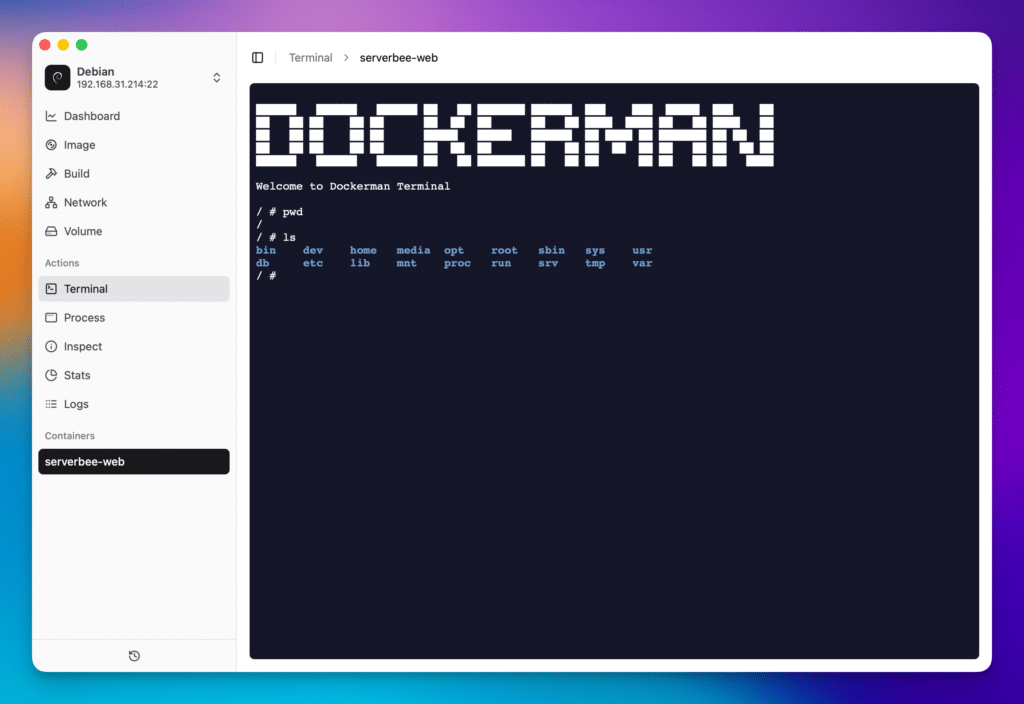
In a world where modern development increasingly depends on containers, day-to-day Docker management has become a real productivity bottleneck. It’s no longer just about starting and stopping services: teams need to inspect configurations, tail logs in real time, check CPU and memory usage, build images, and debug processes—without constantly fighting heavyweight tooling. That’s the space Dockerman is aiming for: a modern, cross-platform, lightweight desktop UI that focuses on doing the essentials fast.
Hosted on GitHub as ZingerLittleBee/dockerman.app, the project describes itself as a Docker management UI built with Tauri and React, with performance-oriented pieces in Rust. The pitch is straightforward: deliver a clean, responsive experience with minimal system overhead.
A Docker UI focused on what you actually use
Dockerman’s experience is organized around a main dashboard plus task-driven views for common workflows. The dashboard highlights container and image stats, including total image size monitoring, and keeps container status updates flowing in real time. The goal is practical visibility: a quick read on what’s running and what’s growing.
Most of the value, though, sits in container operations. According to the project documentation, Dockerman includes:
- A detailed container list with status indicators
- Deep inspection views showing port mappings, network settings, mount points, and labels
- Resource monitoring for CPU, memory, network stats, and block I/O
- Integrated terminal access, a process list, and a real-time log viewer
That bundle positions Dockerman as an “everyday cockpit” for developers and sysadmins who want visibility and control without a bulky management suite.
The practical differentiators: file browser and Docker events
Two features stand out as especially useful in real workflows.
First, Container File Browser: a built-in file explorer that lets you navigate a container’s filesystem from the UI. The README highlights dynamic tree loading, support for large directories via pagination, folder upload/download, single-file upload/download with mode preservation, symlink support, and context menus for file operations. For many teams, this reduces the need to jump into a shell just to inspect paths, grab config files, or pull artifacts out of a running container.
Second, Docker Events support: Dockerman can listen to Docker events in real time, filter and search them, and display structured JSON details. That’s particularly helpful when debugging fast-moving environments where containers and networks churn quickly—or when you need to trace what happened and when across the daemon.
Image builds with logs and history
Dockerman also targets a common pain point: building images while keeping context. The project lists support for building from a Dockerfile, including build args and tags, plus real-time build log streaming. It also mentions historical log playback, which can be valuable when you need to revisit a past build failure without recreating it from scratch.
On top of that, the image view includes listing by size and tags, creation time tracking, detailed inspection, and usage analytics.
Tauri + Rust: the “tool that doesn’t get in the way” strategy
Using Tauri isn’t just a technical choice—it’s part of Dockerman’s positioning. Tauri has gained traction for desktop apps that want modern UI with a smaller footprint. Dockerman leans into that narrative: fast startup, low resource usage, and a focused interface.
Its product page even publishes indicative performance targets (for example, “~0ms” startup, bundle size under 10 MB, memory usage under 30 MB). These should be read as project benchmarks in its own context, but they make the intent clear: compete on speed and efficiency, not UI clutter.
Local-first operation, with optional remote SSH connectivity
From a security and deployment standpoint, Dockerman emphasizes local-only operation, connecting natively to the local Docker daemon. At the same time, the project documentation references secure remote connectivity over SSH, enabling management of Docker instances across multiple hosts from a single UI—useful for homelabs, DevOps teams, or small fleets where centralized orchestration would be overkill.
Community signals and development pace
At the time reflected in the repository snapshot, Dockerman shows 284 stars, 16 forks, and 69 commits, with recent activity mentioning version 3.0.1 dated December 10, 2025. Those numbers aren’t everything, but they do suggest the project has traction and is being actively maintained.
In a crowded landscape of Docker utilities, Dockerman’s bet is clear: deliver the features people use every day—plus a couple of genuinely practical extras—inside a desktop app that stays fast and lightweight.
FAQ
Who is Dockerman best suited for as a lightweight Docker management UI?
Developers and sysadmins who work with containers daily and want a fast UI for inspection, logs, resource monitoring, and operational control without constantly switching back to the terminal.
Can Dockerman manage containers on a remote server over SSH?
According to the project documentation, yes—Dockerman includes SSH-based remote connectivity for managing Docker instances across multiple hosts.
What does the Container File Browser add compared to using docker exec?
It provides a visual filesystem browser with upload/download support for files and folders, which can speed up debugging, config inspection, and artifact retrieval without opening an interactive shell.
Does Dockerman support building Docker images and reviewing build history?
The project documentation lists Dockerfile builds, real-time build log streaming, and historical log playback for reviewing previous build output.