
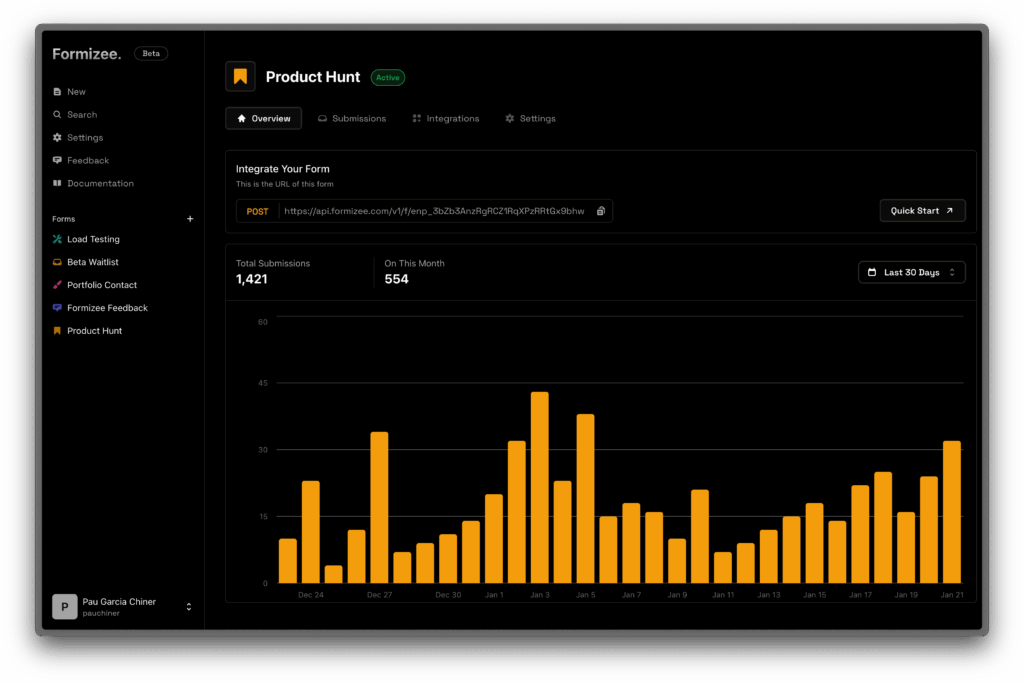
Web forms have been the internet’s front door for decades—contact requests, support tickets, lead capture, bookings, surveys, and sign-ups. Yet even as modern stacks embrace edge deployments, static sites, and API-first architectures, form handling often remains fragmented: either locked into closed services, forced into rigid workflows, or left running on legacy infrastructure that doesn’t fit today’s way of shipping products.
That’s the gap Formizee is trying to fill. It’s an open-source platform positioned as an alternative to popular form backends like Formspree, Formcarry, and Formester. The pitch rests on three simple ideas: build and manage forms from a dashboard, collect submissions through an endpoint, and measure everything with built-in analytics—all on a stack designed to feel fast and developer-friendly.
A form backend built for developers
Formizee describes itself as “the forms platform for developers.” That’s not just branding. The project focuses on easy integration with virtually any website or app—plain HTML pages, modern frameworks, or decoupled frontends—without requiring you to build your own submission pipeline from scratch (validation, storage, notifications, and metrics).
Operationally, Formizee revolves around a key concept: the “endpoint.” In its docs, “endpoint” is the internal name for a form. You create a form in the dashboard, get an Endpoint URL, and wire your frontend form submission to that URL. In parallel, forms live inside a workspace, which groups configuration, users, and notification emails.
The notable part is that Formizee isn’t just “a place to send POST requests.” Its positioning emphasizes analytics and insights as a first-class feature rather than an afterthought.
Analytics and metrics, with ClickHouse at the core
One of Formizee’s differentiators is its analytics stack: it explicitly uses ClickHouse for “Analytics & Metrics.” That’s a meaningful choice. ClickHouse is widely known for handling high-volume event data with very fast queries, which matches what happens when a form starts getting real traffic—campaign spikes, multi-page embeds, localization variants, A/B tests, and conversion funnels.
In practice, an analytics-first approach helps answer the questions teams actually ask: how many submissions are coming in, when they’re rising or falling, and how form performance trends over time.
A modern stack: Hono, Next.js, libsql, and typed APIs
From the repository, Formizee clearly targets the modern web ecosystem with tools many developers already use:
- Hono as the backend framework
- Next.js for the frontend and dashboard
- libsql as the SQLite client, plus Drizzle ORM
- tRPC for typed APIs
- Auth.js for authentication
- Tailwind + shadcn/ui for UI components
On the hosting side, Formizee references familiar “modern infrastructure” providers: Vercel for web/dashboard hosting, Cloudflare for API and vault hosting, Tinybird for managed ClickHouse, plus services like Sentry (error tracking), Stripe (payments), and Turso (edge database). The bigger story here is architectural: Formizee aims to fit naturally into distributed, low-latency deployments.
API-first control: expiring keys and automation
Formizee doesn’t stop at the dashboard. The documentation highlights that terminal-oriented users can rely on a fully featured API. It defines API keys as the way to authorize actions within a workspace—and includes an important operational detail: API keys have expiration dates, encouraging better credential hygiene and reducing risk from forgotten long-lived secrets.
The API documentation includes an endpoint to create a form (endpoint) via a POST request, with parameters such as slug, notification recipients, form name, enabled state, redirects, and additional options. This is the kind of setup that fits teams who want infrastructure-as-code workflows—creating forms per environment (staging/production), per client, per campaign, or per product module.
Pricing and the self-hosting advantage
Commercially, Formizee outlines a simple plan structure:
- Hobby plan at $0/month, with limits such as 1,000 daily API requests, 250 submissions, 100 forms, 10 API keys, 1 member, and 100 MB storage
- Pro plan at $5/month, scaling up to 100,000 daily API requests, 1,000 submissions, 1,000 forms, 100 API keys, and 1 GB storage (noted as “coming soon”)
But the biggest differentiator for many teams isn’t price—it’s control. Formizee is open source and promotes self-hosting, which is a major draw for organizations that need stronger governance, compliance alignment, or simply don’t want sensitive inbound form data handled by third parties. And forms can contain more sensitive information than many people realize: support requests, sales inquiries, incident details, and personal data.
Why forms suddenly feel “strategic” again
It’s easy to think forms are a solved problem, but in 2025 they’re part of a bigger data pipeline: feeding CRMs, automation tools, analytics systems, and internal workflows. When that entry point is constrained by a closed or inflexible system, friction shows up quickly—limited integrations, missing metrics, unpredictable pricing at scale, or reduced control over data handling.
Formizee’s bet is that a modern, open-source forms platform with analytics baked in—plus a clean API for automation—fits the moment. As more teams push for practical sovereignty over critical building blocks, “forms with metrics” stops being a small feature and starts looking like real infrastructure.
FAQs
How do you set up an open-source forms backend with real-time analytics using Formizee?
The core workflow is: create an “endpoint” (form) in the dashboard, connect your frontend to the Endpoint URL, and use the analytics layer to monitor submissions and performance over time.
What advantages does Formizee offer compared to services like Formspree for Next.js, Astro, or static HTML sites?
Formizee is designed for developer workflows: a centralized dashboard, API keys for automation, and built-in analytics—without forcing you to build a custom backend just to receive form submissions.
What does “endpoint” mean in Formizee, and how does it relate to a workspace?
In Formizee’s documentation, an “endpoint” is simply the internal name for a form. Forms are managed within a workspace, which groups settings, users, and linked notification emails.
How does Formizee handle API credentials for automating form workflows?
Formizee uses workspace-scoped API keys and notes that keys have expiration dates, which helps enforce access control practices and reduces the risk of long-lived secrets.