
Over the past two years, “GenAI text-to-SQL” became one of the most repeated promises in enterprise AI: describe your question in plain English and get perfect SQL, ready for production. In practice, a lot of implementations stayed in demo territory. They look great with toy schemas and permissive credentials, then fall apart when they hit real-world joins, role-based access control, concurrency, timeouts, or the messy reality of production authentication.
Google’s MCP Toolbox for Databases is pushing a different thesis: the biggest problem isn’t only generating SQL. It’s everything around it—how agents access databases safely, consistently, and observably. Instead of betting that an LLM will “understand your data” and behave, Toolbox positions itself as a control plane for database access: standardized, authenticated, observable, and more production-friendly by design.
The real pain wasn’t the SQL—it was the operational chaos
SQL generation is the visible iceberg tip. The expensive failures happen underneath:
- Authentication & authorization: who can query what, with which permissions, and how tokens rotate without leaving secrets glued to containers.
- Connection pooling and limits: stopping agents from opening too many connections or hammering the DB with retries.
- Observability: traces and metrics so you can explain what happened when an agent goes off-script.
- Portability: today PostgreSQL, tomorrow Spanner, next month a self-managed MySQL cluster—each bespoke adapter becomes a new maintenance burden.
Toolbox is designed to address that wider system, not just “NL → SQL.”
MCP, explained like infrastructure: a standard “port” for tools
A key piece is MCP (Model Context Protocol), an open standard for connecting LLM-powered apps to external systems through a consistent protocol. MCP uses JSON-RPC 2.0 and defines roles (host/client/server) so tools can be exposed and consumed in a predictable way.
The core idea: if agent ecosystems are going to scale, you need something like “USB-C for integrations” so every project isn’t reinventing connectors. MCP aims to be that standard port; Toolbox is a database-focused MCP server in that ecosystem.
What MCP Toolbox for Databases actually provides
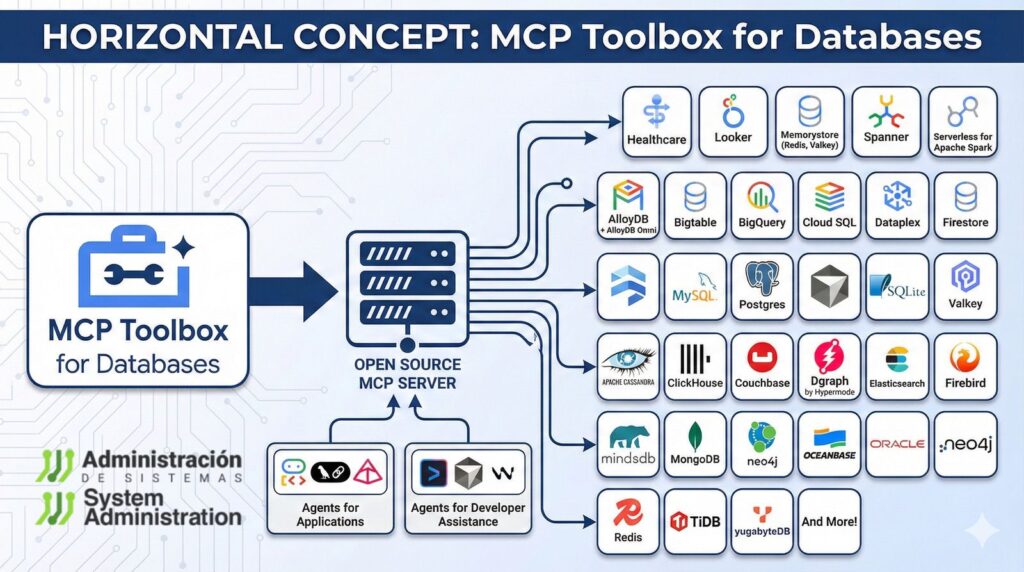
Google describes Toolbox as an open-source MCP server that helps developers connect agents to enterprise data “easily and securely,” handling hard platform concerns such as connection pooling, OAuth2/OIDC authentication, and OpenTelemetry-based observability.
In practical terms, the workflow looks like this:
- Declare tools (e.g., “search orders by customer name”) in a configuration file (commonly
tools.yaml). - Run the Toolbox server, exposing those tools via MCP.
- Connect your agent (LangGraph, ADK, or other frameworks) to Toolbox and load toolsets—without writing custom DB adapters for every backend.
This matters because it shifts teams away from “give the model raw DB access” toward explicit, parameterized, auditable tools with expected behavior.
Supported databases, and why teams care
Toolbox targets a wide range of databases, including AlloyDB for PostgreSQL (and AlloyDB Omni), Spanner, Cloud SQL (PostgreSQL, MySQL, SQL Server), Bigtable, plus self-managed MySQL and PostgreSQL. It also mentions third-party contributions (for example, graph databases like Neo4j and Dgraph).
For platform teams, that breadth is the point: if your organization runs multiple database engines, you can keep a more stable “tool contract” for agents even as backends change.
Beyond queries: ADK, LangGraph, and stateful agents
Google frames Toolbox inside a broader agent stack, including support for the Agent Development Kit (ADK) and a path toward deployment with Vertex AI Agent Engine.
It also highlights LangGraph workflows that need persistence and fault tolerance (checkpoints), with options to store state in managed PostgreSQL offerings (such as AlloyDB or Cloud SQL). That’s a subtle but important shift: many useful agents aren’t a single prompt—they’re long-running workflows that must resume, be audited, and be controlled.
A quick “ops-minded” way to approach adoption
Toolbox documentation includes a fast, non-production way to run the server with a config file—useful for evaluation and prototyping.
If you’re introducing it in a real environment, the safest rollout pattern is boring on purpose:
- Start with read-only tools.
- Use allowlists (specific approved queries/actions).
- Enforce least privilege DB roles.
- Add query guards: row limits, timeouts, and rate limits.
- Make OpenTelemetry traces/metrics mandatory from day one.
Toolbox won’t magically stop bad reasoning—but it does try to make the blast radius smaller and the behavior more inspectable.
One important caveat: the project states it is beta and may introduce breaking changes before a stable v1.0.
FAQ
Does MCP Toolbox for Databases prevent SQL “hallucinations”?
Not directly in a magical way. The benefit is architectural: instead of giving an LLM free-form DB access, you expose explicit tools with parameters, making behavior more predictable and auditable.
Can I use it with PostgreSQL/MySQL outside Google Cloud?
Yes. Google lists support for self-managed MySQL and PostgreSQL, alongside managed options like Cloud SQL and AlloyDB.
What’s the difference between MCP and building my own internal DB API for agents?
MCP is an open protocol (JSON-RPC 2.0-based) intended to make tools and clients interoperable across a growing ecosystem, rather than a one-off integration that only your stack understands.
Is Toolbox production-ready today?
Google’s repo notes it is currently beta, with possible breaking changes until v1.0. Many teams will treat it as “pilot first,” then production under strict controls (least privilege, read-only start, observability).