
For years, software architecture documentation has suffered from the same chronic problem: it starts with good intentions and quietly dies. A diagram in a wiki, a slide deck in PowerPoint, or a “temporary” sketch sitting in a shared folder tends to age badly. The system changes, services get added, APIs are retired, workloads move to the cloud, new providers come in… and the drawing stays frozen in time. That’s why more teams are shifting toward an approach that aims to fix the root cause: treating architecture as something you describe and maintain like code.
That’s where LikeC4 comes in. It’s an open-source project built around a simple but ambitious idea: define architecture using a modeling language (a DSL) and generate diagrams from that model so they stay continuously up to date. Instead of drawing architecture and then chasing changes, the model becomes the source of truth—and diagrams become a compiled, reproducible, version-controlled output.
One model, many diagrams
LikeC4 is inspired by the C4 model (widely used in software architecture) and by tools such as Structurizr DSL, but it adds flexibility: it doesn’t lock you into a rigid notation. You can define your own element types, styles, nested levels, and rules so each organization can adapt the “visual language” to its reality.

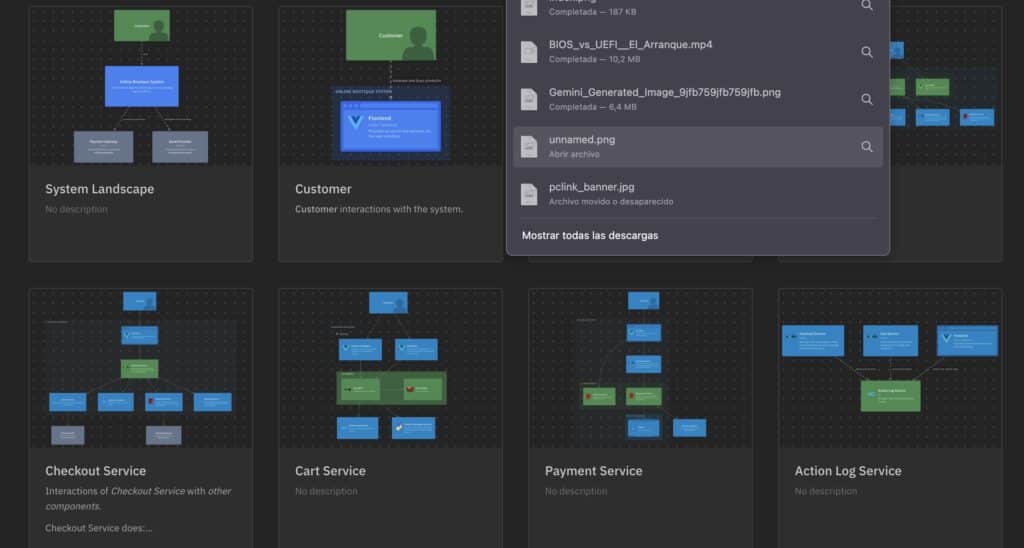
The core concept is that a whole system—or multiple systems—can be described in .likec4 files that consolidate into a single model. From there you create “views”: diagrams that don’t duplicate information, but instead filter and visualize slices of the same underlying model (a context view, a container view, a domain-focused view, a third-party dependency view, and so on). If the model changes, every view updates with it.
From the terminal to a visual workspace in seconds
Part of the appeal is the fast feedback loop. LikeC4 includes a CLI designed for previewing and iterating quickly: edit, save, see changes—much closer to a developer workflow than to traditional diagramming. The project also offers editor integrations (via extensions) with the kind of capabilities developers expect today: validation, autocomplete, navigation, preview, “go to definition,” “find references,” and safe renames.
This fits especially well in environments where architecture changes constantly: microservices, fast-scaling platforms, domain-driven reorganizations, or companies that need traceability for internal and regulatory requirements. It’s not just about making diagrams look nice—it’s about reducing friction in critical conversations: onboarding, security reviews, internal audits, dependency negotiation between teams, or explaining a system to non-technical stakeholders.
Documentation that’s “embedded” and automatable
Another big driver behind LikeC4 is how it integrates with documentation and delivery. Instead of exporting a PNG and pasting it into a wiki, the more modern pattern is interactive diagrams on a documentation site. The LikeC4 ecosystem includes tooling to embed views into websites and apps (for example, through web components or build pipeline integrations), plus options that work well in CI/CD: automatically generating or updating diagrams so changes in the repository are reflected in documentation without manual effort.
This matters in organizations that have suffered from “ghost documentation”: teams reorganize, repositories split, services get deprecated—and diagrams survive as fossils. The practical goal is to stop treating diagrams as handcrafted artifacts and start treating them as a product derived from the development process itself.
Architecture ready for the AI agent era
LikeC4 also touches a fast-emerging area: connecting architecture models to assistants and agent tools powered by large language models. The project provides an MCP Server (Model Context Protocol) to expose architecture knowledge so tools can query it in natural language. That opens up a compelling scenario: asking an assistant things like “what calls this API?”, “which components are marked legacy?”, “what depends on service X?”, or “what inbound relationships does this backend have?”—and getting answers grounded in the real model, not assumptions.
This is particularly relevant as organizations grow and architectural knowledge fragments. If the model is maintained and versioned, it becomes a useful knowledge base for both humans and automated tools that help review changes, map dependencies, or generate technical documentation.
An architecture editor with an engineering mindset
What sets LikeC4 apart from traditional diagramming isn’t only format—it’s discipline. The model lives alongside the code, changes are reviewed like code (pull requests, history, diffs), and it can be integrated into quality controls—and potentially even internal tests. In that sense, LikeC4 aligns with the idea of “verifiable architecture”: diagrams shouldn’t just be pretty; they should be consistent, traceable, and maintainable.
The project is open source under the MIT license and evolves as a set of tools (language, CLI, editor extension, and integration utilities). By late 2025, the repository is already approaching the “thousand stars” range on GitHub, a signal that the “live architecture from a model” concept is resonating with teams trying to reduce documentation debt.
Frequently asked questions
What’s the point of LikeC4 for a team that already uses Confluence or PowerPoint diagrams?
To prevent diagrams from going stale: the architecture model lives next to the code, and diagrams are generated from a single, versioned source of truth.
What’s the advantage of “architecture as code” compared with manual diagram tools?
You can review architecture changes like software changes (history, diffs, PR review) and automate publishing always-updated diagrams.
Is LikeC4 an open-source alternative to C4/Structurizr approaches?
It’s inspired by C4 and Structurizr-style DSLs, but adds flexibility to customize notation, element types, and levels to match different teams and organizations.
How does LikeC4 help document complex systems with microservices and external dependencies?
By centralizing the model and generating filtered views: you can create diagrams by domain, team, critical dependencies, or context without duplicating information or maintaining separate drawings.