
For years, ffmpeg has been the Swiss Army knife of digital audio and video. It converts formats, trims clips, changes codecs, extracts audio tracks, generates thumbnails and powers countless streaming workflows. It is also notoriously hard to master. One look at a command likeffmpeg -ss 00:00:03 -i input.mp4 -vf "scale=1280:720" -c:v libx264 -crf 23 -c:a aac output.mp4
is enough to understand why so many users end up digging through documentation and forum threads every time they need to do something slightly advanced.
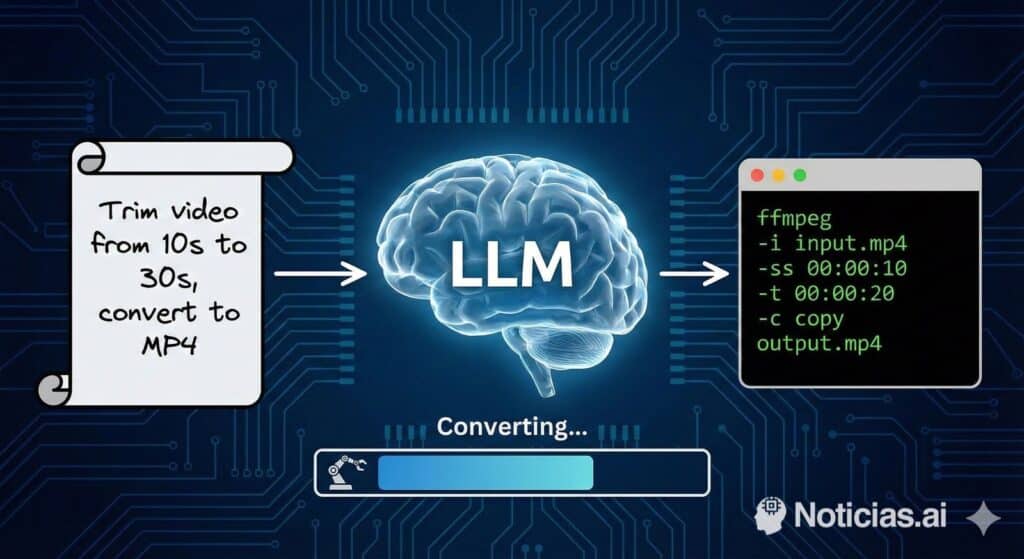
That is the problem llmpeg is trying to solve. This open-source tool wraps ffmpeg in a simple idea: let an AI system handle the hard part. Instead of memorising flags and filter chains, the user describes the task in natural language and llmpeg generates a ready-to-run ffmpeg command.
From “I don’t know ffmpeg” to “tell me what you want”
llmpeg is positioned for people who rely on ffmpeg occasionally, or not often enough to justify learning its full syntax. Rather than forcing users to remember every parameter, it offers a much more approachable interface.
A typical interaction looks like this:
llmpeg "convert screencapture.webm to screencapture.mp4 and downscale from 1080p to 720p"
Code language: CSS (css)
Behind the scenes, llmpeg sends that instruction to a language model and returns something like:
/usr/bin/ffmpeg -i screencapture.webm -vf scale=1280:720 screencapture.mp4
The user thinks in terms of goals (“I want this video in another format and smaller”), and the tool translates that into the exact ffmpeg syntax required for the local operating system, ffmpeg version and binary path.
AI in the terminal: how llmpeg works
llmpeg is a Python-based command-line tool that runs on Linux, macOS and Windows. It was initially developed on Linux, but the author aims for valid support across all three platforms and plans to add automated tests and CI to verify cross-platform behaviour.
By default, llmpeg uses OpenAI’s API as its language-model backend, but the architecture is designed to be flexible. Other providers — such as Amazon Bedrock or Anthropic — can be plugged in via the same interface. The main requirement is that the user has a valid API key set in an environment variable (for example, OPENAI_API_KEY when using OpenAI).
The default model is gpt-3.5-turbo-0125, which is sufficient for most tasks and accessible with the free credits of a developer account. Users who need more accuracy can switch to a GPT-4-class model by passing its name through the --openai_model parameter.
A key design choice is that the language model receives extra context: the operating system, OS version, ffmpeg version and executable path. That allows llmpeg to generate commands that are tailored to each platform and reduces errors caused by differences between installations.
Installation and basic usage
Installation is done directly from the GitHub repository:
git clone https://github.com/gstrenge/llmpeg.git
cd llmpeg
python3 -m pip install .
Code language: PHP (php)
Once installed, usage is straightforward: call llmpeg followed by your instructions in quotes. A help mode (llmpeg -h) explains all available options, including the backend selector and model configuration.
The examples published by the project’s author show another important advantage: llmpeg is not limited to “pure” ffmpeg lines. It can also generate full shell pipelines. For instance, a single natural-language prompt can produce a loop that walks through all .mp4 files in a folder, converts them to .mov and saves the new files in a dedicated directory, building a Bash for loop with the correct variables and paths.
Productivity boost and who it helps
The idea of “natural-language to specialised command” has appeared in other projects over the past year, and the developer community is still debating whether this is a passing trend or something deeper.
In practical terms, though, the benefits are clear for several groups:
- Content creators who need to compress, convert or trim media files periodically but do not want to memorise ffmpeg’s syntax.
- Support and DevOps teams who can document video workflows in plain language and let llmpeg turn them into reproducible commands.
- Power users who are comfortable in the terminal but are tired of scrolling through Stack Overflow every time they need to tweak a parameter.
ffmpeg is not going away, and anyone who truly masters it will always have an edge. But tools like llmpeg lower the entry barrier and let more people tap into ffmpeg’s power without wrestling with its steep learning curve.
Security and good-practice considerations
Because llmpeg delegates part of its logic to a remote language model, there are a few points users should keep in mind.
First, the user remains in control. The generated command is printed in the terminal and can be reviewed before execution. It is always wise to read it carefully, especially when it includes deletes, overwrites or complex shell constructs.
Second, sending prompts to an external API means that some information — such as file names or paths — may leave the local environment. For sensitive or confidential projects, organisations should review the data-usage policies of their chosen AI provider and consider private deployments or self-hosted models if necessary.
The good news is that llmpeg is released under the MIT licence, so the code can be audited, forked, extended or integrated into larger in-house tools as needed.
The future: learn ffmpeg or talk to an assistant?
Some developers see tools like llmpeg as a convenience feature that will sit alongside traditional documentation. Others believe they are an early glimpse of a broader shift: an AI layer sitting between humans and low-level tools, translating high-level goals into precise commands.
Reality will probably land somewhere in the middle. ffmpeg will continue to be a cornerstone in video and audio workflows, and professionals who depend on it heavily will still benefit from knowing its syntax by heart. But for occasional users — or even for experts who simply want a faster starting point — an assistant like llmpeg can be the difference between “half an hour of searching” and “one sentence in the terminal”.
Above all, llmpeg reinforces an emerging idea in software work:
you don’t need to remember everything to be productive; you need to know how to talk to the right tools.
FAQs about llmpeg and AI-generated ffmpeg commands
How does llmpeg work with ffmpeg?
llmpeg takes a natural-language instruction, sends it to a language model (by default via the OpenAI API) and receives a suggested ffmpeg command. It then prints that command — and can execute it — on the user’s system, using the locally installed ffmpeg binary.
On which operating systems can I run llmpeg?
The tool is designed to work on Linux, macOS and Windows, as long as Python 3 and ffmpeg are installed. llmpeg automatically detects the platform and adapts the generated commands to each environment.
Do I still need to understand ffmpeg to use llmpeg effectively?
Not in depth. llmpeg is meant to shield users from most of ffmpeg’s complexity. That said, having a basic understanding of video concepts (formats, resolution, codecs) and glancing at the generated commands is helpful, especially for more advanced tasks.
Is it safe to rely on an AI tool in my video workflows?
From a security perspective, you should always review commands before running them and be aware that prompts are sent to an external API. From a reliability standpoint, llmpeg is best used as a smart assistant: it gives you a strong starting point that you can accept, tweak or adapt, rather than replacing human judgement entirely.