
UI testing has a reputation problem. Not because teams don’t believe in quality, but because end-to-end tests often arrive with three painful side effects: they’re slow to write, fragile to maintain, and usually end up owned by a tiny group of specialists. Meanwhile, modern teams ship faster than ever, and the real bottleneck isn’t coding speed anymore — it’s catching regressions before users do.
That’s the gap Maestro is trying to close: an open-source platform for end-to-end testing across iOS, Android, and Web, built around a simple promise — you can write your first test in minutes, run it locally for free, and scale later if you need to. The pitch isn’t “more features,” it’s “less friction.”
What Maestro is (and why it’s getting attention)
At its core, Maestro is a test runner and framework designed for UI-level workflows: log in, navigate, tap, validate text, submit a form, and confirm the app behaves the way a user would experience it. The key difference is how it approaches authoring and maintenance:
- Declarative flows (YAML) instead of writing long test code in a traditional programming language.
- A focus on reliability and readability, so tests can be understood by more than just the person who wrote them.
- A tooling story that goes beyond CLI-only workflows, which matters in organizations where QA is cross-functional.
In 2026, this matters more than it did even a year ago. When AI tools accelerate development velocity, teams either invest in quality control — or they ship bugs faster.
The big differentiator: Maestro Studio (the “testing IDE”)
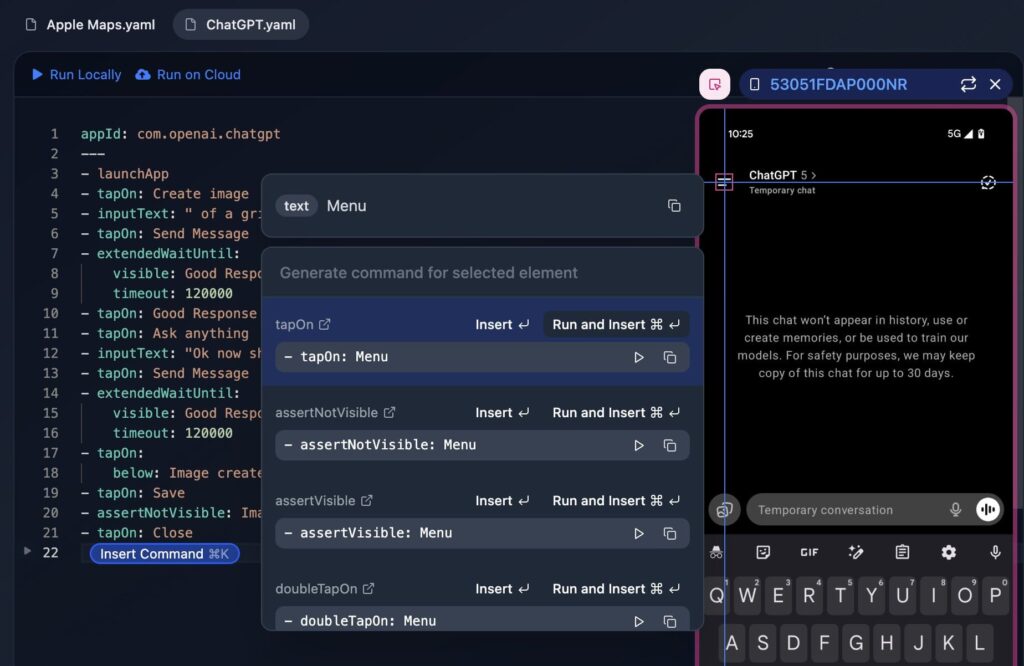
Maestro’s most accessible component is Maestro Studio, a free desktop app that positions itself as a testing IDE for both technical and non-technical users. The practical value is simple: you don’t have to guess selectors or write everything from scratch.
Studio typically revolves around three capabilities:
- Element Inspector
You can see what Maestro “sees” in your app or web view, helping you identify UI elements without trial-and-error. - Recording / Generating commands
Instead of manually authoring each action, you can interact with the app and let Studio generate the right test steps. - Cross-platform testing in one place
The platform aims to unify testing workflows for iOS, Android, and Web under one framework, regardless of whether your product is native or built with frameworks like React Native or Flutter.
This “anyone can contribute” angle is a big deal in real teams: it turns UI testing from a specialty task into something product, QA, and engineering can share without losing maintainability.
One framework for mobile and web (and why that’s attractive)
Most companies don’t run a single surface anymore. They have:
- A mobile app (often iOS + Android),
- A web app,
- Sometimes web views inside mobile,
- And often a cross-platform framework in the mix.
Maestro’s positioning is to keep teams from maintaining different testing stacks for each surface. If that holds up in practice, it’s a meaningful reduction in complexity — especially for teams that are already juggling multiple build pipelines, release trains, and environments.
AI-assisted writing (without turning tests into a black box)
Maestro also promotes MaestroGPT, an assistant trained on Maestro’s concepts and syntax. The goal isn’t to “replace QA,” but to speed up the boring parts:
- generate the next command,
- help you express a validation step,
- answer framework-specific questions quickly.
That’s a sensible middle ground for the current era: use AI to write and accelerate, but keep the source of truth as explicit, reviewable test flows.
Local-first, cloud when you need it
Another practical detail: Maestro can be used for free with the CLI or Studio on local machines — which makes it easy to pilot. But when test suites grow, teams run into the same problem everywhere: you need parallel runs, stable infrastructure, and clean reporting. Maestro’s Cloud plan exists for that scale-up moment.
This is an important product philosophy: don’t force cloud from day one, but offer it when the team hits the “we can’t run 200 flows on laptops” stage.
Quick snapshot: what each part is for
| Component | What it does | Best for |
|---|---|---|
| Maestro CLI | Run flows locally and in CI | Dev teams, automation pipelines |
| Maestro Studio | Visual authoring, inspector, recording | QA, product, mixed teams |
| Maestro Cloud | Parallel execution + enterprise reliability | Larger suites, fast CI |
| MaestroGPT | AI help for commands and framework questions | Faster authoring and troubleshooting |
Where Maestro fits best (and where to be realistic)
Maestro is most compelling when you need workflow coverage (the things users actually do) and want to keep the tests easy to read and easy to contribute to.
That said, every UI testing framework hits the same reality: if your UI changes constantly, your tests will still require upkeep. The “win” is reducing that upkeep and lowering the barrier to writing and debugging tests, not eliminating maintenance entirely.
FAQs
What is Maestro used for?
Maestro is an open-source end-to-end UI testing framework for iOS, Android, and web apps, designed to automate user workflows like login, navigation, and form submissions.
Is Maestro Studio only for developers?
No. Maestro Studio is built to help QA, developers, and even non-technical teammates create and maintain tests using visual tools like an element inspector and action recording.
Can Maestro test React Native or Flutter apps?
Yes. Maestro positions itself as a single framework that supports native mobile apps and common cross-platform frameworks, plus web and web views.
How do teams run Maestro tests in CI/CD?
Teams typically run Maestro flows in CI for pull requests, nightly builds, or release candidates. For larger suites, Maestro Cloud can parallelize runs and improve reliability.