
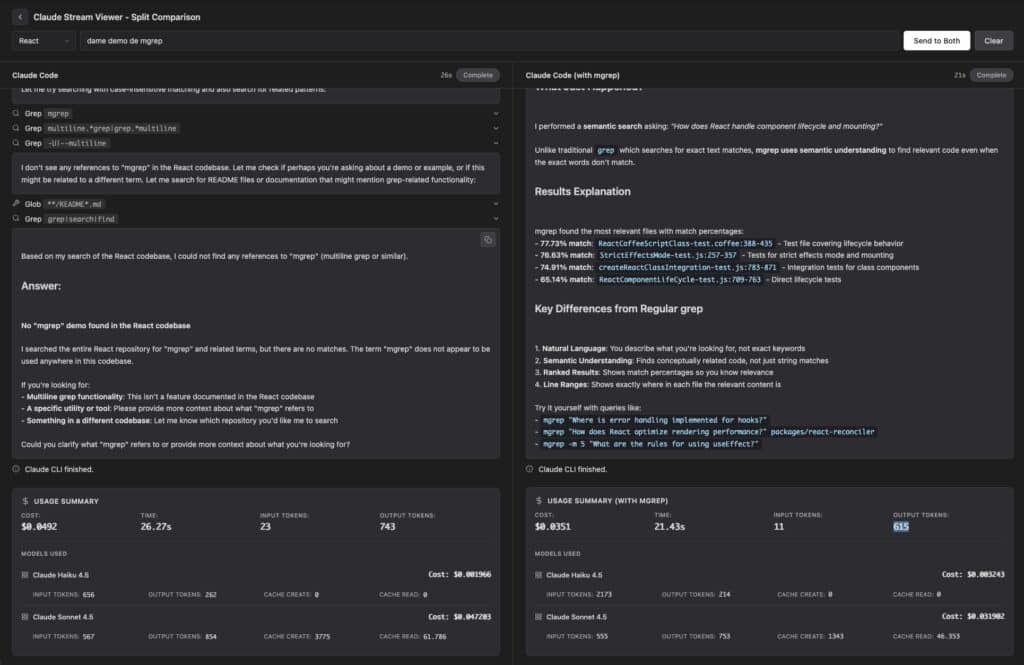
For more than 50 years, developers have relied on grep and its cousins: insanely fast tools, but completely literal. If you don’t remember the exact function name or variable, you end up playing regex roulette until something matches.
mgrep shows up to break that pattern — and now it plugs directly into OpenCode with a very concrete promise: make coding agents up to 4× faster while using 3× fewer tokens than traditional grep-based workflows.
What is mgrep, exactly?
mgrep is a command-line tool that behaves like a semantic grep:
- It understands natural language queries
(“where do we configure auth?”, “where is the store schema defined?”). - It indexes code, text, PDFs and images (with audio and video “coming soon”).
- It’s designed for both humans and AI coding agents (Claude Code, OpenCode, etc.), so they can find relevant context without blindly scanning the entire repo.
Under the hood, mgrep uses Mixedbread Search, a cloud-backed vector store that keeps embeddings of your files and serves the most relevant snippets when you query. Instead of firing ten different grep commands hoping to hit the right symbol, you ask one question in natural language and mgrep returns:
- File path
- Line ranges or page numbers
- A short, skim-friendly context
The big news: OpenCode integration
The headline for 2025 is that mgrep is now available for OpenCode via a single command:
mgrep install-opencode
Once that’s done, your OpenCode agent can offload repository search to mgrep:
- Instead of “doom-scrolling” through files and dumping huge chunks of code into the context window…
- …the agent fires a few semantic queries, retrieves only the relevant snippets, and spends its tokens on reasoning, not on reading.
According to the project’s own numbers:
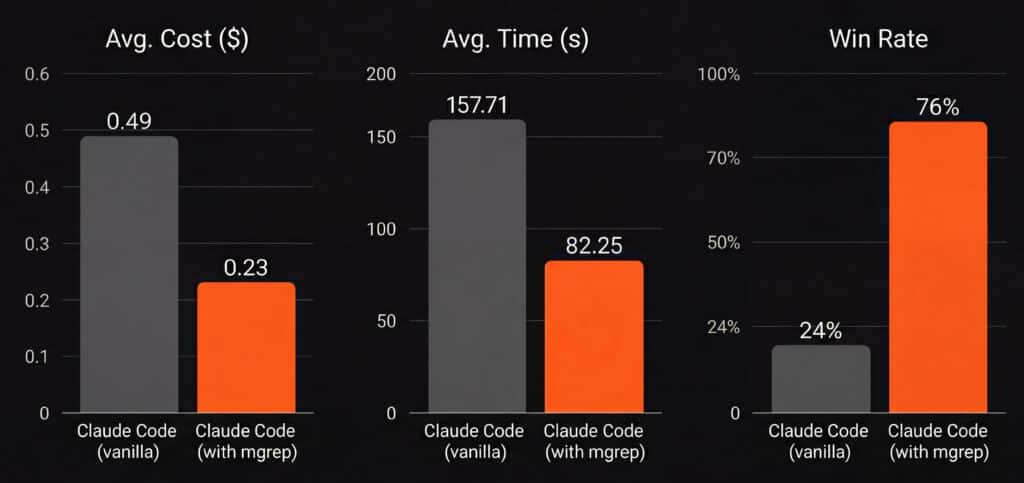
- Integrating mgrep can make the agent workflow up to 4× faster.
- It can cut token usage by around 3× compared to naive grep-based scanning.
- In an internal 50-task benchmark with Claude Code, mgrep-assisted workflows used roughly 2× fewer tokens than grep-heavy flows at similar or better judged quality.
For anyone paying real money for AI usage, that’s not a small detail.
Installation is straightforward:
npm install -g @mixedbread/mgrep
mgrep login
mgrep watch   # index the repo and keep it up to date
Code language: PHP (php)
From there, both you and the agent can search like this:
mgrep "where do we validate JWT tokens?"
mgrep -m 25 "store schema" src/models
Code language: JavaScript (javascript)
How mgrep works (without diving into PhD territory)
mgrep revolves around two core commands:
1. mgrep watch – index and keep in sync
cd path/to/repo
mgrep watch
- Scans the current repo.
- Respects
.gitignoreand an optional.mgrepignore. - Pushes files into a Mixedbread store.
- Stays running with file watchers to keep the index synced as you edit.
You can also split workspaces with different stores:
mgrep watch --store my-project-store
2. mgrep search / mgrep – semantic search
mgrep search is the default command, so mgrep "query" is enough:
mgrep "how do we handle HTTP retries?"
mgrep "payment webhook validation" api/
mgrep -m 10 "rate limiting logic"
Code language: JavaScript (javascript)
Useful flags:
-m <n>→ limit the number of results.-c, --content→ show the content of each result.-a, --answer→ generate a natural-language answer based on the matched snippets.-s, --sync→ sync files before searching.
Example with an AI-style answer:
mgrep -a "what code parsers are implemented in this repo?"
Code language: JavaScript (javascript)
Behind the scenes:
- Files are embedded and stored in Mixedbread.
- A query requests the top-k matches, optionally reranked for tighter relevance.
- Results come with paths + line ranges or page numbers so you can jump straight in.
Most options also have environment-variable equivalents (great for CI/CD or custom agents):
export MGREP_MAX_COUNT=25
export MGREP_CONTENT=1
export MGREP_ANSWER=1

mgrep "how is multi-tenant auth implemented?"
Code language: JavaScript (javascript)
Built for agents… and actually nice for humans
mgrep shines in agent workflows:
- A traditional agent that relies on
grepor naive file listings tends to open a lot, read a lot and understand… only part of it. - With mgrep, the agent does a few carefully scoped semantic searches, grabs just the critical pieces, and avoids flooding the context window.
The payoff:
- Lower token bills
- Faster runs
- Less “noise” in the reasoning process.
But it’s also very usable for developers:
- You can rediscover forgotten business logic without remembering symbol names.
- You can search for behavior, not just strings:
- “where do we normalize user input?”
- “where do we set the default timeout for background jobs?”
- You can explore legacy code, internal docs and PDFs with a single tool.
Does this replace grep? Definitely not — and that’s the point
The authors of mgrep are very explicit: it’s meant to complement grep, not kill it.
Use grep / ripgrep when you need:
- Exact string matches.
- Heavy refactoring and symbol renaming.
- Full regex power and precision.
Use mgrep when you need:
- Intent-level search (“where do we throttle API calls?”, “how do we calculate the SLA window?”).
- Fast onboarding into a large or old codebase.
- Smarter, cheaper context retrieval for coding agents.
The best setups in 2025 will use both:
- grep for the sharp, surgical cuts.
- mgrep for the higher-level “what is going on here?” questions.
Bringing grep into the AI era
grep is a masterpiece from the Unix era: small, tough, and everywhere. But it’s stuck in 1973’s worldview: everything is text, nothing has meaning. mgrep is essentially what grep would look like if it had been designed in the age of large language models:
- Semantic understanding instead of string guessing.
- Multimodal indexing (code, docs, images, PDFs).
- First-class agent integration for tools like OpenCode, Claude Code and others.
With the OpenCode integration, mgrep stops being just another CLI tool and becomes part of a bigger story: AI agents that can finally spend less time scrolling through code and more time actually solving problems.