
Homelabs have matured. What used to be a single box for file shares often turns into a small “personal cloud” running containers, a few VMs, and storage that grows drive by drive. The tooling ecosystem reflects that reality—yet many setups still end up as a patchwork of dashboards, scripts, and half-documented one-offs.
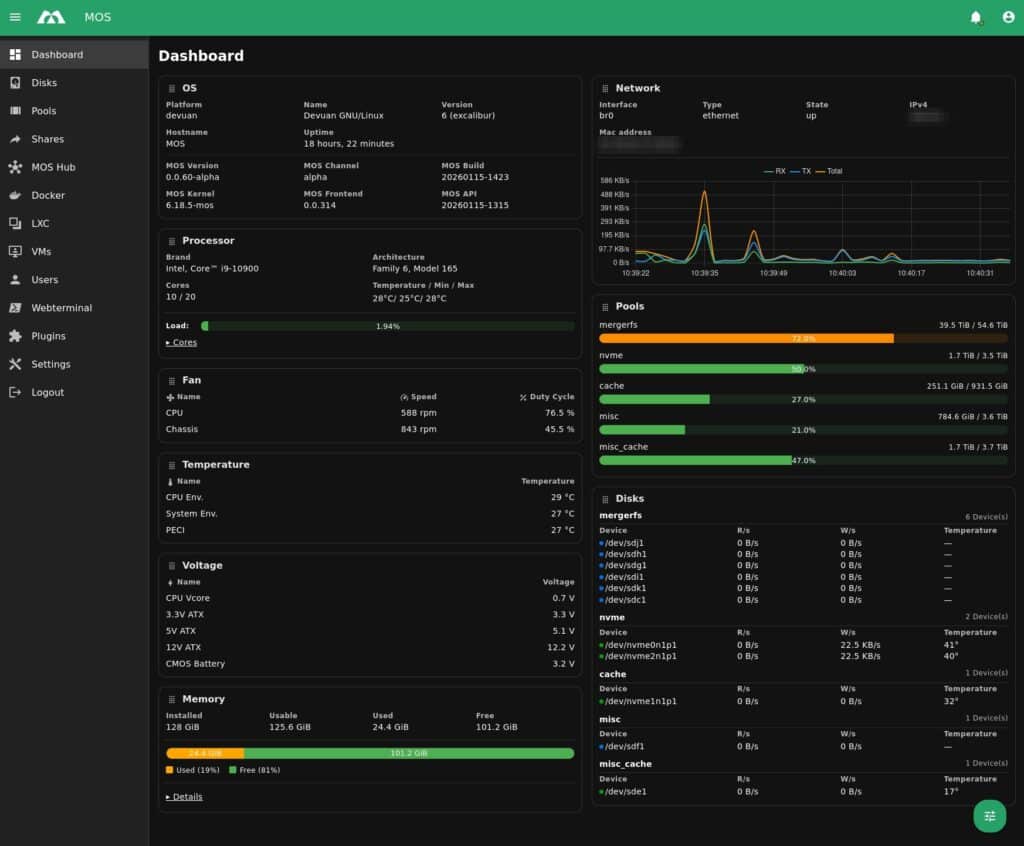
MOS (Modular Operating System) is a new open-source project that tries to pull those threads together into a lightweight, modular server operating system for self-hosting and lab environments. Built on Devuan, MOS positions itself as a low-overhead platform with a clean Web UI, a fully documented REST API, and modular extensions for storage and drivers. It’s explicitly aimed at home servers and small racks, where simplicity matters but automation is still expected.
API-first by design: the Web UI is just a client
What stands out for sysadmins and developers is not just “another dashboard,” but the way MOS describes its control plane: the Web UI does not perform direct system actions. Instead, it talks exclusively to the MOS API, meaning every click in the UI maps to an API call.
That architectural choice is more than a slogan. The official API overview frames it as a deliberate guarantee of consistency: if something can be done in the UI, it can be automated through the API—making MOS inherently scriptable and easier to integrate with external tooling (CI workflows, internal portals, glue scripts, or even a custom UI).
MOS also advertises a modern API stack that includes REST plus WebSocket, suggesting real-time status and notifications without the classic “refresh the page” experience many admin panels still rely on.
For developers, the project ships API docs through a built-in Swagger UI, and the API is organized into logical sections (authentication, disks, pools, shares, Docker, LXC, virtual machines, and more). Authentication is Bearer token-based, with tokens created from the Web UI—straightforward for scripting and compatible with typical automation patterns.
Example API docs endpoint (as documented by MOS):
http://<yourMOSip>/api-docs/
Code language: JavaScript (javascript)
The storage angle: mergerfs + SnapRAID as the default baseline
MOS is not positioned as “just containers.” Storage is a first-class concern, and the default approach is telling: it ships with built-in support for mergerfs (pooling multiple disks into one unified filesystem) and SnapRAID (snapshot-based parity). That combination is common in homelabs because it’s flexible for incremental expansion and fits media-heavy workloads where data changes less frequently than in transactional systems.
MOS also highlights a plugin-driven approach for other storage technologies, keeping the core lean and letting users opt into extra drivers/modules as needed. In practice, this is the classic “minimal core, modular capabilities” philosophy applied to a NAS-plus server OS.
Containers and virtualization: Docker, LXC, and QEMU in one place
MOS includes support for Docker and LXC by default, reflecting where most self-hosters have landed: quick deployment, isolation, and easy teardown. For virtualization, MOS ships QEMU support, with an important caveat from the project itself: the VM frontend is still in development, although the API is described as “almost fully” supporting it.
That split matters. From a sysadmin perspective, MOS currently reads as API-ready for virtualization, while the UI experience for VMs is still catching up. For lab users who are comfortable driving QEMU workflows through API calls (or simply waiting for the UI to mature), it can still be useful—but it’s not promising a fully polished “hypervisor console” today.
Lightweight and privacy-forward: no telemetry, no reporting
MOS makes a direct play for the “full control” crowd. The project documentation states it is fully open source and emphasizes no telemetry, no tracking, and no usage reporting, with everything running locally. That messaging is increasingly relevant as even home-server products drift toward cloud dependencies, accounts, or analytics.
On licensing, MOS publicly brands itself as open source and the official website references AGPLv3. At the same time, the build/release repository notes that different MOS components may use different licenses, which is common in multi-repo projects. The practical takeaway: it’s open source, but anyone adopting MOS seriously should check the license per component they deploy or modify.
Notifications as a service: MOS Notify (Go) and external targets
MOS includes a dedicated notification service called MOS Notify, described as Go-based, with support for internal notifications and forwarding to external providers. The documented targets currently include Discord, Gotify, Pushover, and PushBits, and multiple providers can be enabled simultaneously.
Configuration is currently manual via a path under /boot/config/notify/providers/, and the service is restarted through a classic init script (/etc/init.d/notify restart). The docs also note that frontend configuration is planned but not yet implemented—another sign that MOS is usable but still in “fast iteration” territory.
Installation and boot constraints: UEFI by default, FAT32 media, VM images available
MOS’s release artifacts make it clear the project is trying to be approachable for homelab installs. Releases include:
- a ZIP archive intended for installation to physical media (with specific formatting requirements), and
- a compressed disk image for VM testing.
One notable constraint: MOS release notes state that it only supports UEFI boot by default at this stage. For many modern homelab builds that’s fine, but it is a real limitation for older hardware or certain embedded environments.
The release notes also list minimum requirements for VM testing (e.g., 2 cores and 6 GB RAM in the release page excerpt), while the main README recommends 8 GB RAM as a baseline for reliable operation on physical systems—especially when combining storage services with containers and virtualization features.
“Early, but usable”: the project’s own caution flags
MOS is candid about its maturity level. The README describes MOS as being in a very early stage of development and provided “as is.” It explicitly recommends keeping backups of important data, acknowledging that bugs “can and will occur” at this stage.
That messaging is important for sysadmins evaluating MOS: it can be a promising homelab platform or dev/lab OS, but it’s not positioning itself as a conservative, long-term stable appliance yet. The upside is transparency: early adopters know what they’re signing up for.
Where MOS fits in a sysadmin/dev stack
From a sysadmin and development perspective, MOS’s strongest differentiators are:
- API-centric control plane (UI and automation share the same source of truth)
- service-oriented modularity (enable what you need; keep the rest out)
- sane defaults for expandable homelab storage (mergerfs + SnapRAID)
- container-first reality (Docker/LXC built in) with virtualization on the roadmap/UI catch-up
- privacy posture (no telemetry) and no forced cloud tie-ins
It’s a project to watch—and a project to test carefully. If MOS continues to mature its VM frontend, improves in-UI configuration for services like notifications, and keeps documentation and release cadence stable, it could become a credible alternative for users who want a modern server OS that stays transparent and automatable.