
Most AI “copilots” live inside heavy IDEs or browser UIs. OpenCode goes the other way: it’s an open-source coding agent designed first for the terminal, built by people who live in ssh, tmux, monorepos and remote servers.
For developers and sysadmins who already spend their day in a shell, it feels less like a new product and more like a natural extension of how they work.
An AI agent that doesn’t drag you out of the terminal
OpenCode calls itself “the open source coding agent built for the terminal.” It isn’t just another chat window: it’s a TUI (text-based UI) binary that runs directly in your terminal, with access to your filesystem and project tree (under your control).
Its core principles are pretty clear:
- Everything from the terminal
Built by Neovim/terminal power users for keyboard-driven workflows. - 100% open source
The client is auditable, hackable, and not a black box. - Provider-agnostic
It can talk to multiple LLM providers:- OpenAI
- Anthropic
- Other API-compatible services
- Even local models, if you expose a compatible endpoint
That’s a big deal if you’re running on-prem infra, care about data residency, or simply want to optimize for cost and latency.
Installation that respects real-world environments
OpenCode isn’t just a single “random binary download.” It offers multiple ways to install depending on how you manage your tooling:
- Quick script for a fast test:
curl -fsSL https://opencode.ai/install | bash - Package managers:
npm i -g opencode-ai@latestbrew install opencode(macOS & Linux)choco install opencode(Windows)scoop install opencode(Windows)paru -S opencode-bin(Arch Linux)nix run nixpkgs#opencodeor viagithub:sst/opencodefor latest dev
The installer respects environment variables like:
OPENCODE_INSTALL_DIR– custom install pathXDG_BIN_DIR– XDG-compliant location- Fallbacks like
$HOME/binor$HOME/.opencode/bin
If you maintain dotfiles, homelab machines, or standardized dev containers, this kind of flexibility saves time and friction.
Two built-in agents: build and plan
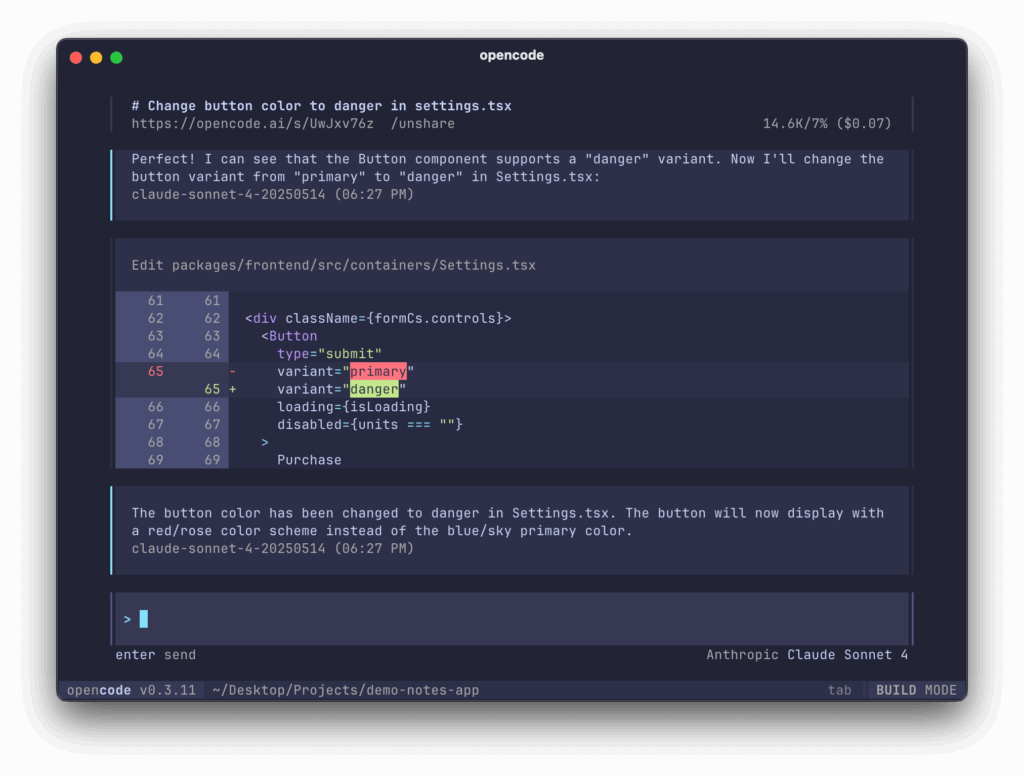
Once you’re inside the OpenCode TUI, the tool is structured around “agents” – essentially behavior profiles for the AI:
build: the full-access development agent
This is the default mode, meant for hands-on coding work:
- Reads and edits files
- Creates new files
- Proposes and applies refactors
- Can execute shell commands (tests, linters, builds, etc.)
It’s designed for active development: big refactors, scaffold generation, test creation, and iterative coding loops.
plan: the read-first analysis agent
This mode is tuned for safe exploration and planning:
- Read-only by default for code edits
- Asks before executing shell commands
- Great for:
- Understanding unfamiliar codebases
- Exploring large monorepos
- Designing changes before touching anything
You can switch between agents with the Tab key. There’s also an internal sub-agent @general for complex searches and multi-step tasks (for example: “Find all the places where we handle sessions, summarize the patterns, and propose a new shared API.”).
For sysadmins and SREs, plan mode is particularly useful for auditing scripts, infrastructure-as-code, or operational playbooks without accidentally running anything.
Provider-agnostic, LSP-aware and client/server by design
OpenCode is more than a thin chat wrapper on top of an LLM API. It’s built to be an orchestration layer for coding with AI.
Provider-agnostic by default
You’re not locked into a single vendor. You can configure OpenCode to use:
- OpenAI models
- Claude
- Google models
- Other third-party APIs
- Local or self-hosted models exposed behind a compatible endpoint
That matters if you:
- Need to run fully on-prem
- Want to tune for the best $/token ratio
- Need different models for different tasks or teams
Out-of-the-box LSP support
OpenCode integrates Language Server Protocol (LSP), so it doesn’t just see code as raw text. It can leverage:
- Symbol information
- Types and signatures
- References and definitions
That helps the agent reason better about non-trivial codebases, especially in typed languages or large projects.
Client/server architecture
OpenCode isn’t just a monolithic TUI:
- A server process can run on your laptop, a dev host, or a beefy workstation.
- The client is the TUI… but could also be other frontends in the future (mobile app, web UI, etc.).
A very common pattern:
- Run the OpenCode server on the same machine that hosts your code and build tools (local or remote).
- Connect via the TUI from wherever you’re working (local shell,
ssh, etc.).
For people who already work via bastion hosts or remote dev boxes, this architecture fits seamlessly.
What it brings to developers
For application and platform developers, OpenCode enables a few high-value workflows:
- End-to-end refactors with project context
Instead of “edit this file only,” the agent can:- Understand the full tree.
- Track dependencies.
- Propose consistent changes across modules.
- Faster onboarding into legacy code
Things like: “Explain the request flow from the HTTP entrypoint to the DB layer.” become guided navigations with references to specific files and functions, instead of hours of manualgrepandrg. - Test generation and improvement
OpenCode can:- Propose unit and integration tests.
- Run them (depending on your config).
- Iterate on failures until the suite passes.
- Automating tedious mechanical work
Examples:- “Add structured logging to all handlers in this directory.”
- “Migrate from
requeststohttpxacross this module.” - “Convert this internal REST client to gRPC and update all call sites.”
You stay in control of the diffs; the agent just does the heavy lifting.
What it brings to sysadmins, DevOps and SREs
For sysadmins and operations teams, the value shows up in a different layer:
- Script review and generation
For Bash, PowerShell, or “glue” Python:- Review safety and error handling.
- Propose idempotent patterns.
- Detect fragile constructs and race conditions.
- Infrastructure-as-Code assistance
Helping with:- Terraform modules and variable structures.
- Kubernetes manifests (consistency, anti-patterns).
- CI/CD pipelines and job dependencies.
- Troubleshooting support in real environments
Because it runs in the terminal, you can use it directly on:- Bastion hosts
- Staging machines
- Lab environments
The key, of course, is discipline: let the agent propose commands and changes, but keep a human in the loop for execution — especially in production-adjacent environments.
Mode plan is a strong fit for audits and risk analysis, since it defaults to not touching anything without explicit permission.
Not magic, still needs human judgment
Like any LLM-driven agent, OpenCode has limits:
- It can hallucinate flags, paths or APIs that don’t exist.
- It doesn’t inherently understand:
- Your SLAs and SLOs
- Internal compliance rules
- Network topology and security constraints
So, best practices still apply:
- Always review diffs before applying them.
- Be careful with secrets and sensitive data in prompts.
- Set clear boundaries about which directories and projects the agent can access.
OpenCode is a power tool, not an autopilot.
A serious addition to the terminal toolbox
For developers and sysadmins who feel more at home in a shell than in a bloated IDE, OpenCode is a compelling idea: an AI coding agent that lives where you work, speaks the terminal’s language, and doesn’t lock you into a single cloud provider.
It won’t replace your skills or your judgment — but used well, it can become one of those tools you ssh into a box and install almost by reflex, right next to git, htop and your favorite editor.
vía: Noticias.Ai