
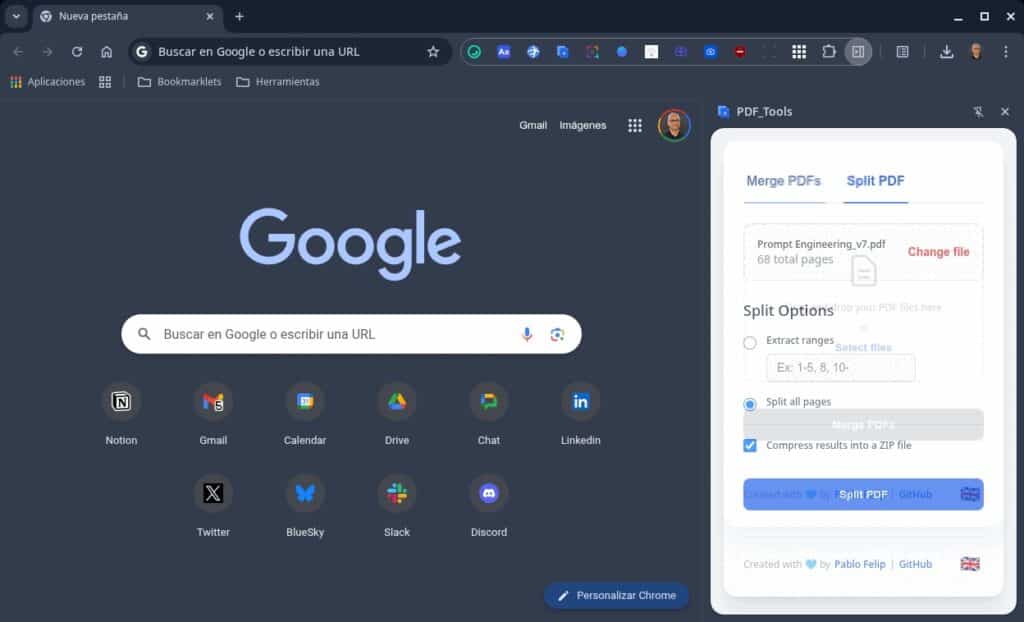
For years, the quickest way to merge or split a PDF has usually meant one of two things: installing a heavy desktop program or using a website that asks you to upload files—often containing sensitive information. Sitting between convenience and privacy is PDF_Tools, an open-source project designed to bring common PDF tasks directly into the browser.
The premise is straightforward: a lightweight extension for Google Chrome (and compatible browsers) that adds PDF tools to a modern side panel, so users can keep browsing while preparing a final document. Maintained by Pablo Felip, the project positions itself as an everyday utility: merge multiple PDFs into one, extract specific pages, or split a document into separate files—without switching to another app.
A side panel designed for real work
PDF_Tools is built around a simple but practical idea: instead of opening extra tabs, websites, or desktop software, everything happens inside Chrome’s side panel. That reduces friction for common workflows: receiving multiple PDFs by email, ordering them, merging them into a single file, and sending them back; or taking a long document and extracting only the pages needed for a form, class, or submission.
For merging PDFs, the extension uses a visual, direct approach: drag and drop to add files, plus reordering before generating the final document. That detail matters in day-to-day office and education use, where time is often lost fixing the order of attachments, budgets, legal annexes, or course materials.
The split feature focuses on flexibility. Users can extract single pages or page ranges using a friendly syntax (for example, “1–5, 8, 10–”). It also covers a very common scenario: splitting an entire PDF into one file per page with a single click—useful for distributing exercises, breaking content into modules, or separating documentation for different recipients.
When splitting generates a lot of files, PDF_Tools adds a practical safeguard: it can download everything as a single .zip, so results don’t turn into dozens of separate downloads.
Privacy as a selling point—and as a design choice
Where the project aims to stand out is its privacy stance. According to its documentation, processing happens locally: files aren’t sent to external services. At a time when many users are increasingly wary of uploading personal documents to unknown websites, that becomes a key differentiator—especially for PDFs containing health, employment, tax, or academic data.
That privacy-first approach is paired with another user-focused feature: multi-language support. The interface is available in Spanish, English, and Catalan, with a selector that can follow the browser language or be set manually, and the preference saved locally.
Built on modern extension standards: Manifest V3 and “vanilla” JavaScript
PDF_Tools doesn’t just emphasize convenience—it also highlights a modern technical base. It’s built with Manifest V3, the latest Chrome extension format, and written in vanilla JavaScript (no frameworks), aiming for a smaller package and fewer dependencies.
On the API side, it uses chrome.sidePanel for the integrated UI, chrome.i18n for localization, and chrome.storage to store user preferences. The project also credits widely used libraries: pdf-lib (PDF manipulation), Sortable.js (drag-and-drop reordering), and JSZip (creating ZIP files in the browser). The code is distributed under the GPL-3.0 license.
For installation, the project offers two routes: the standard install via the Chrome Web Store, or loading it from source for more technical users—useful in controlled environments like classrooms, or in setups where browsing is done in incognito mode and extensions must be explicitly allowed.
Beyond the extension: a web SPA version
PDF_Tools doesn’t stop at the extension. The project also includes a web-based SPA (Single Page Application) designed for a larger, more visual interface. This version adds features such as organizing pages in a light-table style view (rotate, delete, reorder), exporting pages to images (JPG or PNG), and a continuous workflow concept: the output of one operation can be sent into another tool without downloading and re-uploading files.
The SPA also includes dark mode, and it draws a key distinction from the extension: it follows the same privacy philosophy (local processing), but may require an initial connection to load libraries from a CDN, while the Chrome extension is designed to work 100% offline, with libraries bundled.
The open-source ripple effect: a Firefox version
The project’s story also reflects a classic open-source pattern: when a tool solves a real pain point, the community expands it. PDF_Tools has a Firefox adaptation prepared by Juan José de Haro, keeping the same local-processing approach. The add-on description highlights merging PDFs, splitting by page ranges or individual pages, downloading outputs separately or as ZIP, and using storage only to remember the selected language.
That Firefox version also broadens language reach: in addition to Spanish, English, and Catalan, it includes Galician and Basque, and lists compatibility with Firefox 58+. In an ecosystem where many tools remain locked to a single browser, this port reinforces the project’s core value: focusing on the user’s need, not the platform.
FAQ
How can you merge multiple PDF files in Chrome without uploading them to a website?
Extensions like PDF_Tools let users drag and drop PDFs, reorder them visually, and create a single merged document while keeping processing local.
How do you extract a page range from a PDF (for example, 1–5 and 10–12) directly in the browser?
The split tool lets users specify ranges and individual pages to generate new PDFs with only the needed sections, with an option to bundle results into a ZIP.
What’s the difference between a Chrome PDF extension and a web-based SPA tool?
The extension prioritizes speed and a side-panel workflow and can work offline; the SPA expands UI/UX with visual page organization and image export, and may require an initial connection to load libraries.
Is there a similar privacy-focused option for Firefox that processes PDFs locally?
Yes. A Firefox version follows the same approach—merging and splitting PDFs locally without uploading documents—and includes additional languages like Galician and Basque.