
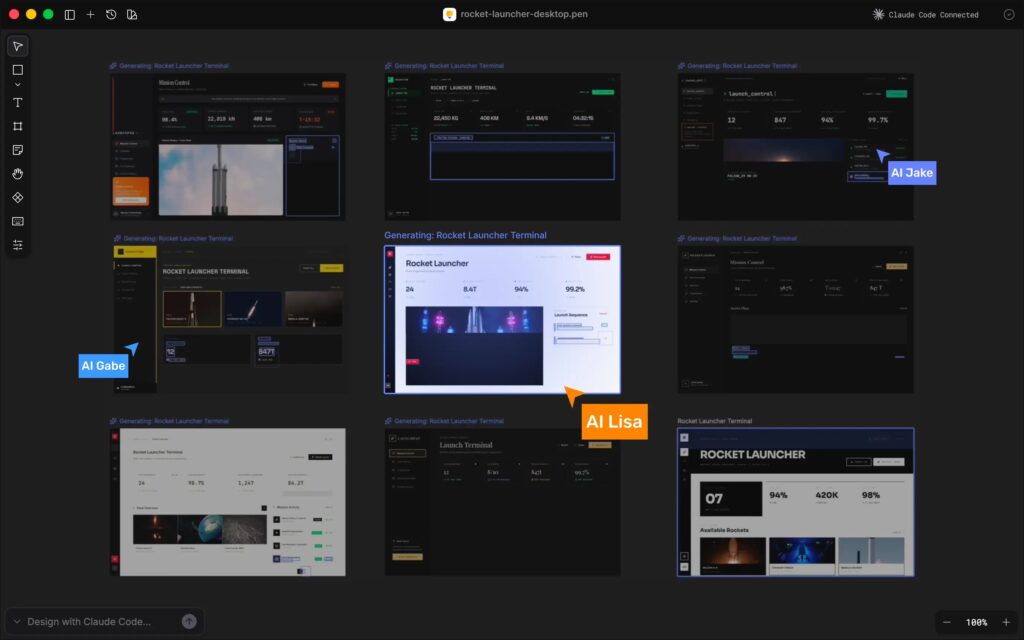
A new tool called Pencil is making the rounds in developer circles with a bold promise: design where you code, keep designs in Git, and let AI agents generate or modify UI with real write access—not just screenshots or text suggestions. Pencil positions itself as an “agent-driven MCP canvas” built around an open design format that lives in your codebase, explicitly targeting the pain of design handoffs and “design drift” between mockups and production UI.
For sysadmins and engineering teams, the interesting part isn’t the marketing—it’s the architecture: a local MCP server + versionable design files + IDE-first workflow.
What Pencil is, in operational terms
Pencil provides an infinite vector design canvas that opens inside developer tooling (not in a separate browser-only design suite). The workflow is built around a file type called .pen, and Pencil’s docs make the intent explicit: design files should live in the same repo as the code so that an agent can see both and keep them in sync.
Pencil’s documentation frames this as “design as code,” where the design artifacts are treated like any other repository asset—branchable, diffable, and reviewable.
The core mechanic: MCP integration (with write access)
Pencil’s “secret sauce” is its deep integration with MCP (Model Context Protocol), which allows AI assistants to interact with tools instead of only generating text. Pencil’s docs list multiple supported assistants via MCP, including Claude Code, Cursor, and Codex CLI, among others.
The key claim is that Pencil isn’t just “MCP read tools”—it’s designed for full canvas operations, meaning an agent can programmatically create, edit, and iterate designs inside the .pen artifact, with Pencil acting as the tool surface.
A practical note for teams: AI features depend on Claude Code auth
Pencil’s docs state that its AI features require Claude Code to be installed and authenticated, with login performed through the Claude CLI (claude) and credentials stored locally.
That matters for enterprise rollouts: the “free tool” may still depend on whatever policies and entitlements you have for the AI assistant you connect.
The file format: .pen is JSON (and intended to be Git-friendly)
Pencil describes .pen files as:
- JSON-based
- structured and readable
- version-control friendly
- portable across teams and platforms
Their developer documentation goes deeper: .pen is an object tree “not unlike HTML or SVG,” where each object is a graphical entity with a unique id and a type like frame, text, rectangle, etc.
For engineers, the implication is clear: you can put UI design changes through normal workflows—PR review, CODEOWNERS, change history, and even policy checks (e.g., “no UI changes without UX approval” becomes enforceable in Git).
Installation and platform support (and a Windows caveat)
Pencil offers both an IDE extension workflow and a desktop app distribution:
- The downloads page lists macOS (Apple Silicon and Intel) and a Windows x64 download alongside the desktop offering.
- However, Pencil’s troubleshooting docs also state that the Windows desktop app is not currently available and advise Windows users to use the VS Code or Cursor extension instead.
For sysadmins, that discrepancy is a reminder to validate the current state before standardizing: the most reliable approach today appears to be the VS Code/Cursor extension path documented under installation and troubleshooting.
Privacy posture: what Pencil claims about Inputs/Outputs
Pencil’s Privacy Policy and Terms of Use both state that Pencil does not store or record user Inputs or generated Outputs on its servers, including logs, telemetry systems, caches, or storage; storage is described as local to the user device (e.g., filesystem or localStorage).
That’s a meaningful claim for organizations evaluating risk—but it still leaves real-world due diligence:
- confirm what your connected AI provider logs/retains (Pencil explicitly notes third parties may have their own retention practices),
- review extension permissions,
- and test traffic patterns in a controlled environment.
What this changes for dev + infra workflows
If Pencil works as advertised, it shifts UI work in three ways that sysadmins and developers will care about:
- UI becomes a first-class repo artifact
.penfiles in Git mean the same governance model as code—branching, merging, reviewing, auditing. - Agents can operate on design, not just code
MCP turns “generate a screen” from a text request into a tool action on a structured canvas, potentially reducing rework. - The “handoff” becomes a change request
Instead of exporting from a design tool and rebuilding in React, the UI change can come as a PR that includes both.penupdates and code updates side-by-side.
A sysadmin-minded checklist before enabling it broadly
- Treat
.penlike code: PR-required, CODEOWNERS, and review rules for UI artifacts. - Define who can run MCP write tools: limit to trusted environments/users; keep policies explicit.
- Pin versions: extension version + any related MCP config, especially if deploying to a team.
- Build a small regression harness: sample screens + expected HTML/CSS/React outputs (or visual checks) before adopting it in production UI workflows.
- Validate privacy claims: confirm data flow locally and document what the connected LLM provider retains.
Quick FAQ
What is Pencil?
An IDE-first design canvas that stores designs as .pen files in your repo and integrates with AI assistants via MCP.
What are .pen files?
JSON-based, Git-friendly design files representing an object tree (similar in spirit to HTML/SVG).
Which AI tools can it connect to?
Pencil lists MCP support for Claude Code, Cursor, Codex CLI, and others.
Does Pencil store prompts or generated outputs on its servers?
Pencil’s policy and terms say it does not store Inputs/Outputs on its servers, and that any storage is local; third-party providers may differ.