
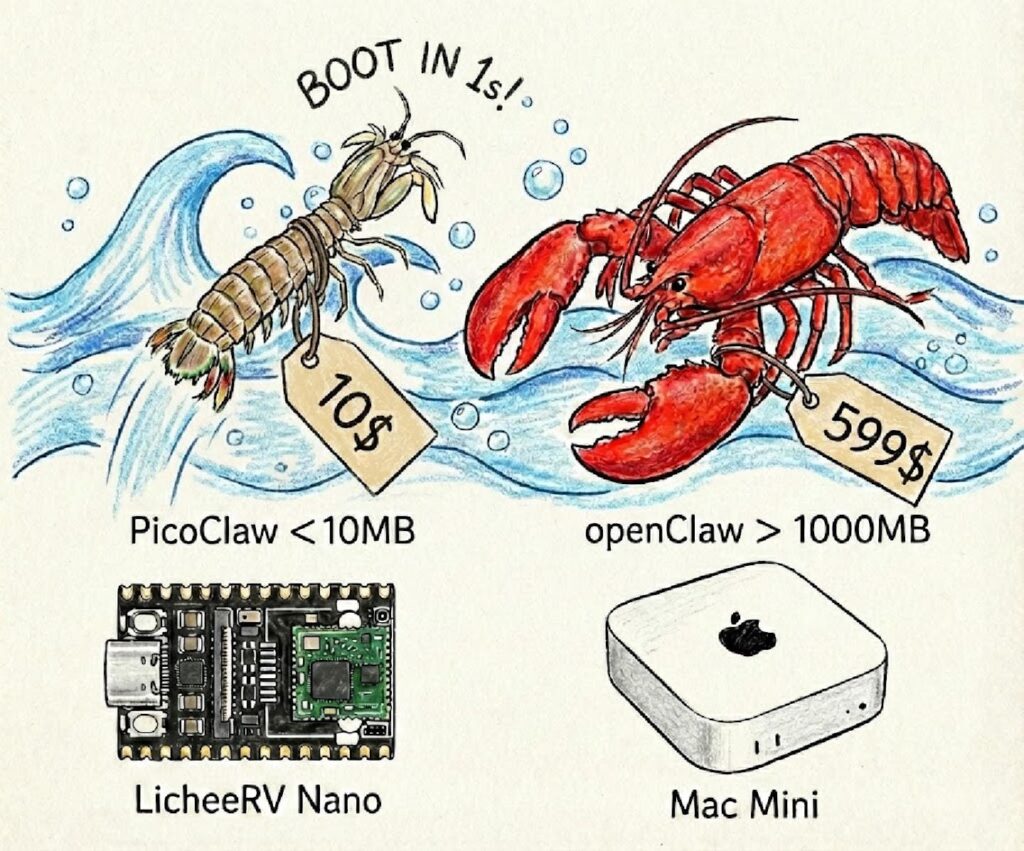
Most “AI agent” projects today share the same tradeoff: they add capabilities by piling on dependencies, runtimes, and background services until the assistant looks more like an application platform than a tool. PicoClaw comes in with the opposite pitch: an ultra-lightweight AI assistant written in Go, shipped as a single self-contained binary, designed to run on modest hardware and boot fast enough to feel like a system utility—not a lab experiment.
The reason it’s getting attention isn’t that it replaces the big models. It doesn’t. The point is that it minimizes the agent layer—the orchestration, tools, state, and integrations—so the “agent” can live closer to where you actually need it: home labs, edge nodes, low-cost SBCs, tiny maintenance boxes, and constrained environments where a 1 GB memory footprint is simply a non-starter.
The headline claim: tiny footprint, near-instant startup
PicoClaw’s README makes strong performance claims, including:
- < 10 MB RAM footprint
- ~1 second boot
- single binary portability across RISC-V, ARM, and x86
Those numbers are project-declared comparisons, not independent benchmarks, but they clearly signal the design goal: bring agent-like workflows to environments that typically can’t tolerate Node/Python stacks with large dependency trees.
Quick comparison: PicoClaw vs “typical” assistant stacks
PicoClaw’s documentation includes a simple comparison table against other approaches (OpenClaw and NanoBot). The key takeaway isn’t the exact numbers—it’s the order-of-magnitude shift in runtime expectations.
| Attribute | OpenClaw | NanoBot | PicoClaw |
|---|---|---|---|
| Language | TypeScript | Python | Go |
| RAM (project-stated) | > 1 GB | > 100 MB | < 10 MB |
| Startup on low CPU | > 500 s | > 30 s | < 1 s |
| Cost target | Mac mini (reference) | typical SBC | “as low as” $10 boards |
For sysadmins and developers, this reads like a familiar story: Go as an operations-friendly toolchain—fast startup, static-ish binaries, easier distribution, fewer runtime surprises, and better suitability for edge deployments.
What sysadmins should care about (beyond the hype)
1) Deployment model: binary + config, not a framework zoo
PicoClaw is set up around a user config file (commonly ~/.picoclaw/config.json) and supports both:
- running directly as a CLI agent (one-shot or interactive)
- running via Docker Compose for quick testing
That flexibility matters operationally: you can treat it as a “tool” (CLI) or as a “service” (gateway), depending on how you intend to integrate it.
2) A real workspace layout for state and operations
The project describes a structured workspace containing:
- sessions and conversation history
- “memory”
- persistent state
- scheduled jobs (“cron”)
- skills and behavior docs
This is a sysadmin-friendly concept because it’s explicit: you can back it up, mount it, lock it down, monitor it, or move it. It’s also a double-edged sword—persistent state is useful, but it raises the bar for secrets management and access controls.
3) Sandbox-first posture (a surprisingly practical default)
One of the most relevant parts for a systems audience is the default sandbox restriction: PicoClaw can be configured to restrict file access and command execution to the workspace directory. It also documents that certain dangerous command patterns are blocked.
This doesn’t magically make an agent “safe,” but it reflects a needed shift in the agent ecosystem: tooling boundaries must be part of the default design, not an afterthought.
4) The project’s own warnings: early-stage and impersonation scams
PicoClaw’s README includes a clear caution section, including:
- No official token/coin (explicitly warning about scam claims on trading platforms)
- Official domain guidance and warnings about lookalike domains
- A blunt note that the project is early in development and may have unresolved network security issues, advising against production use before v1.0
Sysadmins should take that at face value: this is something you test in a controlled environment, not something you expose broadly without hardening.
What developers should care about
Go changes the “agent runtime” conversation
A big chunk of the agent ecosystem has been built on runtimes that are fantastic for iteration but costly to ship and operate. PicoClaw leans into Go’s strengths:
- single binary delivery
- fast startup
- multi-arch builds
- a smaller operational surface area
That’s why this kind of project resonates: it treats agents like infrastructure software, not just product software.
“AI-bootstrapped” development: interesting, but not the main point
PicoClaw also claims an “AI-bootstrapped” build process (a large portion of core generated by an agent with human-in-the-loop refinement). Whether that number is 95% or 50% is less important than the end result: a codebase optimized for strict constraints (memory, startup time, portability). That’s where most agent frameworks struggle.
Where it fits—and where it doesn’t (yet)
Good fit if you want:
- a lightweight agent layer for homelab / edge experiments
- a portable assistant runtime for constrained Linux devices
- a sandboxed-by-default tool that’s easier to ship than heavier stacks
- quick integrations with chat platforms (Telegram/Discord-style flows)
Not a fit (today) if you need:
- mature production guarantees, compliance posture, or audited security model
- fine-grained enterprise permissioning and policy enforcement
- a “set-and-forget” product you can safely expose without guardrails
FAQ (for sysadmins & developers)
Does PicoClaw run models locally?
Not in the way “local LLM” projects do. PicoClaw is mainly the agent runtime and tool layer; it connects to external LLM providers via API keys (the README mentions options like OpenRouter, Zhipu, Anthropic, OpenAI, Gemini). That keeps the agent lightweight but makes secrets and egress control critical.
Can I run it without Docker?
Yes. The project describes using precompiled binaries or building from source, plus Docker Compose as an optional path for quick setup.
What’s the security model?
It supports a “restrict to workspace” model that limits file access and command execution to a defined directory, and it documents blocked dangerous command patterns. It also explicitly warns that the project is early-stage and may have unresolved security issues—so treat it as experimental unless you’re prepared to harden and isolate.
Should I deploy it in production?
The project itself advises against production deployment before v1.0 due to potential unresolved security risks. From a sysadmin standpoint: keep it in a lab, isolate network access, restrict tools, and use least-privilege API keys.
Where does it make the most sense operationally?
Edge-like scenarios: small Linux boxes, SBCs, local automation helpers, maintenance “sidecars,” or internal assistants where you value fast boot, low memory, and minimal dependencies more than feature breadth.
What should I check before running it on a real network?
At minimum: secret storage for API keys, outbound firewalling/allowlists, gateway exposure controls, workspace permissions, logging, and whether any tool integrations could execute commands beyond what you intend.
Sources: