
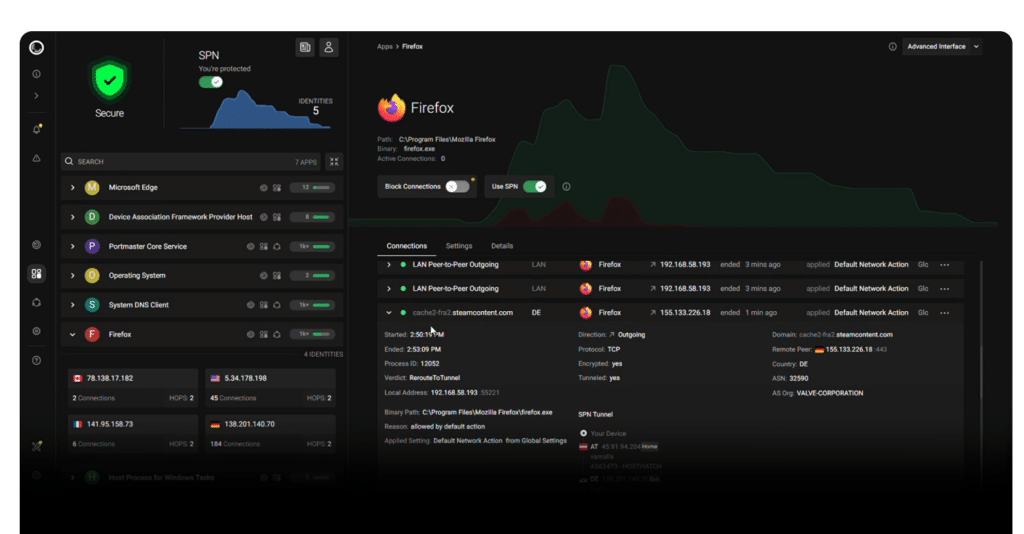
For most people, network traffic is something that “just happens.” Apps phone home, background services reach out to third parties, telemetry flows quietly, and it’s rarely obvious what’s normal, what’s excessive, and what’s outright invasive. Portmaster positions itself as a practical antidote to that default opacity: a free, open-source application firewall designed to block mass surveillance and give users clear, granular control over everything their computer sends and receives online.
Built by Safing in Austria (EU) and released under the GPLv3 license, Portmaster isn’t trying to be another traditional firewall that forces users into port-level rulemaking. Its core promise is simpler—and more ambitious: make privacy and network control usable, with strong secure defaults for everyday users, and deep knobs and dials for power users who want to inspect and govern network behavior down to the finest detail.
A firewall that thinks in “apps,” not just ports
The big idea behind Portmaster is that the unit of control is the application. Instead of treating the system as one blob of outbound traffic, it aims to attribute connections to the processes that created them, so the user can decide:
- Which applications can access the internet at all
- Which ones are allowed on local networks only
- Which domains or IPs should never be reached
- Whether traffic should be restricted by geography or other “entities”
This approach matters because modern privacy risks rarely come from a single suspicious port. They come from a familiar app quietly making calls to analytics services, ad networks, tracking endpoints, or bundled SDKs that the user never agreed to invite in. Portmaster’s goal is to make those relationships visible and actionable.
How Portmaster hooks into the network stack (and why it matters)
Portmaster’s technical approach is one reason it has attracted attention in privacy-focused circles. According to its own documentation, it integrates at a low level:
- On Linux, Portmaster integrates into the network stack using nfqueue, while attributing ownership of connections via eBPF and
/proc. - On Windows, it relies on a kernel driver using Windows Filtering Platform (WFP), plus system APIs used to map connections to processes.
The significance is straightforward: by intercepting traffic at the raw packet level, Portmaster claims it can see and stop connections before they leave the machine—rather than relying on higher-level tricks that some apps can bypass.
Architecturally, Portmaster runs a Core Service as a system service, while the UI components run in the user context. It also notes that the current interface uses Electron as a wrapper (with plans to change this in the future), and that the UI can be opened in a browser as an alternative.
“Everything local,” with one notable exception
A repeated theme across Portmaster’s messaging is local-first privacy. The project states that its filtering and control logic runs 100% on the device, with one exception: SPN (Safing Privacy Network), an optional paid feature that acts as a privacy network for routing traffic.
Portmaster also describes two background mechanisms that matter for real-world usage:
- Signed updates that are downloaded automatically
- Downloaded intelligence data (such as block lists and geo-IP data) that can be applied automatically
That combination—local enforcement, regularly updated intelligence, and signed updates—frames Portmaster less as a static firewall and more as a privacy “suite” designed to stay current without constant manual maintenance.
Secure DNS: preventing “side-door” lookups
DNS is one of the most common privacy leaks on desktop systems. Even if a user blocks certain connections, some applications attempt to resolve domains through alternate paths, or rely on system behaviors that make filtering inconsistent.
Portmaster addresses this with a built-in Secure DNS feature supporting DoH (DNS-over-HTTPS) and DoT (DNS-over-TLS). The project says it can intercept “astray” DNS queries and reroute them through Portmaster for seamless integration, then resolve via the default or configured DoH/DoT resolvers.
It also mentions support for split horizon and horizon validation, with the goal of defending against DNS rebinding-style attacks and other scenarios where DNS behavior becomes a security problem—not just a privacy one.
Privacy Filter: network scopes and human-readable intent
Portmaster’s filtering model is designed to be more legible than “allow/deny port X.” It introduces network scopes—such as Localhost, LAN, Internet, P2P, and Inbound—so policies can match how users actually think about network activity.
It also supports rules based on “Internet entities,” including domain, IP, country, and more. In practice, this makes it possible to create policies like:
- “This app can talk to the LAN but not the public internet.”
- “Block known tracking domains across all apps.”
- “Allow only these domains for this specific tool.”
The project highlights filter lists that can block common malware, ad, and tracker domains automatically, which is a key point for users who want meaningful protection without becoming firewall experts.
Free and open-source, but not “everything included”
Portmaster is free and open source, but the project is explicit about which features are monetized:
- Network History (recording connection details in a local database and searching them later)
- Per-app bandwidth visibility
- SPN (Safing Privacy Network), positioned as a privacy network between a VPN and Tor, using onion-style multi-hop encryption and routing strategies designed to increase privacy and geo-unblock content in some cases
Portmaster notes SPN nodes can be hosted by Safing and the community, and cites “decent speeds” in the 100+ Mbps range as a typical expectation—though performance, as with any overlay network, will depend on routes, congestion, and location.
Who Portmaster is for
Portmaster’s pitch lands in a specific sweet spot:
- Users who want privacy controls beyond the browser
- People who suspect software is “calling home” and want proof
- Power users who want per-app and per-domain network control
- Anyone who wants better defaults than the standard “allow everything unless malware is detected” model
It’s not a magic cloak. If a user logs into services, identity correlation can still happen at the account layer. But Portmaster aims to reduce the constant background leakage that makes modern systems feel like surveillance devices by default—without demanding that users become network engineers.
FAQ
Is Portmaster just a firewall, or more like a privacy suite?
It’s positioned as an application firewall with privacy-first features—like tracker blocking, secure DNS (DoH/DoT), and per-app controls—so it functions more like a privacy suite than a classic port-based firewall.
Can Portmaster block trackers and telemetry system-wide, not just in the browser?
That’s one of its main goals. It can apply filter lists and rules at the network layer and enforce them per app, which can reduce tracking beyond web traffic.
Does Portmaster work fully offline and locally?
Its enforcement runs locally on the device. It does automatically download signed updates and intelligence data (like block lists and geo-IP), and the optional SPN feature involves routing traffic through a privacy network.
What’s the difference between SPN and a VPN?
SPN is described as a multi-hop privacy network using onion-style encryption, aimed at use cases “between” a VPN and Tor. It focuses on privacy properties and routing behavior rather than acting as a conventional single-hop VPN tunnel.