
For years, running a couple of database queries has come with a hard-to-defend paradox: to do something simple, many developers end up launching heavy apps, installing huge toolchains, burning memory, and waiting through slow startups. In many corporate environments, that “tax” became normal—especially when the most familiar path was a full-blown suite like SSMS in the SQL Server world, or a general-purpose editor with database extensions.
That’s where sqlit comes in. The open-source project describes itself as “the lazygit of SQL databases”: a TUI (terminal user interface) designed to connect to and query databases in seconds, right from the command line, with a keyboard-first workflow. The goal isn’t to replace a DBA or compete with performance dashboards. It’s to provide a fast, pleasant tool for developers who just want to browse tables, run queries, inspect results, and move on—without leaving their terminal.
A straightforward pitch: more databases, less friction
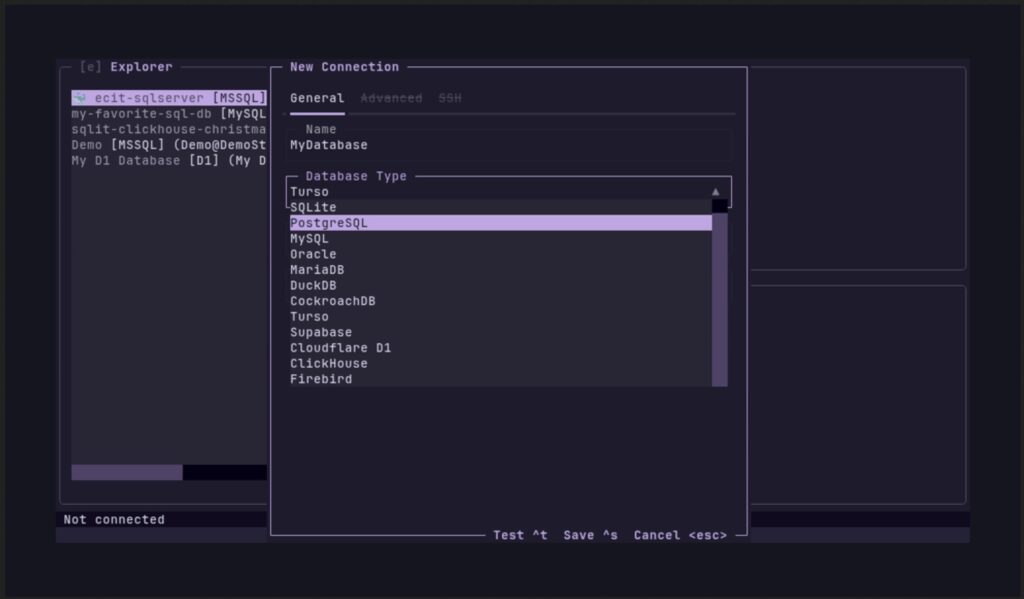
sqlit is written in Python and is aimed at a very real modern setup: teams juggling multiple database engines at the same time. According to its documentation, it supports a long list of databases and providers, including SQL Server, PostgreSQL, MySQL, SQLite, MariaDB, Oracle, DuckDB, CockroachDB, ClickHouse, Snowflake, Supabase, Cloudflare D1, and Turso, among others. That breadth targets a common pain point: every engine has its own client, authentication quirks, dependencies, and “one-off” workflows.
Installation stays pragmatic. You can install it via pipx (the project’s recommended method), uv, or plain pip. The idea is that you can try it quickly and start working without wrestling with configuration: run sqlit, pick a connection from the UI, and go.
For remote environments—where database access often happens over bastions and locked-down networks—sqlit also supports SSH tunnels. True to the project’s “low friction” philosophy, it can guide you through installing missing drivers or optional dependencies, and in some cases even propose the exact command your environment needs.
What it’s aiming for: real productivity from the keyboard
The appeal of sqlit isn’t one single killer feature. It’s a bundle of small conveniences that add up and noticeably speed up day-to-day work:
- Connection manager: save and switch between connections without retyping CLI flags every time
- Keyboard-first UI: with on-screen shortcuts and a Vim-style “modal” workflow
- Query editor with syntax highlighting, plus per-connection query history
- Database browser: navigate tables, views, and other objects without a separate GUI
- Autocomplete for tables and columns to cut down on typos and context switching
- Results built for big data: inspect, filter by content, and fuzzy-search through large result sets without pain
A particularly practical feature for dev teams is automatic Docker discovery. sqlit can detect running database containers and help you connect without manually hunting for ports, credentials, and connection details. In setups where PostgreSQL, MySQL, or MariaDB live inside Docker Compose, that can save minutes every day.
Practical security: credentials in your OS keychain
Credential storage is always sensitive territory. sqlit states that connection metadata is stored locally, but passwords are stored in your OS keyring when available (macOS Keychain, Windows Credential Locker, Linux Secret Service). It’s not a silver bullet, but it’s a more sensible default than plaintext passwords or constantly re-entering secrets.
For teams with stricter requirements, it’s also notable that sqlit is open source under the permissive MIT license, making it easier to review, audit, and adapt internally.
Built from a familiar frustration: “I just need to run a query”
The project’s motivation is blunt: many developers don’t need enterprise admin consoles, but are still expected to install them to do simple tasks. SSMS is the classic example—an enormous application just to update a few rows or check a small dataset. Moving to Linux or lightweight environments often doesn’t solve it; instead, people end up launching heavy editors like VS Code even when they’re not coding—just querying data.
sqlit tries to fill that gap: fast startup, lightweight footprint, keyboard-driven navigation, and a UI designed to be usable without reading a manual. That’s why it borrows from tools like lazygit: the “jump in and work” approach, with shortcuts shown on screen and an interface that rewards muscle memory.
Where it fits now: the terminal’s comeback as the workbench
The rise of modern TUIs isn’t an accident. In development and operations, the terminal has become the center of gravity: automation, SSH, logs, containers, Git workflows, and scripts live there. Git has a whole ecosystem of fast tools. Databases, meanwhile, have remained tied to either heavyweight GUIs or barebones CLIs.
sqlit is attempting to rebalance that: keep the speed of the terminal, but add quality-of-life features you’d expect from an IDE—history, autocomplete, object browsing, and result filtering. It’s not promising miracles, but it’s pushing a meaningful habit change: database querying shouldn’t have to break your flow.
FAQ
Who is sqlit best for compared to a graphical database client?
Developers, SREs, and technical users who run frequent queries but don’t need advanced admin dashboards. It’s especially useful if you prioritize speed, low resource usage, and terminal-first workflows—common in Linux and remote environments.
What databases does sqlit support, and how does it extend support?
It supports many engines (SQL Server, PostgreSQL, MySQL, SQLite, and more) via Python drivers. If a driver is missing, sqlit can guide you through installing what your environment needs.
Is sqlit safe for storing database passwords?
According to its documentation, passwords are stored in the OS keychain when available, while connection details are stored locally. For sensitive environments, you should still follow best practices: least privilege, secret rotation, and internal review/auditing.
How does sqlit help in Docker-based dev setups?
It can discover running database containers and streamline connections without manually collecting host/port details. That’s a good fit for Docker Compose-heavy workflows.