
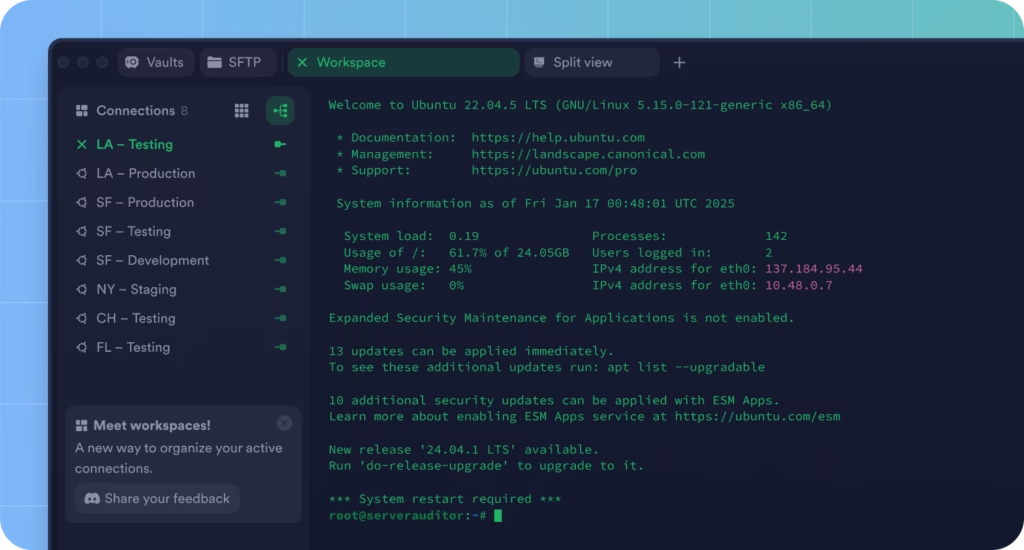
In an era of distributed infrastructure, multi-cloud deployments and remote DevOps teams, the old ritual of opening PuTTY and typing an IP address is starting to feel dated. That’s where Termius comes in: a modern SSH client that behaves more like an IDE for servers, with secure sync, collaboration features and apps for practically every platform.
But what does it really offer compared to classics like PuTTY or enterprise workhorses such as SecureCRT? And does it make sense for sysadmins, SREs and DevOps teams to switch?
Let’s break it down.
Termius: from simple terminal to infrastructure workspace
Termius calls itself a “Modern SSH Client built for productivity and collaboration”. In practice, it’s not just a terminal window but a full workspace for infrastructure access.
Truly cross-platform
One of its biggest strengths is how widely available it is:
- Desktop: macOS, Windows, Linux
- Mobile/tablet: iOS, iPadOS, Android
That means you can SSH from your laptop, your phone or your tablet without reinventing your setup every time. For on-call engineers, that’s a big deal.
Encrypted Vault and secure sync
At the core of Termius is its Vault:
- Stores hosts, users, SSH keys, passwords, labels and snippets.
- All data is end-to-end encrypted on the device.
- Termius can’t see your plaintext data – only you (and your team, depending on permissions) can decrypt it.
- You can organize everything into multiple vaults (e.g. Personal, DevOps, Production) with granular access controls.
For teams, this effectively becomes a single source of truth for infrastructure access: new engineers can get started without chasing ~/.ssh/config files, screenshots or random notes in shared docs.
Productivity features: more IDE than bare terminal
Termius pushes the SSH client closer to an IDE experience:
- IDE-style autocomplete: context-aware suggestions for commands, paths, snippets and credentials.
- Built-in SFTP: file transfers without switching tools.
- Visual host management: group by environment (dev, staging, prod), tag and search quickly.
- Session logs: see what was run in previous sessions – useful for handovers and internal audits.
Recent UI previews also highlight AI-assisted suggestions for common commands (“Press ↓ to generate with AI”), aimed at speeding up repetitive tasks directly from the terminal.
Real-time collaboration: multiplayer terminal
Another key differentiator is real-time collaboration:
- Multiplayer terminal sessions allow several people to share and view the same session in real time.
- It’s useful both for joint troubleshooting and mentoring/onboarding.
- No extra complex setup: it’s integrated into the normal Termius workflow.
In incident response scenarios where multiple engineers need to look at the same production host simultaneously, this can be far more effective than “share your screen over a video call”.
Enterprise-grade security
Termius clearly targets teams that care about security and compliance:
- SOC 2 Type II compliance for handling sensitive customer data.
- End-to-end encryption for all vault data.
- Support for FIDO2 hardware security keys for stronger SSH authentication.
- Biometric protection for keys on supported devices (Windows Hello, Touch ID/Face ID, Android biometrics).
- Direct connections to your servers: it doesn’t force you to go through a vendor-controlled proxy or cloud gateway.
Termius vs PuTTY, SecureCRT and other SSH clients
Now let’s see how Termius compares to some of the most widely used SSH clients.
1. PuTTY: the minimalist classic
PuTTY is still everywhere, especially in traditional Windows environments:
- It’s lightweight, free and open source.
- It covers the basics: SSH, Telnet, Rlogin, serial.
- Comes with companion tools like
pscpandpsftpfor file transfers.
But compared to Termius, PuTTY shows its age:
- No sync across devices.
- No built-in end-to-end encrypted vault with modern team workflows.
- The UI is functional but spartan, with no IDE-like productivity layers.
- No official mobile apps.
- It’s not designed around team collaboration or controlled sharing of infrastructure access.
When PuTTY still makes sense:
If you need something ultra-light for Windows, for quick one-off connections or scripted usage, PuTTY remains a solid option.
2. SecureCRT: corporate powerhouse, more traditional approach
SecureCRT is a long-standing favorite in many enterprises:
- Offers professional support and a very rich set of configuration options.
- Strong scripting capabilities (e.g. with Python) for session automation.
- Supports multiple protocols (SSH1/2, Telnet, Rlogin, serial, etc.) and terminal emulations.
However:
- It’s a commercial product with per-user/device licenses.
- It focuses mostly on desktop environments (Windows, macOS, Linux), without the same “everywhere” mobile emphasis as Termius.
- While it does handle sessions and credentials, it’s not built around an end-to-end encrypted multi-vault model as the central experience.
- It doesn’t prioritize real-time “multiplayer” collaboration in the terminal in the same way Termius does.
Where SecureCRT shines:
In organizations that have heavily standardized on SecureCRT, with years of scripts and processes built on top of it, and where a conservative, incremental approach to tooling changes is preferred.
3. Other players: MobaXterm, OpenSSH and more
Outside PuTTY and SecureCRT, there are several notable options:
- MobaXterm
- Very popular on Windows.
- A “Swiss army knife” of remote access: X server, RDP, VNC, FTP, SFTP, SSH, etc. in one package.
- Great if you want an all-in-one remote toolbox.
- Less focused on team vaults, end-to-end encryption for shared infrastructure and mobile workflows.
- OpenSSH (CLI)
- The de facto standard on Linux and macOS; also available on Windows.
- Perfect for scripts, CI/CD, Ansible, automation pipelines.
- But no GUI, no integrated host manager, no built-in collaboration: everything depends on
configfiles, external password managers and team discipline.
Quick comparison table
| Client | Main platforms | Model | SFTP built-in | Vault / credential management | Real-time collaboration | Primary focus |
|---|---|---|---|---|---|---|
| Termius | Windows, macOS, Linux, iOS, Android | Freemium / Teams | Yes | Yes – E2E encrypted, multiple vaults | Yes (multiplayer terminal, shared logs) | Productivity and team workflows for infrastructure |
| PuTTY | Windows (ports to other OS exist) | Free, open source | Limited (via pscp/psftp) | Basic (local session lists) | No | Lightweight, classic SSH client |
| SecureCRT | Windows, macOS, Linux | Commercial license | Yes | Advanced, more individual/corporate | Limited (no native “multiplayer”) | Highly configurable professional client |
| MobaXterm | Windows | Freemium | Yes | Session management, not E2E multi-team | No | All-in-one remote access suite |
| OpenSSH | Linux, BSD, macOS, Windows (port) | Open source | No (uses sftp/scp) | Depends on files / external tools | No | CLI standard for SSH and automation |
Should you switch to Termius?
It depends on your role and context. Broadly speaking:
- If you’re a sysadmin, SRE or DevOps engineer managing lots of hosts and environments
Termius offers clear advantages:- Encrypted vaults and structured infrastructure data.
- Sync between laptop, desktop and mobile.
- AI-assisted productivity and autocomplete.
- Real-time collaboration during incidents.
- If you’re in a team that shares access to infrastructure
The combination of multi-vaults, granular permissions and secure sharing can dramatically reduce the chaos of keys in random files and chats. - If you only connect occasionally or work in a very traditional Windows setup
PuTTY or MobaXterm might still be enough: they’re familiar, light and require minimal change in habits. - If your organization has deep integration with SecureCRT
A gradual adoption strategy makes sense: test Termius with a small group (on-call, DevOps, SRE), use it for mobile/on-the-go scenarios, and only then evaluate a broader rollout.
Conclusion
Termius is not “PuTTY with a dark theme”. It’s a serious attempt to reimagine the SSH client as a productivity and collaboration platform, built on top of strong security and compliance foundations.
In a world of remote teams, multi-cloud architectures and always-on incident response, treating SSH access as a shared workspace rather than a purely individual tool starts to make a lot of sense.
PuTTY, SecureCRT, MobaXterm and OpenSSH won’t disappear – each has its niche and history. But Termius clearly points toward where SSH clients are heading when they’re designed for modern teams, complex infrastructures and collaborative workflows, not just for a lone admin at a single desktop.