
In many Proxmox VE environments, Windows remains a common guest OS: application servers, remote desktops, corporate tools, or legacy workloads that have not yet been modernized. But there is a clear operational difference between a virtual machine that simply “boots and runs” and one that is truly ready for day-to-day datacenter operations: installing VirtIO drivers and the QEMU guest tools (qemu-guest-agent).
System administrators see the same pattern repeatedly. The VM is deployed, but disk performance is underwhelming, networking feels heavier than expected, and the hypervisor lacks the visibility needed for basic lifecycle management. In most cases, the root cause is not Proxmox itself—it is the driver stack: Windows does not include native support for VirtIO devices, which provide paravirtualized (more direct and efficient) access to storage and network resources. Without those drivers, Windows falls back to emulated devices that are compatible, but typically slower and more CPU-intensive.
On top of performance, there is a second layer that matters just as much in production: the QEMU Guest Agent, which creates a communication channel between the host and the guest OS. In Proxmox, the agent is commonly used to support clean, reliable guest shutdown from the hypervisor UI and to allow the host to retrieve guest-reported information, such as IP addresses. In certain backup and snapshot workflows, the agent can also participate in “quiescing” activities (briefly freezing filesystem state) to improve the consistency of live snapshots.
Why VirtIO matters: less emulation, more throughput
VirtIO was designed to reduce the performance penalty of emulation. In practical terms:
- Storage: VirtIO SCSI or VirtIO Block typically provide better sustained performance and lower overhead than emulated controllers, especially under I/O-heavy workloads.
- Networking: NetKVM (VirtIO) usually improves throughput and reduces CPU per packet compared to emulated NICs.
- Ballooning: enables dynamic memory management, useful where VM density and resource optimization matter.
Proxmox documentation highlights the core idea: VirtIO enables paravirtualized access to devices and peripherals, avoiding the slower emulation path. The virtio-win ecosystem provides Windows drivers that are compiled and digitally signed (commonly associated with Red Hat), an important detail for enterprise environments where driver integrity and operational assurance are non-negotiable.
QEMU Guest Agent: the management bridge between host and Windows
If VirtIO is about performance, qemu-guest-agent is about operational control. The agent allows the hypervisor to request actions from the guest OS in a controlled manner. In Proxmox, one of the most visible benefits is orderly shutdown initiated from the host, reducing the need for forced power-offs. It also improves observability by enabling guest-side reporting (for example, IP addresses) that the host cannot reliably infer on its own.
This becomes especially relevant when you introduce backups and snapshots into the picture. While storage-level snapshots can be fast, they are not always application-consistent by default. In certain designs, the guest agent can be involved in coordinating brief “freeze/thaw” operations so that snapshots are less likely to capture inconsistent filesystem states during active writes. In Windows contexts, QEMU’s guest agent documentation also references integration paths involving VSS (Volume Shadow Copy Service), with documented limitations and behavior depending on versions and configuration.
Download and installation: two approaches, same goal
Option 1: install guest tools via executable (direct method)
For installing guest tools on Windows, a straightforward approach is to download:
- virtio-win-guest-tools.exe (latest release): provided through the virtio-win download repository hosted via Fedora People.
Practical guides commonly describe a standard Windows setup flow: run the installer, accept license terms, confirm the components, and complete the wizard. At the end, you can reboot immediately or schedule the reboot for a maintenance window.
Option 2: mount the VirtIO ISO (the standard Proxmox method)
Proxmox also recommends the classic approach: mount the VirtIO ISO as a virtual CD-ROM in the VM and run the installer from that media.
The official documentation describes two modes:
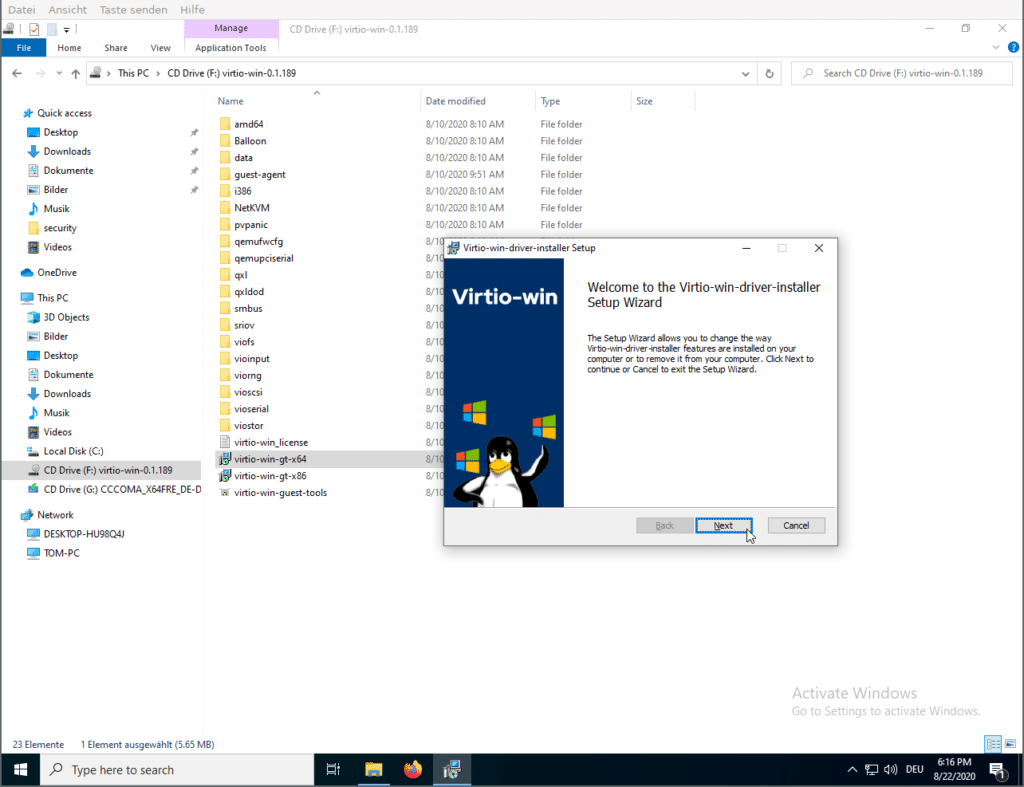
- Wizard installation: the fastest path to install “all” or a selected set of VirtIO drivers. You open File Explorer, access the CD drive, run the installer (commonly the 64-bit variant), follow the steps, and then reboot the VM.
- Manual installation: useful in controlled environments or when you need a specific driver (for example, storage). The ISO is organized into folders such as NetKVM (network), vioscsi (SCSI), balloon, guest-agent, and others, typically with subfolders by Windows version. You install the relevant INF (“Setup Information”) files, repeat as needed for each component, and reboot.
In enterprise operations, the wizard is usually sufficient. Manual installation is more common during migrations, controller changes, or when resolving missing devices in Device Manager.
What production teams care about: versions, compatibility, and known issues
In virtualization, the job does not end with “Next, Next, Finish.” The real value comes from standardizing a version, validating it under realistic workloads, and having a rollback plan.
Proxmox documentation includes troubleshooting guidance and references to known issues affecting certain VirtIO releases in specific scenarios. For example, notes have highlighted reports of read errors and performance problems with particular versions under heavy I/O workloads on Windows Server 2025, with practical mitigations including using an alternative release that does not exhibit the problem in that environment.
A second operational reality is just as important: newer driver releases may drop support for older Windows versions (for example, Windows 7). If your estate includes legacy guests, you may need to keep access to older VirtIO driver packages and document which version is approved for each template or golden image.
The safest operational pattern is now widely adopted: test in staging, use realistic load profiles, roll out in waves, and maintain a documented rollback path.
Conclusion: a small install that prevents big incidents
VirtIO drivers and QEMU guest tools can be installed in minutes, but their impact is measured over months: fewer performance complaints, fewer forced shutdowns, better day-to-day management, and a stronger foundation for consistent backup practices. In a world where every reboot is negotiated and every maintenance window is scrutinized, this installation has effectively become a baseline requirement for any Windows VM expected to run reliably on Proxmox.
FAQ
What improves most after installing VirtIO in Windows on Proxmox—disk or network?
Both typically improve, but the most noticeable gains are often in storage (sustained I/O) and networking once the VM handles real traffic (backups, services, RDP, repositories, file transfers). VirtIO reduces emulation overhead.
What is the QEMU Guest Agent used for if Windows already “works”?
It provides more reliable management: clean shutdown initiated by the hypervisor, better guest visibility (such as IP reporting), and support for certain snapshot/backup consistency workflows depending on how the environment is designed.
Is it better to install VirtIO from the ISO or with the guest tools executable?
In Proxmox, mounting the VirtIO ISO is the most standard and flexible method (and works even without network). The virtio-win-guest-tools.exe installer is convenient when you want a guided, bundled installation experience.
What should you do if a newer VirtIO version causes issues under heavy I/O on Windows Server?
Best practice is to validate in pre-production, check known issues, and if you see instability or degraded performance, roll back to a stable release from the archived downloads until a reliable combination is confirmed.