
In many operations teams, automation and observability have evolved in layers: a handful of cron jobs, an orchestration tool for pipelines, a monitoring stack for metrics, and an alerting system that—too often—fires without context. When something breaks, engineers bounce between dashboards, logs, and ticketing systems trying to answer the same basic questions: What happened? Where? What changed? And what was the server doing at that exact moment?
That pain is the starting point for xyOps, an open-source project positioning itself as a “next-generation” platform for job scheduling, workflow automation, server monitoring, alerting, and incident response—all inside a single, integrated system. Instead of stitching together separate tools and hoping they correlate cleanly during an outage, xyOps aims to build a cohesive feedback loop where automation and monitoring are inherently linked.
From running jobs to understanding them
The central idea behind xyOps is straightforward: running tasks is the easy part. The harder part is operating those tasks in production—especially when performance degrades, dependencies slow down, or servers run out of resources.
Many workflow engines can execute pipelines reliably, but when a job stalls or fails, the signal arrives fragmented: an alert might tell you CPU spiked or a service went down, while a job runner shows a task failed—without explaining how those events relate. xyOps tries to close that gap by connecting job execution directly to live monitoring and incident workflows.
In its own description, xyOps highlights an approach where alerts carry richer context. For example, when an alert triggers on a server, the notification can include which jobs are currently running there. With a click, an operator can open a snapshot view showing the system state—processes, CPU load, and network connections—right when the alert fired. And when jobs fail, xyOps can open tickets that include logs, history, and linked metrics, so the handoff from detection to diagnosis doesn’t start from zero.
Job scheduling beyond cron, with visual workflows
xyOps positions its scheduler as “more than cron,” leaning into the reality that modern automation often needs more than time-based execution. Cron is great for simple recurrence, but it struggles when workflows need branching logic, event-driven triggers, conditional actions, or integrated visibility into failures and performance.
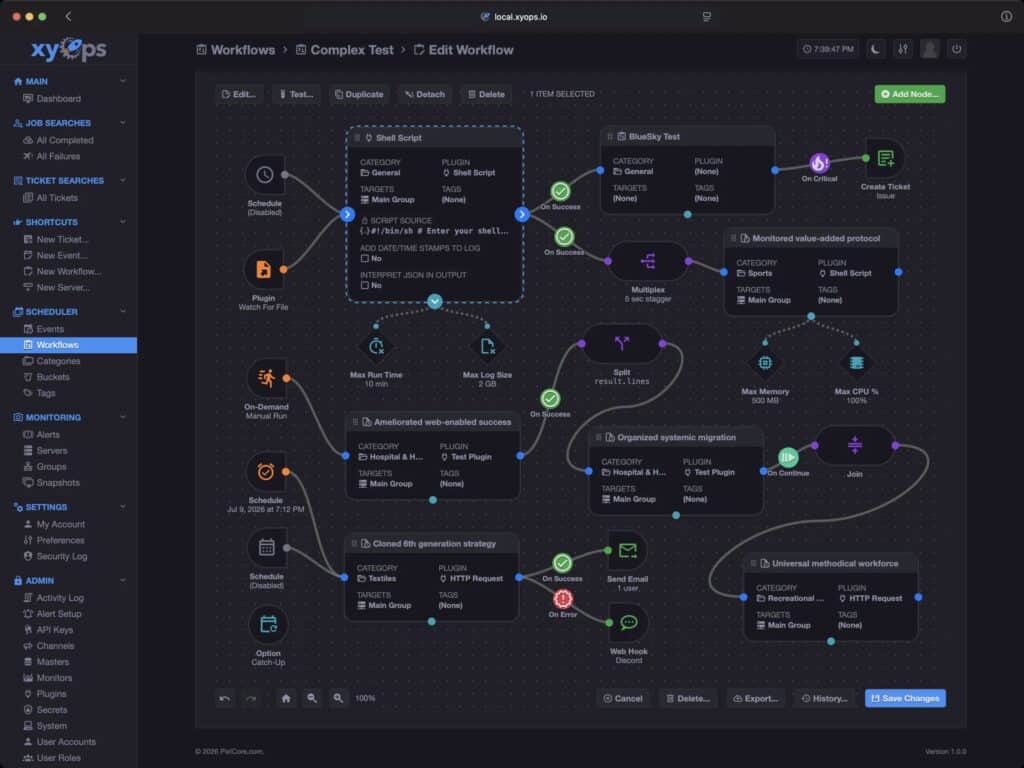
To address that, xyOps includes a graphical workflow editor where teams can connect events, triggers, actions, and monitors into pipelines that are easier to reason about and maintain. Visual tooling isn’t automatically better than code, but for many ops teams it reduces the “tribal knowledge” problem—where a small set of people understand the automation because they wrote the scripts years ago.
By encouraging workflows that are explicit and inspectable, xyOps is clearly aiming at the long-term maintainability problem that plagues homegrown automation stacks.
Monitoring and alerting designed to be actionable
xyOps also emphasizes “smart alerts”—not just threshold triggers, but alerts that can be customized and built from more complex conditions. The goal is to move away from noisy notifications and toward alerts that carry enough context to accelerate decisions.
For operations teams, the promise is familiar but meaningful: fewer blind pings, more insight in the first message, and faster root cause analysis because the system already knows how automation, hosts, and failures relate.
Built for fleets, from five servers to five thousand
The project frames itself as “fleet-ready,” suggesting it’s designed for environments where the challenge is consistency and scale: scheduling jobs across many servers, tracking performance across the fleet, and handling incident response without building custom glue between tools.
Whether xyOps can truly scale to “five thousand servers” depends on architecture details and real-world deployments, but the intent is clear: it’s not a single-host utility. It’s meant to be a central automation-and-ops layer for teams that want a unified view.
Self-hosted by default, with an explicit stance on telemetry and paywalls
One of xyOps’ strongest positioning points is philosophical: it’s built for teams who want to control their automation stack without giving up data, freedom, or visibility. The project claims it doesn’t hide core functionality behind paywalls and doesn’t push telemetry to third parties.
That posture will resonate with sysadmins who have grown wary of SaaS-only automation and monitoring tools—especially in environments where compliance, sovereignty, or air-gapped operations matter.
Licensing reinforces that direction: xyOps is published under the BSD-3-Clause license, a permissive open-source license that generally reduces friction for organizations adopting or extending the software.
Quick local testing with Docker, production hardening still required
xyOps provides a one-liner Docker command for fast evaluation, exposing a web interface locally and using default credentials (admin/admin). That makes it easy to test, but it also highlights a practical reality: default settings are for labs, not production.
Any real deployment would require the usual hardening steps: changing credentials, limiting network exposure, placing it behind proper authentication, and reviewing access to host-level integrations (such as Docker socket access) depending on how it’s deployed.
The project also hints at future commercial offerings—such as a managed cloud service and an enterprise plan, including on-prem and air-gapped installs—though these are framed as “coming soon.”
Governance and long-term commitment
In today’s open-source landscape, licensing changes and “rug pulls” have become a recurring fear—especially for tools that become operationally critical. xyOps addresses this head-on with a stated “longevity pledge,” emphasizing that it intends to remain open-licensed and OSI-approved.
That doesn’t replace strong support or guarantees, but it can reduce adoption risk for teams that want to avoid building core automation around a project that might later change its licensing model.
Why sysadmins might care
xyOps is ultimately pitching a time-saving story: fewer tool-switches, better context when things break, and a tighter loop between automation and observability.
It may appeal most to teams that:
- prefer self-hosting for control and compliance reasons,
- want a unified UI that ties jobs to host state and alerts,
- or are trying to reduce operational complexity by eliminating glue between schedulers, monitoring, and ticketing.
If it delivers on its “everything talks to everything” promise, xyOps could become a compelling option for operations teams who want a cohesive automation stack without surrendering visibility or autonomy.
FAQ
When does xyOps make more sense than cron + scripts?
When the real problem isn’t running tasks, but operating them: richer alert context, traceability, linked job history, and fast access to server state during incidents.
Can xyOps handle automation and monitoring across multiple servers?
That’s a core part of the design goal—schedule jobs across a fleet and connect monitoring, alerts, and incident response in one place.
Is it easy to test xyOps quickly?
Yes. The project provides a Docker one-liner to run it locally and access the web UI. For production use, operators should still harden credentials and lock down exposure like any critical ops service.
What does BSD-3-Clause licensing mean for organizations?
It’s a permissive open-source license that typically makes adoption and internal customization easier, including in commercial settings, without the constraints of strong copyleft licenses.