
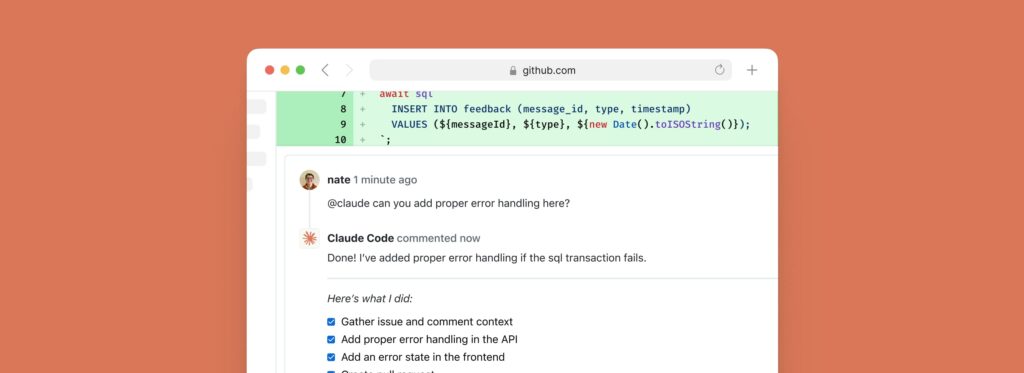
Anthropic is pushing Claude Code beyond the terminal and into the core of GitHub workflows. Its claude-code-action project lets developers use Claude inside pull requests, issues, and comments, where it can answer questions, review changes, and even implement code updates from within GitHub Actions. The official repository currently shows about 6,200 stars, 1,500 forks, and 494 commits, which suggests this is no longer a lightweight experiment but an actively developed part of Anthropic’s developer tooling strategy.
The pitch is straightforward: instead of keeping AI assistance inside an editor or chat window, Anthropic wants Claude to participate directly in the shared workflow where teams discuss code, review changes, and coordinate work. According to the project README, the action is designed for GitHub PRs and issues, can respond to @claude mentions, supports issue assignments and automation prompts, and works with multiple authentication paths including Anthropic’s direct API, Amazon Bedrock, Google Vertex AI, and Microsoft Foundry.
More than a comment bot
What makes the action notable is that it is not limited to posting text replies. Anthropic says it can work as an interactive code assistant, a PR reviewer, and a code implementation tool. In practice, that means it can answer architecture and programming questions, analyze pull request changes, suggest improvements, and carry out simple fixes, refactors, or feature work. It also supports structured JSON outputs that can become GitHub Action outputs, making it useful not only for conversation but also for more formal automation pipelines.
Anthropic also emphasizes that the action runs on the user’s own GitHub runner. The model call goes to the chosen provider, but the execution itself stays inside the organization’s GitHub Actions infrastructure. For many engineering teams, that distinction matters because it keeps the automation closer to their own operational boundaries rather than turning the whole workflow into a black-box hosted service.
The usage guide shows that the action can be wired to common GitHub events such as issue_comment, pull_request_review_comment, issues, and pull_request_review, which covers much of the day-to-day collaboration around code changes. By default, the trigger phrase is @claude, though teams can change it, and the same configuration also supports issue assignment and label triggers.
Setup is simple, but the details matter
Anthropic’s quickstart is intentionally lightweight. The easiest path is to open Claude Code in the terminal and run /install-github-app, which walks a repository admin through GitHub App installation and secret setup. That shortcut, however, only applies to users of Anthropic’s direct API. Teams using Bedrock, Vertex AI, or Microsoft Foundry need to follow separate provider-specific setup instructions.
The usage documentation also shows a broad range of configuration knobs. Teams can pass direct prompts, fine-tune Claude CLI arguments, configure extra permissions, choose branch prefixes, enable commit signing, and define automation prompts for non-interactive workflows. Anthropic’s migration notes make clear that the current v1 approach is intended to simplify setup compared with earlier versions while keeping most workflows compatible.
Security is where the action becomes most interesting
One of the strongest parts of the project is its security documentation. Anthropic states that, by default, the action can only be triggered by users with write access to the repository. It also blocks GitHub Apps and bots by default, unless maintainers explicitly allow them through the allowed_bots parameter. That is not just a minor detail: the docs warn that if a public repository sets allowed_bots='*', external GitHub Apps could potentially trigger workflows with prompts they control.
The same document is equally blunt about another risky option: allowed_non_write_users. Anthropic describes it as a significant security risk because it bypasses the standard write-permission requirement. The docs say it should only be used in extremely limited workflows, such as narrowly scoped issue-labeling automations with minimal permissions.
Another important safeguard concerns logs and sensitive output. Anthropic says show_full_output is disabled by default for security reasons, because enabling it can expose full tool outputs, API responses, file contents, or command output that may contain secrets. The recommended practice is to keep show_full_output: false and rely on sanitized output unless debugging in a controlled private environment.
Anthropic also builds in a layer of human oversight around code changes. The security guide says that in the default setup, Claude does not open pull requests automatically in response to @claude mentions. Instead, it commits changes to a new branch and returns a link to the PR creation page, leaving a person to open the pull request manually. That is a small but meaningful design choice: the company is clearly trying to balance automation with an explicit review step before code enters the normal merge process.
A sign of where AI-assisted development is heading
The broader significance of claude-code-action is not just that Anthropic shipped another integration. It reflects a wider shift in AI-assisted development. The center of gravity is moving from “AI in the editor” to “AI in the workflow” — in comments, reviews, issue handling, repository maintenance, and policy-driven automation. Anthropic’s own solutions guide for the action points to use cases such as automatic PR review, path-specific checks, external contributor reviews, issue triage, documentation sync, and security-focused reviews.
That does not mean the hard problems are solved. Once an AI system can interact with repository context, execute tools, and shape code changes, the real challenge becomes governance: who can trigger it, what it can access, what it is allowed to do, and how much output should be exposed. Anthropic seems aware of that. The project’s documentation is unusually direct about permission boundaries, bot risk, commit signing, and prompt-injection-style concerns.
For now, claude-code-action looks like an early but meaningful step toward making AI a first-class actor inside GitHub workflows rather than just a helper on the side. Whether teams trust it enough to give it a larger operational role will depend less on the model’s raw intelligence and more on whether Anthropic’s security and control model holds up in real repositories.
Frequently asked questions
What does Claude Code Action do in GitHub?
It lets Claude answer questions, review pull requests, and implement code changes inside GitHub workflows tied to PRs, issues, comments, and related events.
How is Claude triggered in a repository?
The action can be triggered by events such as issue comments, PR review comments, issue assignments, and PR reviews. By default, the trigger phrase is @claude, though it can be customized.
Which providers does Claude Code Action support?
It supports Anthropic’s direct API as well as Amazon Bedrock, Google Vertex AI, and Microsoft Foundry.
What are the main security warnings in the documentation?
Anthropic warns against overbroad bot permissions, describes allowed_non_write_users as risky, keeps show_full_output disabled by default, and notes that Claude does not automatically open pull requests in the default configuration.