
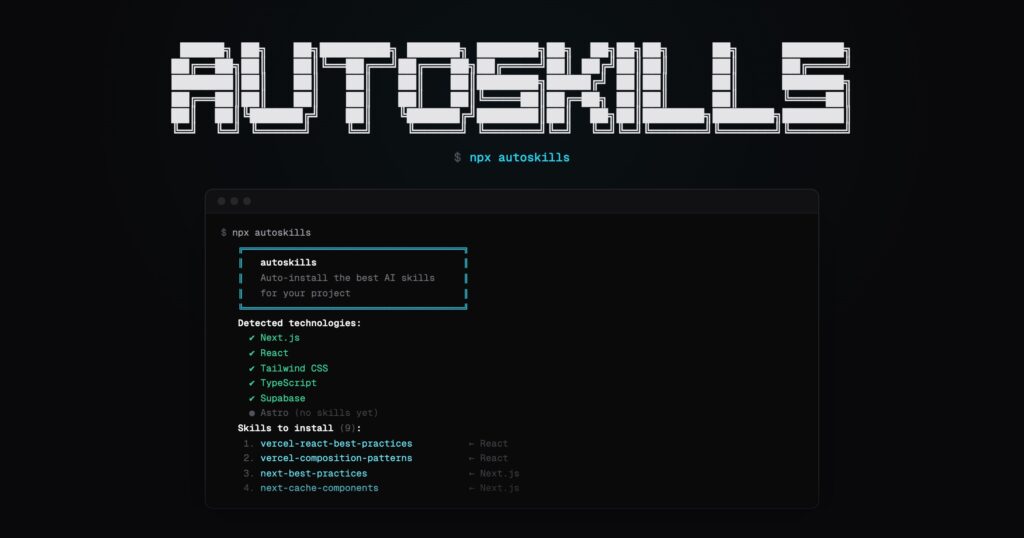
Configuring a coding agent so it properly understands a project is starting to look a lot like setting up a development environment: having the binary is not enough, you also need context, conventions, and technology-specific knowledge. That is where autoskills comes in, a utility published by midudev that promises to do in a single step something that has usually been manual until now: scan the project, detect the stack, and automatically download the most suitable agent skills from the skills.sh ecosystem. The idea is simple: run npx autoskills in the root of the repository and let the tool read package.json, Gradle files, and configuration files to identify which technologies are actually in use.
The proposal has attracted attention because it tackles a real problem for development and operations teams. Skills are becoming established as a reusable context layer for assistants such as Claude Code, Cursor, Codex, Gemini CLI, or Windsurf. Anthropic defines these skills as modular capabilities that package instructions, metadata, and optional resources so the agent can load them when relevant, instead of repeating the same guidance over and over in every conversation. In that sense, autoskills does not invent the format, but it does automate installation and brings the concept closer to the everyday workflow of a real project.
For a sysadmin and development outlet, the interesting point is not the slogan of “one command and done,” but what it means underneath: turning skills into another layer of the project bootstrap process. Just as a repository installs dependencies, configures linters, or prepares containers, it can now also provision specialized knowledge for the agent that will be working on that code. That helps both individual developers and teams that want to reduce variability in how AI is used across monorepos, hybrid stacks, or environments where backend, frontend, cloud, and testing all live in the same tree. That reading fits both the philosophy of skills.sh and the way Anthropic frames skills: reusable resources, loaded on demand, designed to turn general-purpose agents into specialists.
What autoskills actually does when you run it
According to its README and official website, autoskills follows a fairly direct flow. First, you run npx autoskills at the root of the project. Then it inspects package.json, Gradle files, and several configuration files to detect technologies. Next, it resolves which skills are the best match and installs them through skills.sh. If the detected or specified target agent is Claude Code, it also generates a CLAUDE.md file with a summary of the installed skills in .claude/skills, which is a practical way to keep the project’s main context more readable from the start.
The utility also includes several options that are especially useful for teams that do not want to run anything “blindly” in a shared repository. The official site lists --dry-run to show what would be installed before making changes, -y or --yes to skip confirmations, -v or --verbose to display more detail in case of errors, and -a, --agent to limit installation to specific agents such as cursor or claude-code. In practice, that last point matters: it allows provisioning to be adapted to the agent a team actually uses, without assuming everyone works with the same tool.
| Option | What it does | When it is useful |
|---|---|---|
--dry-run | Shows what skills would be installed without making changes | Pre-run audit, CI, team review |
-y, --yes | Skips the interactive confirmation | Scripts, automation, non-interactive environments |
-v, --verbose | Shows more detail on failures | Debugging and diagnosis |
-a, --agent | Installs for specific agents | Teams using Cursor, Claude Code, or multiple agents |
-h, --help | Shows the help text | Quick syntax reference |
The catalog is already broad, but not uniform
One of the reasons autoskills is drawing so much attention is the number of technologies it can detect. Its website lists support for frontend, backend, mobile, cloud, data, testing, and media, with integrations for React, Next.js, Vue, Angular, Astro, Svelte, TypeScript, Node.js, Bun, Deno, Supabase, Cloudflare, Vercel, Terraform, Playwright, Vitest, Prisma, Drizzle, Stripe, Hono, NestJS, Spring Boot, Flutter, Android, WordPress, Laravel, Django, FastAPI, and many others. The repository summarizes this as support for “modern stacks” and lists Node.js 22 or higher as a requirement.
That said, coverage is not completely consistent. There are technologies where autoskills installs several specific skills, and others where it detects the technology but no skills are available yet. On the official site, React Router, Express, AWS, and PostgreSQL, for example, appear in some cases with a “no skills yet” notice, while others such as WordPress, GSAP, Android, or Cloudflare receive much richer packages. This detail matters for sysadmins and platform teams: the tool is already useful for speeding up setup considerably, but it should not be assumed that it provides the same depth for every detected stack.
| Area | Examples detected | Current state |
|---|---|---|
| Frontend | React, Next.js, Vue, Astro, Svelte, Angular, Tailwind | Broad coverage with several skills per framework in many cases |
| Backend | Node.js, Hono, NestJS, Spring Boot, Laravel, FastAPI, Django | Growing coverage; some technologies have mature skills, others less depth |
| Cloud and infrastructure | Cloudflare, Vercel, Terraform, Azure | Good support in Cloudflare and Terraform; AWS is detected but currently appears without dedicated skills on the public site |
| Data | Prisma, Drizzle ORM, Neon, Supabase, SQLAlchemy | Useful coverage for modern app + database stacks |
| Testing | Playwright, Vitest, Pytest, RSpec | Present support oriented toward best practices |
| CMS and ops | WordPress | Particularly interesting for sysadmins: includes performance, WP-CLI, and operations |
Specifically for the sysadmin profile, one of the most interesting points is the detection of WordPress with skills such as wp-performance, wp-wpcli-and-ops, wp-rest-api, or wp-project-triage. The Cloudflare, Terraform, and Azure blocks also stand out, making it more useful for infrastructure and deployment than its initial marketing might suggest. It is not just a toy for frontend developers or for people using React with Cursor; it is starting to address real needs in platform, automation, and operations.
Its value also comes from the ecosystem it builds on
autoskills is built on top of skills.sh, the open agent skills directory and CLI, and that is a big part of its value. The vercel-labs/skills repository explains that skills are reusable sets of instructions defined in SKILL.md, and that the system supports a long list of agents: Claude Code, Cursor, Codex, Gemini CLI, GitHub Copilot, Continue, OpenHands, OpenCode, Windsurf, and many more. In other words, autoskills acts as an autodetection and provisioning layer on top of a distribution ecosystem that is already relatively cross-platform.
That has practical implications. For a development team, it means skills can start to become part of the project itself, instead of depending so much on the memory or discipline of each developer. For operations, it means the agent’s context can be standardized more easily across laptops, ephemeral environments, or new team members. And for technical leads, it means AI usage can start to become more auditable and repeatable, because installing context stops being an informal process. The promise is less about “magic” and more about “reproducibility,” which is exactly the language sysadmins and senior developers tend to trust.
What to check before adopting it
Not everything is automatic upside. The first point to review is the license. Although the project is publicly available on GitHub, the repository indicates CC BY-NC 4.0, a Creative Commons license with a non-commercial use clause. That makes the “open source” label worth qualifying, especially in business environments where commercial use can be a red line. Before bringing it into corporate workflows or standard internal documentation, that point should be examined carefully.
The second aspect is the actual maturity of the catalog. autoskills already detects a lot, but not every technology has the same depth, and not every skill comes from the same source or level of polish. Some are highly specific and useful, others are still expanding, and in some cases there is detection without an associated package. For that reason, the best approach does not seem to be running it blindly, but using --dry-run first, reviewing what it is going to install, and validating whether that set of skills adds real value to the team’s workflow. For a small project, the gain may be immediate. For a complex platform, the real value may lie more in how it standardizes context than in the convenience of the first minute.
Overall, autoskills is a small tool, but quite revealing of the stage AI-assisted development has reached. The market is no longer competing only on models or IDEs with integrated chat. It is also starting to compete on how expert context is distributed, how it is reused, and how it is installed without friction. That is where this command gains importance: not because it replaces technical judgment, but because it packages a layer of knowledge that until now has been too scattered.
Frequently asked questions
What does npx autoskills actually install in a project?
It installs agent skills from skills.sh based on what it detects in package.json, Gradle files, and project configuration files. If the target is Claude Code, it also generates a CLAUDE.md file with a summary of the installed skills.
What stacks does autoskills support as of April 2026?
Its official website lists dozens of technologies across frontend, backend, cloud, mobile, data, testing, and CMS, including React, Next.js, Vue, Astro, Node.js, Deno, Bun, Prisma, Cloudflare, Terraform, WordPress, Flutter, Laravel, Django, and FastAPI. Coverage, however, is not equally deep in every case.
Is it useful for sysadmin teams as well as frontend developers?
Yes, especially in environments using Cloudflare, Terraform, Azure, or WordPress, where the official website shows skills oriented toward deployment, operations, performance, and WP-CLI. In AWS, for example, detection appears today, but without dedicated skills in the current public list.
Is it really open source?
The code is published on GitHub, but the repository declares a CC BY-NC 4.0 license, with a non-commercial restriction. That means its fit for business environments should be reviewed carefully before adopting it as an internal standard.