
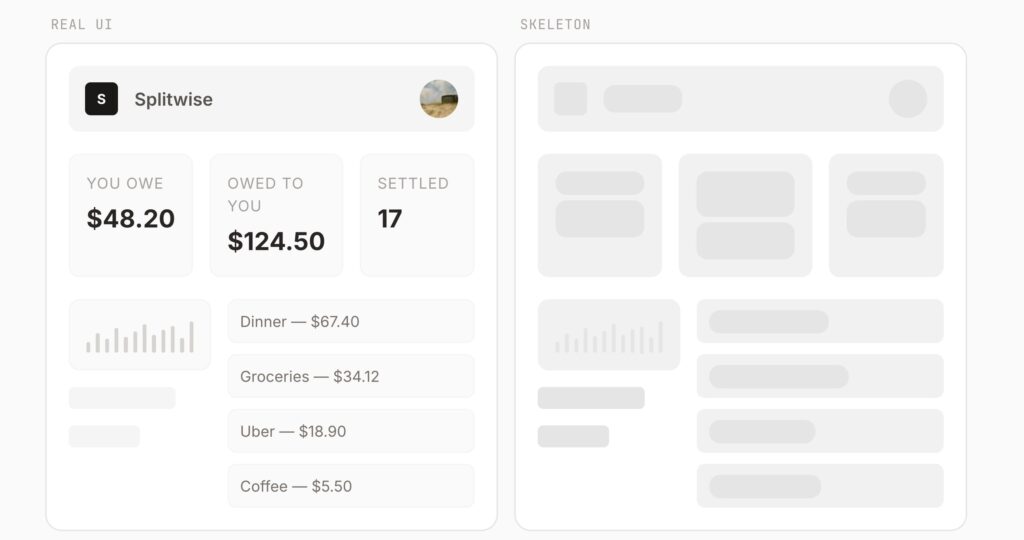
Skeleton loading screens have become a standard trick for improving perceived performance, but they usually come with an annoying cost: somebody still has to design and maintain them by hand. That means measuring blocks, approximating layouts, updating placeholders when the UI changes, and keeping the loading state visually aligned with the real component. Boneyard tries to remove that work almost entirely. The open-source project describes itself as an auto-generated skeleton loading framework that creates “pixel-perfect” skeleton screens directly from the real DOM, rather than from manually designed placeholders.
The idea is straightforward. Developers wrap a component with a <Skeleton> wrapper, give it a name, and then run npx boneyard-js build. According to the project’s README, that build step snapshots the DOM, generates the skeleton data, and lets the app resolve those skeletons automatically after importing the generated registry once. In practice, Boneyard is trying to turn skeletons from a design chore into a build artifact.
That workflow is probably the main reason the project is getting attention. On GitHub, the repository has passed 1.2k stars and is published under the MIT license, which makes it easy for frontend teams to test, modify, and integrate into their own React stacks. The repository also shows no formal releases yet, which suggests the project is still early despite the initial traction.
What makes Boneyard different from typical skeleton libraries is the way it captures layout information. The project says it reads getBoundingClientRect() from every visible element inside the component, stores those positions as a flat array of { x, y, w, h, r } values, and then renders them back as gray rectangles that match the real UI structure. In other words, it is not guessing what a loading card or dashboard should look like. It is deriving the skeleton directly from the existing component tree.
That approach has an obvious advantage for teams building fast-changing interfaces. When product, design, or frontend developers update the real component, the loading state can be regenerated instead of redesigned. Boneyard also claims responsive behavior out of the box by capturing multiple breakpoints — 375 px, 768 px, and 1,280 px by default — so the skeleton is not tied to a single viewport. The CLI supports custom breakpoints and custom output paths as well.
The API is intentionally small. The documented props are name, loading, color, animate, and snapshotConfig. That means developers can still control whether the skeleton is shown, tweak the fill color, disable the pulse animation, or influence which elements are included in the generated snapshot. Boneyard is not trying to become a huge UI framework. It is trying to automate one very specific part of modern frontend work.
This is also why the project feels timely. Frontend teams are under constant pressure to improve perceived speed and reduce layout shifts without adding even more maintenance overhead. Skeletons help, but hand-built skeletons tend to drift away from the real interface over time. Boneyard’s pitch is that loading states should come from the same source of truth as the UI itself. If that works reliably in production apps, it could save a surprising amount of repetitive work for teams shipping dashboards, content feeds, cards, forms, and data-heavy layouts.
It is still early, and there are limits to what can be concluded from the public README alone. But the concept is strong enough to explain the early interest: less manual placeholder work, better visual consistency, and a simpler path to responsive skeletons that mirror real components instead of approximating them. For React teams tired of maintaining duplicate loading layouts, that is a very compelling promise.
Frequently Asked Questions
What is Boneyard exactly?
Boneyard is an open-source skeleton loading framework that generates skeleton screens from the real DOM of your components instead of requiring developers to hand-build placeholders.
How does Boneyard work in a React app?
The project says you wrap a component with <Skeleton>, run npx boneyard-js build, and then import the generated registry once. After that, each named skeleton resolves automatically during loading states.
What does Boneyard capture from the UI?
According to the README, it reads getBoundingClientRect() for visible elements, stores them as { x, y, w, h, r } bones, and renders those back as gray placeholder rectangles matching the real layout.
Does it support responsive layouts?
Yes. The project says it captures multiple breakpoints by default — 375 px, 768 px, and 1,280 px — and also supports custom breakpoints through the CLI.
What props can developers configure?
The documented props are name, loading, color, animate, and snapshotConfig.
What license does Boneyard use?
The repository is published under the MIT license.
Is Boneyard a mature production library already?
The repository has strong early traction, but GitHub shows no formal releases published yet, so it still looks like an early-stage project rather than a long-established frontend standard.