
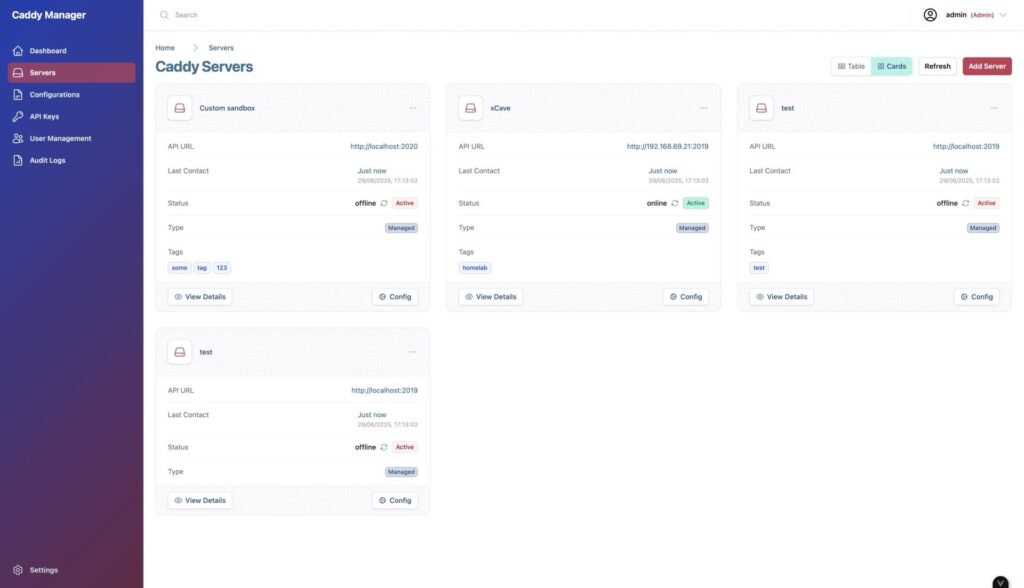
Caddy has become a common choice for publishing web services with automatic HTTPS, clean configuration and a more approachable learning curve than other traditional servers. But when infrastructure starts to grow, managing several Caddy2 servers, reviewing configurations, validating Caddyfiles, controlling users, checking status and keeping audit records can end up spread across the console, files, scripts and internal documentation.
CaddyManager tries to solve that operational layer with a modern web interface for managing Caddy2 servers from a single panel. The project, available as open source software under the MIT licence, is built on the MEVN stack and combines a Vue 3 frontend with a Node.js and Express backend. Its goal is not to replace Caddy, but to make day-to-day management of multiple instances, configurations, users, API keys, metrics and audit logs easier.
It should be read with an important caveat: the project itself warns that it is in early development and recommends backing up Caddy configurations and data before testing it. In other words, it may be an interesting tool for labs, testing and technical teams that want to explore a visual administration layer, but it should not be placed in front of critical environments without prior validation.
Multi-Server Management, Configuration and Access Control
CaddyManager’s core function is to allow users to add, remove, monitor and manage several Caddy2 servers from the same dashboard. For teams working with more than one instance, this can save quite a lot of time, especially when they need to check status, edit configurations or review changes without jumping between machines.
The configuration editor allows users to create, edit and validate Caddyfiles with syntax highlighting and templates. This matters because many errors in web servers do not come from major architectural failures, but from small poorly reviewed changes: an incorrect path, a badly closed block, a misconfigured proxy or a directive applied in the wrong place. Having validation and a shared interface can reduce part of that risk, although it does not remove the need to review every deployment carefully.
CaddyManager also includes user authentication, JWT-based sessions and role-based access control. It also adds API key management for programmatic access, with the ability to generate and revoke credentials from the panel. This combination fits environments where it is not enough for a single person to access the server over SSH, but where permissions need to be separated, actions recorded and some level of automation enabled.
| Area | What CaddyManager Provides |
|---|---|
| Server management | Add, remove, monitor and control multiple Caddy2 servers |
| Configuration | Caddyfile editor with syntax highlighting, templates and validation |
| Users | Secure login, JWT sessions and roles |
| API keys | Creation and revocation of keys for programmatic access |
| Audit | Logging of user and system actions |
| Status | Health checks and real-time updates |
| API | Integrated Swagger documentation |
| Metrics | Prometheus-compatible endpoints and JSON output |
Auditing is another relevant piece. CaddyManager records user and system actions, which is useful for security, internal compliance and traceability. In any tool that touches edge configuration or web servers, knowing who changed what and when is far from a minor detail.
SQLite by Default and MongoDB for Larger Deployments
One of the project’s strengths is that it offers two database options. SQLite is the default choice, with no additional configuration, designed for testing, development and small or medium deployments. Everything is stored in a single file, which simplifies the initial setup and avoids depending on an external service from the first minute.
For larger environments or heavier usage, CaddyManager can also use MongoDB. This option requires more configuration, but may fit better in deployments with several users, more administrative traffic or scaling needs. Switching between engines is done through the DB_ENGINE environment variable, with sqlite and mongodb as available options.
The proposed Docker Compose installation separates backend and frontend. The backend is not exposed directly, as the frontend acts as a proxy for /api/* routes. There is also an optional profile to run MongoDB, although SQLite remains the simplest path to get started.
This approach makes the tool easy to test in just a few steps, but the configuration example makes something basic for production clear: secrets, passwords and default values must be changed. The initial system user is created as admin with the password caddyrocks, a credential that should be changed immediately after the first login.
Metrics, Prometheus and Documented API
CaddyManager is not limited to a visual interface. The project exposes runtime and application metrics in two formats: a Prometheus endpoint at /api/v1/metrics/prometheus and an aggregated JSON endpoint at /api/v1/metrics. This makes it possible to integrate it with monitoring systems or build custom dashboards if the team already works with Prometheus.
It also includes Swagger documentation to explore and test backend APIs directly from the interface. For administrators and DevOps teams, this is relevant: a visual management tool gains more value when it also allows automation, integration and controlled programmatic access.
The technical stack is aimed at a modern web application: Vue 3, Vite, Pinia and Vue Router on the frontend; Node.js and Express on the backend; SQLite or MongoDB as the database; and a RESTful integration for managing Caddy2 servers. The project also mentions development scripts for running test Caddy servers, both custom and vanilla instances, which are useful for validating the tool without touching real systems.
A Promising Tool, but Still Young
CaddyManager appears at a time when more teams are looking for simple interfaces for powerful tools. Caddy already makes web publishing much easier compared with heavier configurations, but not every team wants to manage every change by editing files or working through the console. A web layer can help organize tasks, reduce errors and bring operations closer to profiles less used to working directly with Caddyfiles.
The risk, as always with infrastructure management tools, lies in maturity. If an interface manages web servers, configurations, users, API keys and audit logs, it needs to be stable, secure and predictable. A failure in this type of tool can affect service availability or introduce unwanted configurations. That is why the project’s warning about its early stage should not be treated as a formality.
For labs, internal testing, small environments or teams that want to experiment with visual Caddy2 management, CaddyManager may be an interesting project. For production, the reasonable recommendation is to test it first in an isolated environment, review permissions, change default credentials, protect access properly, validate configuration backups and understand how it behaves when errors occur.
Its proposal, in any case, addresses a real need: managing Caddy2 with more visibility, stronger user control and better traceability. If the project matures, it could become a useful piece for those who want to keep Caddy’s simplicity without giving up a more convenient management interface.
Frequently Asked Questions
What is CaddyManager?
CaddyManager is an open source web interface for managing Caddy2 servers from a modern panel, with support for multiple servers, Caddyfile editing, users, API keys, metrics and auditing.
Does it replace Caddy?
No. CaddyManager acts as an administration layer on top of Caddy2 servers. Caddy remains the server that runs the configurations.
What database does it use?
It uses SQLite by default, with no additional setup. It can also use MongoDB for larger deployments or environments with greater scaling needs.
Is it ready for production?
The project itself states that it is in early development and recommends making backups before testing it. The prudent approach is to validate it first in controlled environments.
How is it installed?
The project proposes deployment through Docker Compose, with backend, frontend and an optional MongoDB service. SQLite works by default with persistent data stored in a Docker volume.