
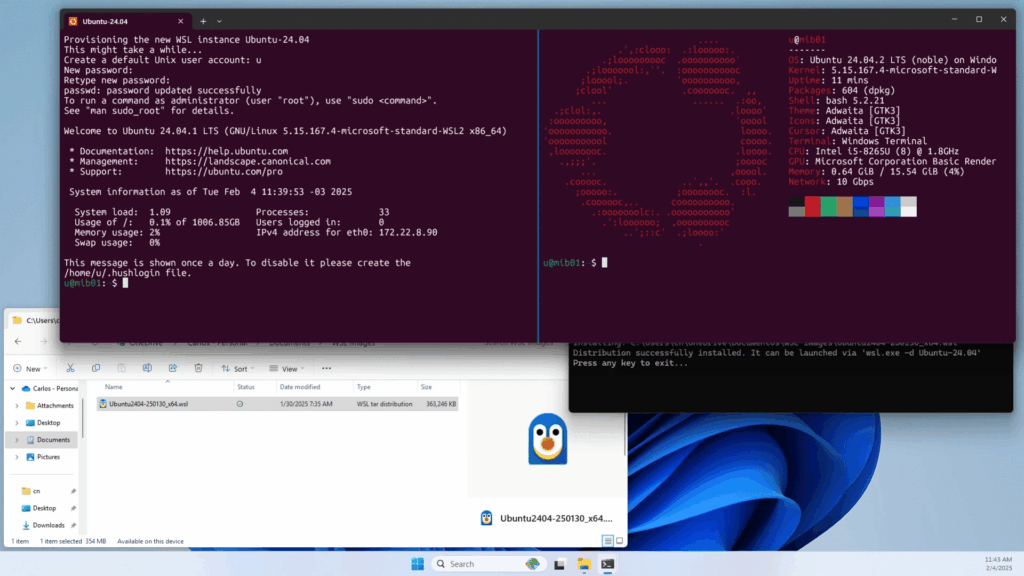
Ubuntu could reach a milestone before the end of 2026 that would have sounded contradictory a decade ago: having more users running it inside Windows through Windows Subsystem for Linux (WSL) than using Ubuntu as a native desktop operating system. The forecast comes from Jon Seager, Canonical’s VP of Engineering, who says Ubuntu usage through WSL is growing considerably faster than Ubuntu Desktop.
The key points about Ubuntu’s growth on Windows in 30 seconds
- Canonical says Ubuntu on WSL is growing much faster than its traditional Linux desktop user base.
- Jon Seager expects Ubuntu WSL users to surpass native Ubuntu users “over the coming months.”
- Development, artificial intelligence and machine learning are among the main drivers.
- Microsoft has turned WSL into an increasingly complete Linux development environment inside Windows 11.
- WSL Containers now allows developers to run Linux containers through
wslc, although the feature remains in preview.
The comparison needs an important clarification. Canonical is not saying that Windows has more Linux users than all Linux desktops combined, nor that Ubuntu is disappearing as an independent operating system. Seager is specifically comparing people running Ubuntu through WSL with those using Ubuntu natively on their personal computers.
Canonical has also not published absolute figures that would make it possible to determine exactly when the crossover will happen. Seager’s statement, made in late April, was that annual WSL growth was significantly higher than Desktop growth and that he expected WSL users to overtake native Ubuntu users “over the coming months.” Saying this could happen before the end of 2026 is therefore a reasonable interpretation of his forecast, rather than an official deadline announced by Canonical.
Windows is becoming a Linux workstation
Microsoft originally created WSL to solve a fairly common problem for developers: needing Linux tools without leaving Windows.
With WSL 2, the company went considerably further. The subsystem uses a Linux kernel maintained by Microsoft and can run unmodified Linux binaries while integrating with the Windows file system, graphical applications and development tools. Ubuntu is currently the default distribution when a user installs WSL using the standard command.
Installation can be as simple as:
wsl--install
From there, the same computer can run Windows 11 as its corporate desktop while using Ubuntu for Bash, Python, compilers, Git, DevOps tools, containers or artificial intelligence applications.
Canonical specifically presents Ubuntu on WSL as a platform for web development, infrastructure administration and AI and machine learning workloads, including NVIDIA GPU acceleration.
This is particularly useful inside companies where employee computers are standardized around Windows.
A developer may receive a laptop managed through Microsoft’s corporate tools, complete with productivity applications, security policies and enterprise software, while still needing Linux to develop software that will eventually run on Linux servers.
Previously, the usual alternatives were running a virtual machine, maintaining a second computer, connecting to a remote server or configuring a dual-boot system.
WSL significantly reduces that separation.
The result is an unusual combination: Windows remains the user’s operating system, while Linux becomes the actual working environment.
AI is accelerating the trend
Seager specifically identifies artificial intelligence and machine learning as important drivers of WSL adoption.
A large proportion of the tools used to train, fine-tune and run AI models originated on Linux or primarily target Linux deployments. Frameworks, CUDA libraries, Python tools, containers and inference servers naturally fit into that environment.
Canonical says it frequently encounters the same situation: developers required by company policy to work on Windows computers who subsequently need Linux for AI projects. WSL gives them access to both environments without replacing the corporate operating system.
Ubuntu is also strengthening its position in this area.
Canonical provides dedicated documentation for GPU acceleration, AI development and enterprise management of WSL installations. Ubuntu Pro for WSL can also provide security maintenance and management capabilities inside organizations, showing that WSL is no longer treated merely as a convenient tool for individual developers.
The situation benefits both companies.
Canonical can bring Ubuntu to computers where it would probably never be installed as the primary operating system. Microsoft keeps Windows as the corporate platform even when a developer’s actual work depends almost entirely on Linux tools.
The old “Windows versus Linux” argument consequently becomes much less relevant.
WSL Containers takes the integration another step further
Microsoft has continued expanding WSL throughout 2026, and one of the most interesting developments has been WSL Containers.
The feature entered public preview in late June as part of WSL 2.9.3 and introduces an integrated tool called wslc.exe for creating, running and managing Linux containers directly from WSL.
For example:
wslcrun--rm-itubuntu:latestbash
Ports can also be published:
wslcrun-d-p8080:80nginx
The implementation includes support for images, networks, volumes, CPU and memory limits, as well as GPU support through the Container Device Interface (CDI). Microsoft presents it as a way to work with Linux containers through a CLI integrated directly into WSL.
It should not, however, be confused with Docker Desktop.
Docker remains a considerably more mature platform, and Microsoft continues to document its integration with the WSL 2 backend for development environments. WSL Containers is a much newer addition and remains in public preview, meaning limitations and changes may still appear before it becomes suitable for every production or development scenario.
Its existence nevertheless shows where Microsoft is heading: running Linux workloads inside Windows should increasingly require fewer additional layers.
WSL does not make Ubuntu Desktop unnecessary
The growth of WSL does not eliminate the differences between it and a conventional Linux installation.
Native Ubuntu still provides a level of hardware and operating system control that WSL is not designed to reproduce completely. There are scenarios involving drivers, virtualization, specialized networking, hardware devices, custom kernels, embedded systems or Linux workstation administration where a native installation remains the appropriate choice.
WSL 2 also uses a virtualized architecture, although it is much more tightly integrated and lightweight than a traditional manually managed virtual machine. The kernel used by WSL distributions is maintained by Microsoft rather than being the same kernel package delivered with a standard Ubuntu Desktop installation.
Performance can also vary depending on where files are stored and how interoperability between Windows and Linux is handled.
Canonical even acknowledges that WSL 1 may perform better in certain scenarios involving intensive file interoperability between the two operating systems, although WSL 2 is required for many modern capabilities, including systemd and Ubuntu Pro for WSL.
For that reason, Ubuntu’s growth inside Windows should not be interpreted as a defeat for the Linux desktop.
It tells a different story: Linux no longer needs to replace Windows to become one of the main development platforms on a Windows PC.
Microsoft retained developers by giving Linux more room
The historical irony is difficult to ignore.
For years, Microsoft tried to ensure developers could perform all their work using Windows-native tools. Today, one reason developers can remain on Windows is precisely because Microsoft gives them access to a deeply integrated Linux environment.
The company even maintains its own Linux distribution, Azure Linux, for certain cloud and container environments. Linux is no longer an external element in Microsoft’s strategy.
Something similar is happening at Canonical.
Ubuntu Desktop remains an important product, but Ubuntu can reach many more users if adoption no longer depends on convincing them to replace Windows. WSL removes that barrier.
Canonical says Ubuntu is the number one choice among organizations using WSL, although it does not provide a public breakdown of installation numbers that would allow an independent comparison between WSL and Ubuntu Desktop.
That last point matters. Seager’s statement is a forecast from a Canonical executive based on the data available to the company, rather than a publicly auditable statistic.
But if the crossover does happen during 2026, it will carry considerable symbolic weight.
The place where Ubuntu is growing fastest may no longer be the PC that replaced Windows. It may be the PC that continues running it.
Frequently asked questions
Will Ubuntu really have more users on Windows than on native Linux?
Jon Seager, Canonical’s VP of Engineering, expects Ubuntu users running through WSL to surpass native Ubuntu users “over the coming months.” Canonical has not published absolute figures or given an exact date.
Does WSL actually run Linux?
Yes. WSL 2 uses a Linux kernel maintained by Microsoft and runs Linux applications and binaries. It is not simply a compatibility layer translating every Linux command into Windows.
Why is WSL growing among AI developers?
It allows developers to combine a company-managed Windows desktop with Linux tools commonly used for AI, Python, CUDA, containers and software development, without needing dual boot or a separate computer.
Does WSL Containers replace Docker Desktop?
Not necessarily. wslc adds integrated Linux container support, but WSL Containers remains in public preview. Docker Desktop still provides a more mature ecosystem and integrations for many development workflows.
Source: windowslatest