
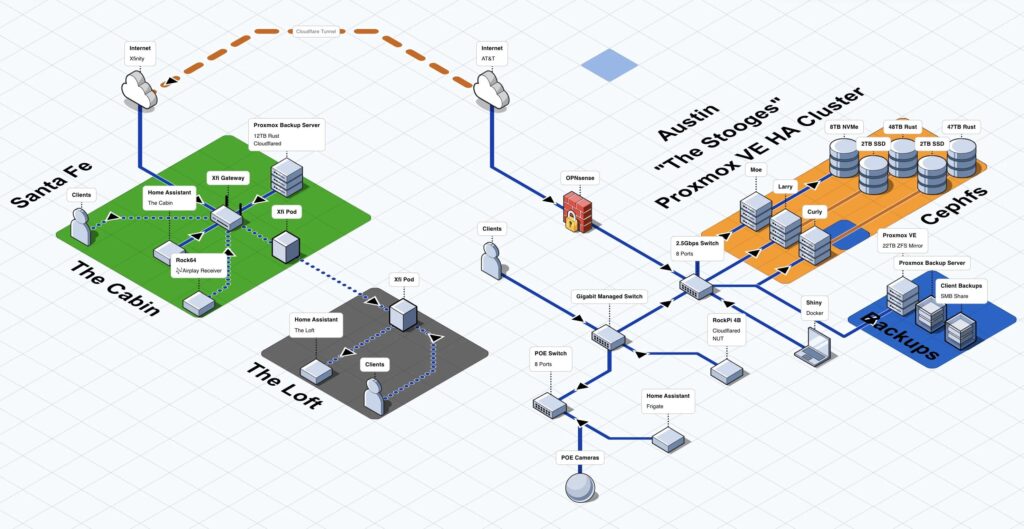
In infrastructure teams, documentation tends to break in predictable ways: diagrams live in someone’s laptop, get exported as static images, then drift out of date the moment a subnet changes or a service gets moved. The tools aren’t always the issue—friction is. The result is that “keeping diagrams current” becomes a task that’s constantly postponed until an incident, an audit, or a handover makes the gap painfully obvious.
That’s the space FossFLOW is trying to occupy. The project positions itself as an open-source, browser-first tool for building visually appealing isometric infrastructure diagrams—without forcing users into a paid account, a heavyweight desktop app, or a vendor-controlled format. The pitch is simple: if teams could draw faster, save more reliably, and share in a portable way, infrastructure documentation would stop feeling like a chore and start behaving like a living asset.
A browser-based diagramming tool with an “infra-first” feel
FossFLOW is built as a Progressive Web App (PWA), which means it runs in the browser and is designed to work offline as well. Under the hood it’s a React application built on top of the Isoflow library (with a fork published under the FossFLOW ecosystem). For day-to-day users, the important part is that it behaves like a modern editor: a canvas, a component library, connectors, and a workflow that doesn’t require installing a thick client on every machine.
The app’s core loop is familiar to anyone who has worked with diagramming tools: place nodes, connect them, label them, and keep iterating as the architecture evolves. FossFLOW leans into isometric visuals—an aesthetic that sits somewhere between “technical diagram” and “presentation-ready.” For many teams, that style matters more than it sounds: diagrams that look approachable are more likely to get shared with stakeholders outside IT, and more likely to be reused in onboarding, incident reviews, or risk discussions.
Usability upgrades that target real pain points
Diagramming tools live or die by small interactions. FossFLOW’s recent emphasis on usability—especially connectors—reflects that. The project includes a click-to-connect mode where you click a first node, then a second node to create a link. That approach tends to be more reliable than drag-to-connect, particularly on trackpads, in the browser, or when working quickly. For users who prefer the traditional interaction, drag mode remains available via settings.
Performance improvements are also called out in the project’s updates, aiming to keep the editor responsive as diagrams grow. In practice, responsiveness is one of the biggest factors in whether teams keep using a tool after the novelty wears off. If every move feels sluggish, “I’ll document it later” becomes the default again.
Multilingual support, including Spanish, with full interface translation
One of FossFLOW’s more practical strengths is multilingual support. The interface is translated across several languages—including Spanish—covering menus, dialogs, tooltips, and help content, with an in-app language selector. That matters in international teams, but also in smaller organizations where documentation needs to travel beyond the engineering group.
In many companies, the people who most need to understand infrastructure maps—ops, security, procurement, legal, compliance—aren’t always the same people who are comfortable navigating tools only in English. A fully translated UI can be the difference between “nice demo” and “this actually gets adopted.”
Portability: diagrams that don’t get trapped
FossFLOW emphasizes exporting and importing diagrams as JSON files. That’s a meaningful choice for engineering workflows:
- A JSON export can be attached to a ticket or a change request.
- It can live in a Git repository alongside IaC, runbooks, or architecture docs.
- It can be versioned, reviewed, and rolled back—just like code.
The project also describes quick-save and auto-save behaviors (session-based by default), which aligns with a common expectation in modern web editors: people want to iterate without constantly managing files. Session storage, however, is inherently temporary—so the ability to export is what turns a diagram into something durable.
Self-hosting with Docker: from “try it” to “deploy it internally”
For teams that prefer tools inside their own perimeter, FossFLOW includes a Docker-based deployment path. The repository provides both a Docker Compose option (typically used when you want persistence and repeatable deployment) and a straightforward container run mode, with server-side storage available so diagrams can be saved outside a single browser session.
That self-hosting story fits the reality of many infrastructure organizations: internal documentation tools often need to run behind a VPN, inside a lab environment, or within a restricted network where SaaS products are either disallowed or impractical. A diagramming tool that can be deployed like any other internal web service has a real advantage—especially when teams are trying to standardize how architecture is recorded.
It’s also worth noting that early “server storage” features in open-source tools can mature in public. The visible feedback loop—issues, bug reports, fixes—often signals that the functionality is being used in real deployments, not just showcased in README files.
Open source licensing and the sustainability reality
FossFLOW is MIT-licensed, which is a permissive license widely used for open-source tooling and friendly to commercial adoption. That choice lowers the barrier for companies that want to deploy it internally or integrate it into a broader workflow.
The project’s maintainer also speaks openly about the reality of maintaining a free tool while working full time, encouraging small donations from users who find value in it. That transparency is increasingly common in open source: the software may be free, but time is not, and community support often determines whether a promising project becomes a stable one.
Why this matters now: documentation is becoming operational again
The bigger story around FossFLOW isn’t just “another diagram tool.” It’s a sign of a shift: infrastructure documentation is regaining urgency because systems have become more distributed, more automated, and more regulated.
When architectures span cloud services, on-prem stacks, SaaS dependencies, and security controls, a diagram is no longer a nice-to-have. It becomes a coordination layer:
- For incident response, it speeds up root-cause analysis.
- For audits, it supports evidence and traceability.
- For onboarding, it compresses the time it takes to understand how things fit together.
- For security, it helps teams reason about boundaries, flows, and exposure.
Tools like FossFLOW are trying to reduce the friction cost of keeping that layer current—by making it fast to draw, easy to revise, and simple to share.
FAQs
Is FossFLOW suitable for internal company use without relying on third-party cloud services?
Yes. FossFLOW is designed to run in the browser and can be deployed via Docker, which makes it viable as an internal tool in self-hosted environments.
What format does FossFLOW use for exporting and sharing diagrams?
The project supports exporting and importing diagrams as JSON files, which works well for sharing, archiving, and versioning.
Can FossFLOW be used offline?
Because it’s a Progressive Web App, FossFLOW is built with offline use in mind, allowing work even when connectivity is limited.
What’s the advantage of isometric infrastructure diagrams compared to “flat” diagrams?
Isometric diagrams can be easier to scan and present, especially to mixed audiences. They often communicate structure and relationships in a more visually intuitive way than purely flat schematic layouts.
Source: X Twitter