
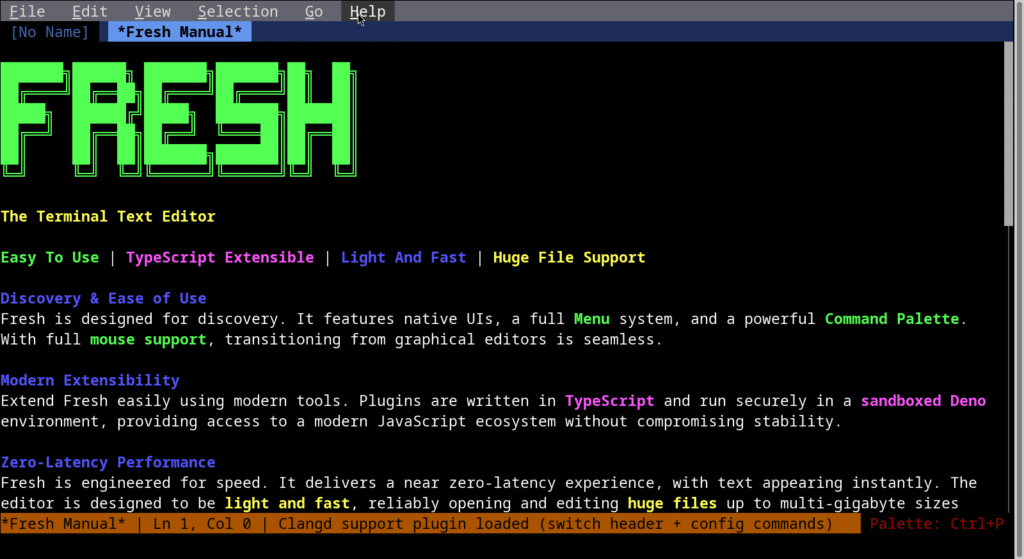
For years, terminal-based text editing has lived under an unwritten pact: if you want real power, you learn Vim or Emacs—or, more recently, Neovim or Helix. In return, you get speed and surgical control… along with a learning curve that can scare off anyone coming from modern GUI editors.
That’s the gap Fresh is trying to fill: a terminal text editor built around one very specific idea—bringing the intuitive, conventional UX of tools like VS Code and Sublime Text into a TUI (terminal user interface), without turning it into an endless configuration project.
An editor for people who don’t want to wrestle with the terminal
Fresh makes a simple argument: not everyone wants to learn modal workflows or memorize dense key-chords to be productive. So it leans into a more familiar interaction model: menus, a command palette, mouse support, visible navigation, and UI elements designed to help users discover features without living in the manual.
This isn’t about “replacing” Vim or Emacs. It’s about serving a very common, often overlooked use case: developers who work over SSH, inside tmux, on remote boxes, or in environments without a full desktop—but who still want the comfort and immediacy of a modern editor.
Performance as a core promise: huge files, low latency
Beyond ergonomics, Fresh plays a second major card: consistent performance with very large files. The project claims it’s engineered to handle multi-gigabyte files or slow network streams efficiently, maintaining negligible memory overhead regardless of file size. That’s a meaningful claim in real-world workflows where editors can bog down on massive logs, data dumps, or long traces.
For DevOps and sysadmin work, that’s instantly appealing: opening heavy logs on a server, searching patterns, editing config files, or making quick fixes without your editor becoming the bottleneck. Still, it’s best understood as a design goal—real-world performance will depend on your machine, your terminal, your remote environment, and the file types you’re working with.
LSP, plugins, and an architecture built for extension
To compete seriously with entrenched habits, an editor can’t just “feel modern”—it has to plug into daily development work. Fresh includes Language Server Protocol (LSP) support and editor staples like autocompletion, diagnostics, rename, code actions, go-to definition, and more.
On extensibility, the approach is notable: plugins are written in TypeScript and run inside a sandboxed Deno environment, aiming to balance flexibility with security. The idea is to tap into a modern JavaScript ecosystem without making extensions a stability or safety liability.
Put together—modern TUI + LSP + sandboxed plugins—Fresh is clearly aiming to be more than a “nice terminal editor.” It lists features such as multi-cursor editing, incremental search, replace, split panes, diagnostics panels, keyboard macros, Git tooling, and Markdown preview.
Installation almost anywhere… and the usual trade-offs
Fresh ships in a long list of formats: Homebrew, .deb and .rpm, AppImage, Flatpak, prebuilt binaries, cargo, Nix, and even npm/npx. It also offers a quick-install script that tries to autodetect the best method.
That broad availability helps adoption, but it also brings back the classic supply-chain conversation: curl | sh is convenient, but in professional environments it’s usually wiser to inspect scripts, prefer official package sources, verify checksums/signatures when available, and stick to trusted package managers—especially on sensitive machines.
Fast-moving development and an early community signal
By late December 2025, the project shows a rapid release cadence: fresh-editor 0.1.64 is dated December 26, just days before this write-up. That pace often signals active refinement and a feedback loop that pushes fixes quickly—things like packaging improvements, CRLF handling, and test reliability are typical of a product tightening cross-platform “it just works” details.
Fresh has also seen visibility in communities like Hacker News, where it’s been introduced explicitly as a Rust-based editor designed to reduce the friction of terminal editing for users who don’t want a steep learning curve.
GPL-2.0 licensing: what it means in practice
Fresh is licensed under GNU GPL v2.0, which matters for legal and compliance reviews in corporate settings. GPL is a copyleft license: you can use, study, and modify the software, but if you distribute modified versions, you’re generally required to provide source code under the same license terms.
For internal use as an editor, this is usually straightforward. The discussion changes if a company wants to redistribute it, embed it into a distributed product, or ship it as part of a commercial offering—then the licensing implications become a real design constraint.
Who Fresh is for
Fresh is aimed squarely at developers and operators who live in terminal sessions but prefer a direct, discoverable UX—with menus, mouse support, and a command palette—while still staying fast and lightweight.
It may not displace deeply customized Vim/Emacs workflows overnight, but it can act as a bridge: a tool you can install quickly, understand in minutes, and still rely on when the work gets serious.
FAQs
Is Fresh a real alternative to Vim or Neovim for SSH-based server work?
It can be, especially for people who want a non-modal editor with menus, mouse support, and a command palette—while staying inside the terminal. For long-time Vim/Neovim users, the decision is often more about habit than features.
Can Fresh open and edit very large logs without heavy RAM usage?
The project claims it’s designed to keep memory overhead low and remain responsive even with multi-gigabyte files or slow streams. In practice, results depend on your system, terminal, and remote environment.
How do Fresh plugins work, and what does using Deno imply?
Plugins are written in TypeScript and run in a sandboxed Deno environment. That enables modern extension development while aiming to reduce risk and keep the core editor stable.
What does GPL-2.0 mean if a company wants to use Fresh internally?
For internal use, it’s typically fine. If you plan to redistribute a modified version or bundle it into a distributed product, you should review copyleft obligations and source-code requirements with counsel.