
For much of the past year, the Model Context Protocol looked like the obvious future of agent tooling. It promised a standard way to connect language models to tools, APIs, internal services, and external data sources. On paper, that is exactly what modern AI agents need: a clean, structured, vendor-neutral interface between reasoning and action. Anthropic itself introduced MCP as an open standard for secure, two-way connections between data sources and AI-powered tools, and the specification continues to define tools as named capabilities with metadata and input schemas that models can invoke.
But in real-world development and operations, the momentum is no longer as one-sided as the early MCP hype suggested. A different pattern has become hard to ignore: the most practical coding agents still live in the terminal. Anthropic describes Claude Code as an agentic coding system that reads codebases, makes changes across files, runs tests, and delivers committed code. Google’s official Gemini CLI documentation says it brings Gemini directly into the terminal and uses a reason-and-act loop with built-in tools and optional local or remote MCP servers. OpenAI, meanwhile, continues to document Codex CLI as a serious local agent environment, including explicit command-line configuration and sandboxing behavior.
That matters because it changes the framing of the debate. This is not really a story about MCP replacing the CLI, or the CLI replacing MCP. It is a story about where each one actually makes sense.
For most programmers and sysadmins, the terminal remains the most natural operational environment. It is where repositories are cloned, logs are tailed, containers are started, tests are rerun, environment variables are checked, files are searched with rg, API calls are probed with curl, and deployments are validated with standard tools that already exist. Frontier models are remarkably comfortable in that environment because they have seen years of shell examples, Unix documentation, troubleshooting output, flags, pipes, and command syntax. Anthropic’s own Claude Code best-practices guide reflects this reality by focusing on how the agent works inside a codebase and a developer environment, not on abstract tool layers detached from the shell.
That is where MCP starts to run into friction in everyday engineering work. The protocol itself is not the problem. The issue is that many development tasks do not need another abstraction layer. To expose an action through MCP, someone has to define a tool, describe its schema, maintain its contract, and ensure that the model sees and uses it correctly. That gives structure and control, but it also adds overhead. Every tool description, parameter definition, and schema is more context the model has to carry around before it even starts thinking about the code, the bug, or the infrastructure issue at hand. The protocol’s own specification makes clear that this structured description is a core part of how MCP works.
For a lot of day-to-day software work, the shell already solves that problem more elegantly. If an agent needs to update a monorepo, it can run rg, edit files, execute tests, inspect git diff, and commit the result. If it needs to debug a staging issue, it can read logs, hit an endpoint, check the process state, or bring up a local dependency with Docker. If it needs to fix a flaky CI pipeline, it can run the same commands a human engineer would run. In those scenarios, the CLI does not feel like a fallback. It feels like the native language of the task.
This is why the “CLI is all you need” argument has gained traction. Not because MCP has failed, but because terminal-native agents expose a simpler truth: models already understand the development toolchain surprisingly well. There is no need to wrap git, npm, docker, cargo, pytest, or gh in custom tooling just to make them intelligible to the model. The model already understands them.
For sysadmins, this matters even more. Operational work tends to involve heterogeneous commands, ad hoc diagnostics, chained tools, and one-off fixes. The strength of Unix-style environments has always been composability: one command feeds another, one script patches a gap, one quick pipeline answers a question that no predesigned API ever anticipated. MCP can represent structured actions, but it is rarely as fluid as the shell when the task is exploratory or emergent. A terminal-native agent can be dropped into a familiar environment and start working with the same operational primitives the team already trusts.
That said, the counterargument is real, and it is important. Shell access is riskier. OpenAI’s own documentation on Codex sandboxing is explicit that sandboxing exists to let agents act autonomously without unrestricted machine access, and that local commands run in constrained environments instead of with full permissions by default. Anthropic similarly emphasizes permission boundaries in Claude Code. This is exactly where MCP remains compelling: it lets organizations decide, very precisely, what an agent is allowed to do and how.
That makes MCP particularly strong in regulated or enterprise-heavy scenarios. If the agent needs access to a billing platform, internal SaaS, ticketing system, identity provider, compliance-sensitive workflow, or proprietary knowledge base, then a structured protocol with well-defined tools is often the right answer. In those environments, the purpose of the abstraction is not convenience. It is governance. Google’s Gemini CLI documentation reflects that balance well: Gemini CLI is terminal-first, but it can also use local or remote MCP servers when the task requires controlled external integrations.
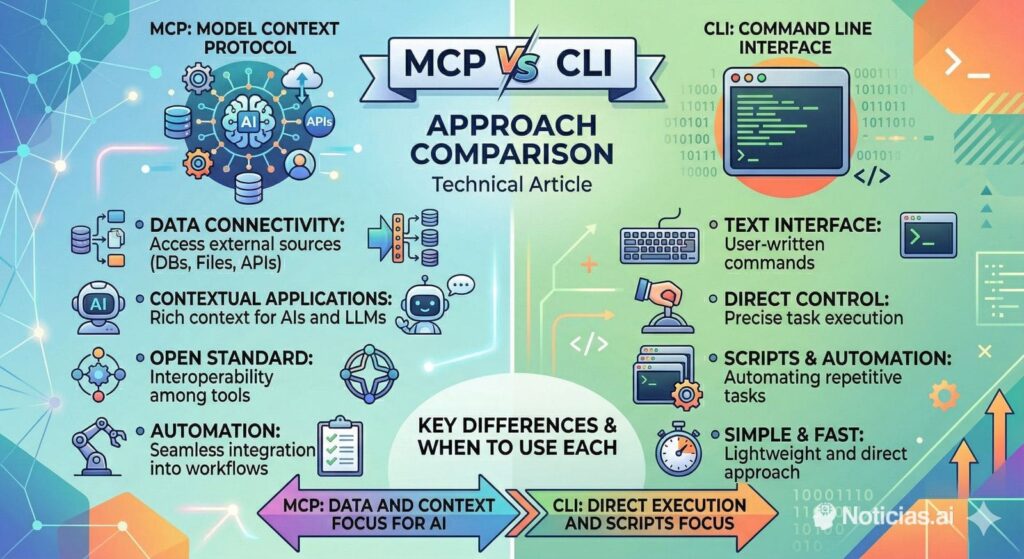
This is the mature way to read the current moment. The real split is not “MCP versus CLI” in the abstract. It is CLI for flexible execution inside the project and operating environment, MCP for controlled integration with external systems. One makes the agent behave like a developer or sysadmin inside a familiar workspace. The other makes the agent behave like a consumer of preapproved capabilities.
That distinction will matter more and more as teams standardize their AI workflows. Developers moving quickly inside repositories will continue to prefer terminal-native agents because they are faster, easier to inspect, and closer to how actual engineering work gets done. Enterprise platform teams, on the other hand, will continue to invest in MCP where permissions, auditability, and safe access boundaries matter more than raw speed.
So no, MCP is not over. But the phase where it was treated as the answer to every tool-use problem probably is. The terminal was always the universal developer interface. In 2026, it is also proving to be the universal interface for many of the best coding agents. And for a large share of real programming and systems work, that may be exactly enough.
Frequently Asked Questions
What is MCP, exactly?
MCP, or Model Context Protocol, is an open protocol designed to connect LLM applications with external data sources and tools in a standardized way. Its specification defines structured tools with names, metadata, and input schemas so models can invoke them reliably.
Why are people questioning MCP for everyday coding work?
Because for many common development tasks, MCP can add extra structure where the shell already works well. Tools need schemas and metadata, and that adds operational and context overhead. Meanwhile, models already understand standard command-line tools such as git, grep, rg, npm, and docker very well. This is an inference from how current terminal agents are positioned and from how MCP tools are specified.
Are the major coding agents really terminal-first?
Yes. Anthropic says Claude Code reads your codebase, makes changes across files, runs tests, and delivers committed code. Google says Gemini CLI brings Gemini directly into your terminal and uses built-in tools plus optional MCP servers. OpenAI continues to document Codex CLI as a serious local agent interface with its own CLI reference and sandboxing model.
Why does the CLI work so well for coding agents?
Because software development and systems work already happen in the terminal. Searching files, running tests, checking logs, diffing changes, launching services, and debugging environments are all native shell workflows. Models trained on large volumes of code and documentation tend to understand those workflows well. This is an inference supported by how Claude Code and Gemini CLI are officially presented.
Is shell access too dangerous for AI agents?
It can be, which is why vendor documentation increasingly emphasizes constraints. OpenAI says Codex uses sandboxing so local commands run in constrained environments instead of with unrestricted access by default. Anthropic similarly frames Claude Code around permission-aware operation. Shell access is powerful, but it needs guardrails.
When is MCP clearly the better choice?
MCP is stronger when the agent needs tightly controlled access to external systems: internal APIs, SaaS services, regulated data, enterprise tools, or organization-specific knowledge sources. In those cases, the structure and permission boundaries are a benefit, not a burden. Google’s Gemini CLI documentation explicitly supports combining terminal workflows with local or remote MCP servers for more structured use cases.
Should teams choose CLI or MCP?
For most teams, the best answer is both, used deliberately. CLI is usually better for fast, transparent work inside repositories and operating environments. MCP is better for controlled integrations and clear permission boundaries. They solve different problems, even when they sometimes overlap. This is an inference drawn from the official positioning of Claude Code, Gemini CLI, Codex CLI, and MCP.
Will MCP disappear?
There is no evidence of that. The protocol remains actively specified, and major tooling such as Gemini CLI continues to support it. What is changing is the expectation that MCP should be used everywhere. The current trend suggests a narrower, more practical role: highly useful for integrations, less essential for routine terminal-native coding work.