
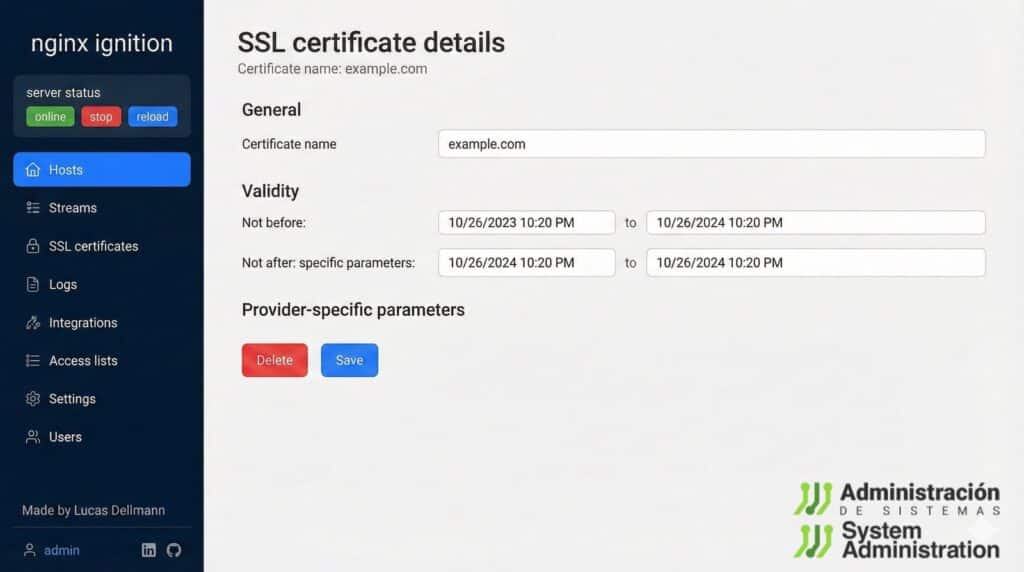
Configuring Nginx manually is still, for many developers, a mix of respect and reluctance. The power of the world’s most used web server is not in doubt, but its configuration files — with directives, nested blocks and easy-to-miss syntax details — can turn a simple redirect or reverse proxy into a lost afternoon.
That’s exactly the pain point Nginx Ignition wants to solve: an open-source web interface on top of Nginx that lets you handle the most common tasks without touching nginx.conf directly.
It doesn’t try to be a heavy, “enterprise” control panel. Its target is clear: developers, enthusiasts and small setups where speed and convenience matter more than ticking every possible box.
A visual console for virtual hosts, routes and proxies
The core idea behind Nginx Ignition is simple: you work from a web dashboard where you can create and edit:
- Virtual hosts (servers) with their domains, ports and certificates
- Routes for each host (locations) that can:
- act as a reverse proxy to another service,
- perform HTTP redirects,
- return a static response,
- or serve static files, with optional directory listing
- Global server settings such as maximum upload/body size, timeouts, log level, or whether to expose server tokens
Behind the scenes, the app generates and maintains standard Nginx config files and can trigger reloads when changes are applied. You also get a real-time preview of the generated configuration, which turns the tool into a learning aid as well: you see exactly how your choices in the GUI translate into Nginx syntax, without the risk of breaking a production config.
More than HTTP: TCP, UDP and sockets via Nginx streams
Unlike some simpler tools, Nginx Ignition is not limited to classic HTTP on ports 80 and 443. It also supports Nginx streams to proxy raw traffic:
- TCP and UDP
- Unix sockets
with advanced options like:
- SNI-based routing (using the TLS hostname)
- weights, circuit breakers and custom bindings per port or interface
That means you can expose databases, internal services or containerised apps more easily, while still centralising everything through one developer-friendly panel.
SSL, logs and user access: what most devs actually need
A big part of day-to-day server management lives around certificates and logs, and Nginx Ignition also leans into that:
- It supports SSL certificates from:
- Let’s Encrypt
- self-signed certs
- or custom certificates you bring yourself
- It handles automatic renewal when applicable (for example with Let’s Encrypt).
- It manages access and error logs both for the main server and for each virtual host, with log rotation included.
On top of that, it includes basic access control features:
- Multiple users with attribute-based access control (ABAC)
- Reusable access lists to protect hosts using:
- basic HTTP authentication, and/or
- source IP checks
This makes it easier to decide who can change or access what, without having to give everyone full system or SSH access.
Think of it as a dev tool, not a massive hosting panel
The maintainers are clear: the goal is not to cover every corner case or to replace hand-crafted configurations in complex environments. The sweet spot is:
- local development machines,
- staging and test servers,
- personal projects,
- small companies or agencies managing a handful of sites.
For very high-traffic sites or highly customised architectures, many teams will still prefer configs managed as code and integrated into CI/CD pipelines. Even there, Nginx Ignition can serve as a quick experimentation and documentation tool, but it’s not meant to replace deep automation.
Docker, NAS and Tailscale: integrations for real-world setups
Nginx Ignition is also attractive to the self-hosting and devops crowd because of how it fits into typical environments:
- Official Docker image, so you can spin up the UI and Nginx with a single command and mount your sites directory to persist configuration.
- Packages for several Linux distributions and binaries for macOS for more traditional installs.
- Support for TrueNAS, making it easier to proxy apps running on a NAS.
- Docker integration to pick containers directly as proxy targets.
- Built-in support for Tailscale, so you can expose hosts inside private tailnets without wrestling with low-level VPN config.
By default it uses an embedded SQLite database — fine for testing and small setups — with the option to switch to PostgreSQL when you need something more robust.
Getting started with Nginx Ignition
The quickest way to try Nginx Ignition is with Docker: one container exposes the web UI on an internal port (for example, 8090) and Nginx itself on ports 80 and 443.
Once it’s running, you just open the browser, go to the configured port, and a small onboarding flow guides you through creating the first user and basic setup. There are no default credentials, which avoids an all-too-common security issue with pre-configured panels.
From there you can add hosts, routes, certificates and access rules, always with the option to inspect the generated Nginx config before applying it.
A helper for learning — and for making fewer mistakes
Beyond convenience, Nginx Ignition works as training wheels for Nginx: every change in the form is reflected in a real config snippet. That helps newcomers understand what each directive does and encourages experimentation in a safer way.
For experienced admins, the value is different but just as real: fewer typos, less time spent on repetitive boilerplate, and more time focused on the actual application. Nginx stays what it has always been — a robust, flexible engine — but without turning every tweak into a mini documentation deep-dive.
In a world full of heavy control panels and locked-down platforms, Nginx Ignition chooses a middle path: a usability layer on top of plain Nginx, respecting its file structure and philosophy, instead of hiding or replacing it.
Nginx Ignition FAQ
What is Nginx Ignition and what problem does it solve?
Nginx Ignition is an open-source web interface for the Nginx web server. It lets you manage virtual hosts, routes, reverse proxies, SSL certificates, logs and global settings from a browser instead of editing config files by hand.
Is it safe to manage Nginx through a web GUI?
Like any admin interface, security depends on how you deploy it. Nginx Ignition supports multiple users and access control, and you can restrict the panel to internal networks or a VPN like Tailscale. On Internet-facing servers you should still follow standard hardening practices.
Can I use Nginx Ignition in production, or is it just for development?
The project is primarily aimed at development, staging and simple production setups. It can be used in production with care, but many teams with large-scale or mission-critical workloads will prefer configs managed as code and automated tooling.
What do I need to run Nginx Ignition?
You need a supported Linux or macOS system (or Docker), Nginx itself, and a small database (SQLite by default, PostgreSQL recommended for long-term or multi-user environments). Once installed, you access the GUI from your browser and manage all your Nginx configuration from there.