
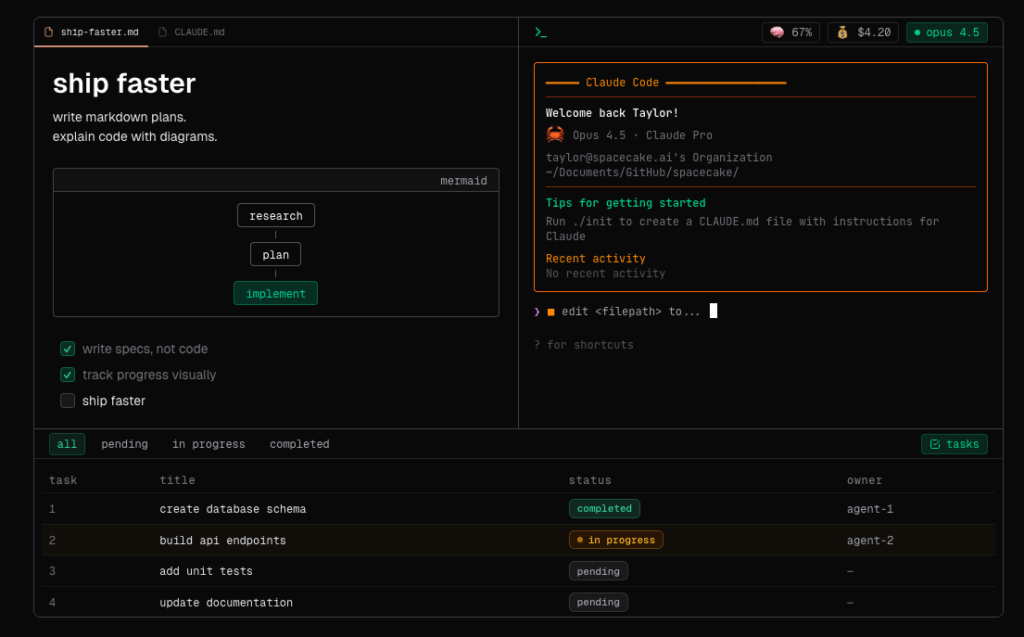
Anyone who’s spent a long afternoon running agents from the CLI knows the routine: the terminal is in one window, specs and notes live somewhere else, the plan becomes a stray checklist, and file/line context gets lost the moment you switch apps. Spacecake tries to remove that friction by turning Claude Code into a more coherent workflow: an open-source desktop app that bundles an integrated terminal, a Markdown editor, and live plan tracking in one place.
The project is public alpha and supports macOS (Apple Silicon & Intel), Windows (x64), and Linux (x64). It’s not trying to replace VS Code or JetBrains. Instead, it focuses on the “agent loop” reality: run tools, write specs, track tasks, and keep context close to execution.
What developers and sysadmins will actually care about
1) Integrated terminal (so the CLI stays the source of truth)
Spacecake embeds a terminal (powered by Ghostty) so you can run your usual command-line agents—Claude Code, Codex, Gemini, and more—without constant context switching. The value is not “a terminal exists,” but that the terminal becomes part of the same workspace where you write and track work.
2) Claude Code integration: context awareness, plan mode, and live session stats
This is the differentiator versus a generic “nice UI around a terminal.” Spacecake advertises:
- Context awareness: tells Claude which file and line you’re editing
- Plan mode: enabled by default when running Claude in the Spacecake terminal
- Status line: live metrics (model, context %, cost)
- Plans panel: quick access (Ctrl+G) to view and manage plans
For teams doing real work, that translates into fewer “what file are we on?” moments and more reproducible agent-driven changes.
3) Markdown that’s meant for specs and runbooks, not just README cosmetics
Spacecake’s Markdown workflow is built for practical docs:
- proper code blocks with syntax highlighting
- checklists (perfect for plan-driven execution)
- Mermaid diagrams
- WYSIWYG and live preview modes
- optional autosave per workspace
This maps cleanly to spec-driven development, operational runbooks, and incident notes that need to sit right next to execution.
4) Code editing: “enough IDE” without pretending to be an IDE
Under the hood it uses CodeMirror, providing the basics: syntax highlighting, autocompletion, bracket closing, folding, linting, and familiar shortcuts. The goal is quick editing and review without leaving the environment where your agent is running.
Installation and operational notes (the sysadmin bits)
Spacecake ships installers per platform (DMG/EXE/DEB/AppImage). A couple of practical points that matter in real environments:
- Windows: you may see a SmartScreen warning because the installer is not code-signed yet (common in public alpha tooling).
- Linux/Windows file watching: the project recommends installing watchman to improve file change detection on large repos. That’s a big deal for monorepos or heavy directory trees.
On first launch, Spacecake opens a home notes folder (~/.spacecake) and lets you open any repo as a workspace with ⌘O / Ctrl+O. That separation is handy: loose notes don’t pollute project docs, and project context stays project-scoped.
What changes in a real workflow
If you already use Claude Code from the terminal, Spacecake won’t “teach” you anything new. It mainly reduces overhead:
- fewer windows and less alt-tabbing
- explicit file/line context passed to the agent
- visible session metrics without extra scripts
- plans become a managed artifact, not ephemeral text
For ops and SRE-style work, it can act as a lightweight “operations console” when you’re mixing scripted changes, agent-assisted tasks, and the documentation trail that should come with them.
Limitations and caution (worth stating plainly)
- Public alpha: expect fast iteration, occasional bugs, and evolving behavior.
- Security model is still your job: an app with a terminal and file access can be powerful or risky depending on usage. Treat workspaces, permissions, and what you execute as part of your normal hygiene.
- GPL-3.0: relevant for orgs with strict licensing policies around redistribution or internal modifications.
Who it’s for (and who can skip it)
It makes sense if you…
- run Claude Code daily and want a tighter workflow
- work with plans/checklists/specs/runbooks
- want quick visibility into model/context/cost while you work
You can ignore it if you…
- already have a polished IDE + terminal + docs workflow you love
- rely heavily on specific VS Code/JetBrains extensions
- need an enterprise-grade managed platform rather than a lightweight, hackable tool
Quick technical FAQ
Does Spacecake “include” Claude Code?
No. It’s an interface/workspace. You run Claude Code from the integrated terminal like you would anywhere else.
Can I use it just for Markdown + terminal without Claude integration?
Yes—the Claude Code integration is the hook, but the core app still works as a workspace + terminal + Markdown environment.
Why does watchman matter?
It can significantly improve file watching reliability and performance on Linux/Windows for large repos, which reduces editor lag and missed updates.