
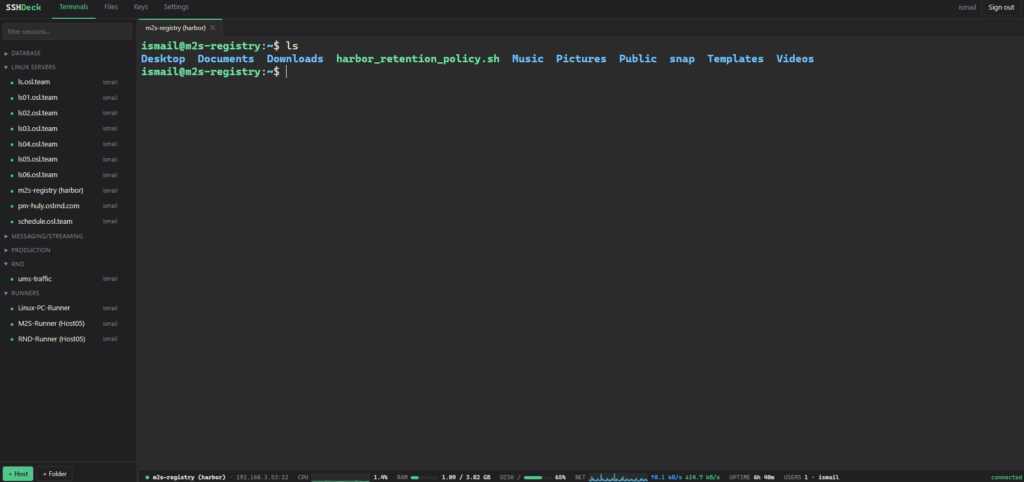
SSHDeck is a new self-hosted web SSH client that aims to bring together some of the features commonly found in tools such as MobaXterm or Termius. The project runs from a single Docker container and lets administrators save sessions, open terminals in tabs, manage files over SFTP, transfer data directly between two servers, and view basic host metrics without installing additional agents.
SSHDeck in 20 seconds
- It is a self-hosted, web-based SSH client deployed using Docker.
- It uses xterm.js for its terminal and supports hosts, folders and reusable identities.
- It includes a dual-pane SFTP file manager with direct server-to-server transfers.
- CPU, RAM, disk, network and logged-in users are monitored through the existing SSH connection.
- Its developer recommends using it only on internal networks or behind a VPN.
The project was created by MD. Ismail Hossain and is available on GitHub under the MIT license. Rather than competing directly with enterprise privileged-access platforms, SSHDeck is primarily aimed at homelabs, internal environments, DevOps teams and system administrators who want to centralize SSH connections without installing a desktop client on every computer.
Installation reflects that philosophy. The repository can be cloned and the application started with Docker Compose:
git clone https://github.com/zeeglyismail/sshdeck.git
cd sshdeck
docker compose up -d --buildCode language: PHP (php)
By default, the interface is then available at:
http://localhost:8022Code language: JavaScript (javascript)From there, users can create an account and add servers manually or import an existing MobaXterm configuration.
A Full SSH Terminal Inside the Browser
The terminal interface is built around xterm.js, a widely used library for implementing terminal emulators in web applications.
SSHDeck supports multiple simultaneous connections through tabs and is designed to work with terminal applications such as tmux, Vim and Nano.
It also includes several features commonly associated with desktop SSH clients: select-to-copy, middle-click paste, Ctrl+Shift+C and Ctrl+Shift+V, font zoom and 256-color terminal support.
One particularly useful feature comes into play when a server is rebooted or the connection drops. SSHDeck lets the administrator attempt to reconnect from the same tab by pressing Enter while preserving the visible session scrollback.
The client also includes browser-side output highlighting that identifies elements such as IP addresses, MAC addresses and UP/DOWN status keywords. This functionality is automatically disabled when full-screen terminal applications are running to avoid interfering with them.
Monitoring Without Installing Agents on Servers
One of the features that distinguishes SSHDeck from a conventional SSH client is its monitoring bar.
SSHDeck retrieves basic information about CPU, memory, storage, network traffic, uptime and logged-in users using the same SSH connection already established with the server.
No additional monitoring software needs to be installed on each machine.
Internally, it queries standard Linux sources and commands including:
/proc/stat
/proc/meminfo
/proc/net/dev
/proc/uptime
df
who
The information is processed on the server running SSHDeck and sent to the browser interface through a WebSocket connection.
According to the project documentation, metrics are refreshed approximately every 0.5 seconds.
CPU and network traffic include 60-second graphs, while the interface can also display logged-in users and the number of active sessions associated with each account.
This approach has a clear advantage: deploying SSHDeck does not require rolling out another monitoring agent across the entire server fleet.
It also has obvious limitations. SSHDeck is not intended to replace Prometheus, Zabbix, Grafana or other observability platforms. Its monitoring features are designed to provide quick operational information while an administrator is actively working on a host.
A Dual-Pane SFTP Manager with Server-to-Server Transfers
One of SSHDeck’s most interesting features is its file manager.
It uses a dual-pane SFTP interface, similar in concept to file managers traditionally used by system administrators, such as Midnight Commander or WinSCP.
Each pane can connect to a different server.
This makes workflows like the following possible:
Server A                    Server B
/etc/app/       ───────>    /backup/app/Code language: JavaScript (javascript)
The administrator can drag a file or directory between the two panes and SSHDeck handles the server-to-server transfer.
Crucially, the data does not need to pass through the computer running the browser.
The backend opens SFTP sessions to both servers and streams the files between them in 1 MB chunks. The browser only carries the transfer instruction and receives progress information.
This can be particularly useful when administering remote infrastructure from a laptop with a relatively slow Internet connection. If both servers are located in a data center with high-speed connectivity, files can move directly between them without first being downloaded to the administrator’s computer and uploaded again.
The file manager also supports multi-selection, directory creation, renaming, permission changes, recursive deletion and drag-and-drop uploads from the desktop.
One SSH Connection Shared Across Multiple Functions
SSHDeck’s internal architecture explains how several of these features work together.
The application is developed as a modular monolith using FastAPI, with AsyncSSH handling SSH connectivity.
The project structure separates authentication, inventory, credentials, SFTP, transfers and portability into different components:
app/
├── main.py
├── db.py
├── crypto.py
├── auth.py
├── ssh_manager.py
├── ws.py
├── mobaconf.py
└── routers/
The decision not to split the application into microservices is deliberate.
At the center of SSHDeck is a pool of SSH connections. For each user-and-host combination, the application can maintain a connection that is shared by the terminal, SFTP, monitoring and file-transfer functionality.
That means the application does not need to establish a separate SSH connection for every feature.
Splitting those functions into different processes would either multiply the number of SSH connections or require an additional RPC layer around the shared connection pool, adding complexity with little benefit at the scale the project is designed for.
For this type of application, the architectural choice is a sensible one.
Reusable Identities and Encrypted SSH Keys
SSHDeck lets administrators create an identity consisting of a username and password and then associate it with multiple hosts.
If that password changes, it can be updated in one place.
SSH key authentication is also supported, with private keys stored encrypted rather than being sent back to the browser.
Credentials are stored in SQLite, while secrets are encrypted using Fernet. The encryption key is stored in the data directory alongside the database.
The basic structure is:
./data/
├── sshdeck.db
└── secret.key
This makes backups and migrations straightforward because the entire installation state can essentially be moved by copying the data directory.
However, it also introduces an important security consideration.
The project’s own documentation warns that an attacker with access to both the database and secret.key could recover the stored secrets. Encryption protects the stored information, but it does not protect against an attacker who completely compromises the SSHDeck host itself.
The security of the platform therefore depends heavily on protecting the underlying server and restricting access to its data directory.
MobaXterm Import and Full Configuration Backups
SSHDeck can import .mobaconf files.
This allows administrators to bring existing MobaXterm bookmarks and folder structures into the application.
The project also supports exporting to the same format and provides its own backup and restore system covering folders, hosts, identities and keys.
The idea is to make it relatively easy to move an entire configuration between different SSHDeck deployments.
That convenience comes with a security consideration: backups containing credentials or private keys should be treated as highly sensitive information and protected accordingly.
SSH Tunnels Managed from SSHDeck
The project also includes local port forwarding.
A tunnel can expose a port on the SSHDeck server and route traffic through one of the saved SSH hosts to another service.
Conceptually, the path looks like this:
User
  |
  v
SSHDeck Server:15001
  |
  v
SSH Host
  |
  v
Internal Service:5432
Tunnel definitions can be saved and started or stopped from the interface.
By default, the Docker Compose configuration publishes ports 15000 through 15020 for these tunnels, although this can be changed.
X11 forwarding is deliberately outside the project’s scope. That decision makes sense because a browser does not provide a traditional X server on which graphical Linux applications could be rendered.
Remote forwarding and dynamic SOCKS forwarding are among the ideas listed on the project’s roadmap.
The Security Caveat: SSHDeck Does Not Yet Verify SSH Host Keys
The most important security warning appears in the project’s own documentation.
SSHDeck currently configures AsyncSSH with:
known_hosts=NoneThis means that SSH host keys are currently not verified.
SSH authentication is not only about a server verifying the identity of a user. The client also needs to verify that it is actually connecting to the expected server.
This is normally handled through host keys stored in known_hosts.
Without that verification, an attacker capable of intercepting or redirecting a connection may have more opportunities to perform a man-in-the-middle attack.
The developer explicitly acknowledges this limitation and lists strict host-key verification using TOFU (Trust On First Use) on the roadmap.
For that reason, the project recommends running SSHDeck only on internal networks or behind a VPN, rather than exposing it directly to the public Internet.
HTTPS through a reverse proxy is also recommended if access extends beyond localhost.
This is an important limitation to consider before deploying the current version in more demanding enterprise environments.
Self-Hosted Does Not Automatically Mean More Secure
Centralizing SSH credentials in a web application offers operational advantages, but it also concentrates risk.
An administrator using private SSH keys distributed across several computers has one security model. Moving those credentials into SSHDeck creates a central system that may potentially contain access to a large part of the server fleet.
That does not make SSHDeck inherently insecure.
It means that the SSHDeck server itself becomes particularly sensitive infrastructure.
It should therefore be protected much like a bastion host: restricted VPN access, HTTPS, a fully patched operating system, carefully protected backups and strict access controls.
SSHDeck provides separate user accounts, bcrypt password hashing and signed session cookies.
However, some features that would be important in more demanding enterprise environments are still on the roadmap. These include TOTP-based two-factor authentication and SSH host-key verification.
SSHDeck should not be confused with a full PAM (Privileged Access Management) platform either. It does not provide the governance, session recording, approval workflows, automated secret rotation or advanced auditing typically found in enterprise privileged-access systems.
An Interesting Open Source Tool for Homelabs, DevOps and Internal Administration
SSHDeck is particularly interesting for administrators managing numerous Linux servers who want their SSH sessions available from a browser inside a controlled environment.
The combination of terminal access, SFTP, monitoring, tunnels and server-to-server file transfers covers many tasks that would otherwise require several separate tools.
Its deployment architecture is also deliberately simple:
Docker
  |
  └── SSHDeck
       ├── FastAPI
       ├── AsyncSSH
       ├── SQLite
       ├── xterm.js
       └── ./data
Running everything from a single container makes the project especially approachable for homelabs, small technical teams and internal administration environments.
Its main challenge now is strengthening security around something inherently sensitive: an application designed to store the keys to an entire fleet of servers.
Adding strict host-key verification and multi-factor authentication would substantially broaden the environments where SSHDeck could reasonably be considered.
Until then, its developer’s recommendation is clear: keep it on an internal network, put it behind a VPN and do not expose it directly to the Internet.
Frequently Asked Questions
What is SSHDeck?
SSHDeck is an open source, self-hosted web SSH client that provides SSH terminals, SFTP file management, tunnels and basic host monitoring from a browser.
How is SSHDeck installed?
The project is designed to run with Docker. It can be cloned from GitHub and started with docker compose up -d --build. By default, the web interface is exposed on port 8022.
Can SSHDeck transfer files directly between two servers?
Yes. The backend establishes SFTP connections to both hosts and streams data directly between them. Files do not need to pass through the computer running the browser.
Should SSHDeck be exposed directly to the Internet?
No. The project’s documentation describes it as intended for homelabs and internal networks and recommends placing it behind a VPN. SSH host keys are also not currently verified, although stricter verification is included in the project’s roadmap.