
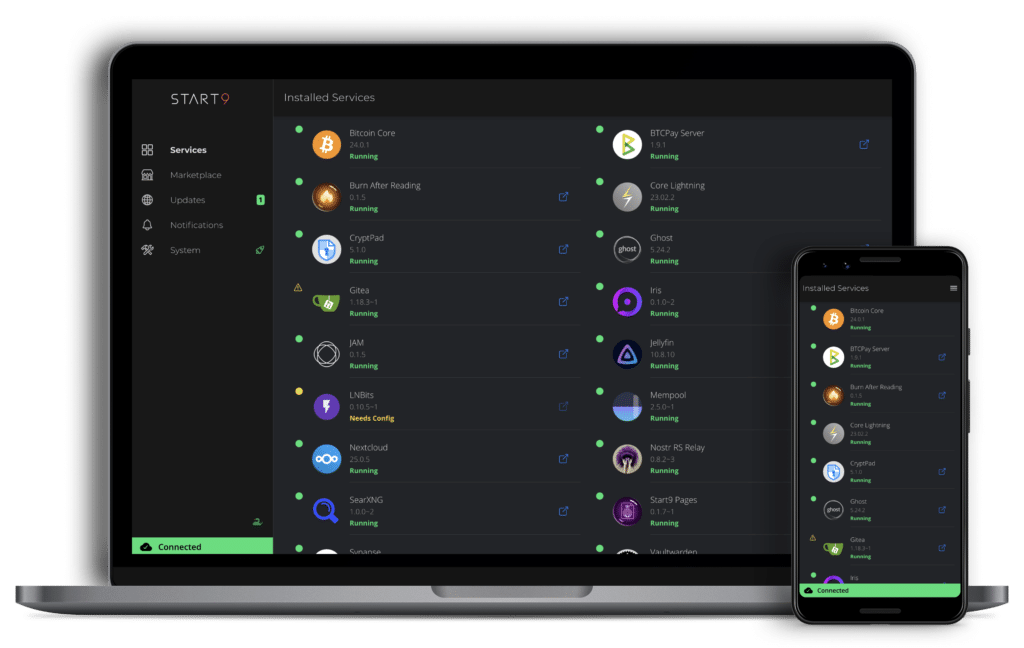
For years, running a server at home has felt like a rite of passage for advanced hobbyists: a messy mix of tutorials, ports, certificates, backups, and the constant feeling that one wrong step could break everything. In that landscape, StartOS—built by Start9 Labs—makes an ambitious play: turn self-hosting into something closer to installing apps on a phone than operating a mini data center.
StartOS is presented as a Linux-based distribution with a graphical interface, designed to run a personal server and simplify the discovery, installation, configuration, and ongoing maintenance of self-hosted services. The pitch fits a growing trend: more people want to regain control of their data—photos, documents, passwords, backups, communications—without relying on big platforms. At the same time, they want an experience that doesn’t force them to become full-time system administrators.
The promise: digital sovereignty without needing to be an expert
Start9 frames StartOS around a concept that’s gaining momentum in tech communities: “sovereign computing.” In practical terms, it means the user decides where their data lives, what software runs, and under what rules that information can be accessed. StartOS aims to be the layer that makes this manageable: a unified control plane to discover services, deploy them, configure networking, manage dependencies, and monitor system health from one place.
The company’s message is that the goal isn’t just “self-hosting for self-hosting’s sake,” but enabling it with a workflow clear enough that a curious user—willing to learn—can make progress without getting trapped in endless configuration chores.
What Start9 also warns (and it’s worth reading): it’s still beta
StartOS doesn’t pretend it’s magic. In its own materials, Start9 includes a blunt disclaimer: StartOS is in beta, it lacks features, and it doesn’t always work perfectly. They also warn that Start9 servers are not plug-and-play and that using them well requires effort and patience. That line draws a clear boundary between marketing and reality: the platform may reduce friction, but it doesn’t remove the underlying complexity of running your own server.
This matters because Start9 also sells preconfigured hardware, and a big part of the appeal is avoiding headaches. The company generally positions two paths: buy a Start9 server, or build your own using hardware you already have.
What it offers in practice: a service “store” and day-to-day remote access
One of StartOS’s more distinctive ideas is its marketplace-style approach: a catalog of services you can install and manage from the UI, often with guides and a more app-like experience. The ecosystem commonly highlights services that match what people actually want from a home server—personal cloud storage, media libraries, messaging, password managers—and also includes options tied to Bitcoin, which is a visible part of the Start9 ecosystem.
On access, StartOS tends to support both local use on your home network (for example, via local hostnames) and remote access flows designed to reduce exposure in the traditional “open ports to the internet” way. Their documentation points to Tor/onion-style access patterns as one of the remote pathways, reinforcing the idea that privacy and sovereignty are not just slogans but baked into how the platform expects to be used.
What hardware can run it
StartOS is designed to work especially smoothly on Start9 devices, but it also supports a DIY route. According to Start9’s own guidance, StartOS works well on Raspberry Pi and most x86_64 platforms (desktops, laptops, mini PCs, servers, and even virtual machines). ARM builds exist too, though they’re described as less tested.
That detail matters because it explains a big part of the attraction: many people already have perfectly usable hardware sitting unused—a retired mini PC, an older NUC, an old laptop—and the idea of turning it into a home server without stitching together dozens of separate pieces is compelling.
A fast-moving project (with versions actively evolving)
As with many platforms in this space, the development pace is part of the “product.” StartOS is not a sealed, mature appliance like a typical consumer router; it’s an evolving platform. For users, that cuts both ways: it can mean steady improvements and new capabilities, but also changes, rough edges, and the occasional friction that comes with software still finding its stable footing.
Why it’s gaining attention: cloud fatigue, privacy, and control
The rise of self-hosting isn’t only about privacy. Subscription fatigue, ecosystem lock-in, account dependency, and the feeling that “free” services are often paid for with data all play a role. StartOS lands right at that intersection: it promises a guided, app-like approach for people who want more control over their digital life without having to master everything from scratch.
Still, self-hosting comes with an unavoidable rule: responsibility shifts to the user. If a drive fails, if an update breaks something, or if backups aren’t set up properly, there’s no cloud provider quietly fixing it in the background. StartOS can organize the process, but it can’t replace the basics: backups, cautious updates, and a minimum level of security hygiene.
Frequently asked questions
What is StartOS, and who is it for?
StartOS is a personal server operating system with a graphical interface and a marketplace-like catalog of self-hosted services. It makes sense for people who want a personal cloud (files, photos, media, passwords) with more control and less dependence on big platforms.
Can I install StartOS on a mini PC or a Raspberry Pi?
Yes. Start9 provides DIY guidance and describes support for Raspberry Pi and common x86_64 systems (mini PCs, desktops, servers, and even VMs). Hardware compatibility can vary, so choosing well-supported devices helps.
Can StartOS be accessed remotely without opening ports?
StartOS documentation emphasizes privacy-friendly remote access options, including Tor/onion-style access, alongside standard local-network access. The exact setup depends on the user’s environment.
What precautions should I take before self-hosting critical services?
Start with non-critical services, plan backups early, and remember StartOS is in beta. For important data, it’s smart to design a backup strategy and test restores before trusting everything to a single box.