
WordPress has officially released version 6.9, codenamed “Gene”, a major update that confirms the CMS wants to be much more than a tool to publish pages and blog posts. This release clearly leans on three pillars: real collaboration inside the editor, noticeable performance improvements, and a serious first step toward bringing artificial intelligence into WordPress in a native way.
At first glance, many users will only see small changes in the editor. Under the hood, though, there are more than 400 Core tickets closed, hundreds of improvements in the block editor, and a new API designed so AI tools can understand and work with WordPress rather than just sit on top of it.
Create content “together” without leaving the editor: Notes arrive
The most visible change for everyday users is Notes, the new commenting system inside the block editor.
In WordPress 6.9, editors, writers, designers or clients can leave comments directly on a specific block: a paragraph, an image, a button, a heading block, and so on. Notes can be replied to, edited, resolved, and they trigger email notifications to the post author when someone leaves a new one.
In practice, this means a lot of the feedback loops that used to live in email threads, chats or external tools (Google Docs, Figma, etc.) can now stay inside WordPress. Collaboration moves to the same canvas where the layout and content are being built.
For teams managing large editorial workflows, this is a big shift: instead of “approve this draft and I’ll paste it later in WordPress”, work happens directly in the CMS, with comments anchored to the exact element they refer to.

A smoother editor: truly visual drag-and-drop and adaptive typography
The block editor also gains several usability upgrades.
- Direct drag and drop
The drag-and-drop system is now more natural. Blocks can be moved directly within the canvas with clearer handles and a real-time preview of what is being moved. This reduces the feeling of working with “chips” and makes it behave more like a real layout editor. - Fit text to container
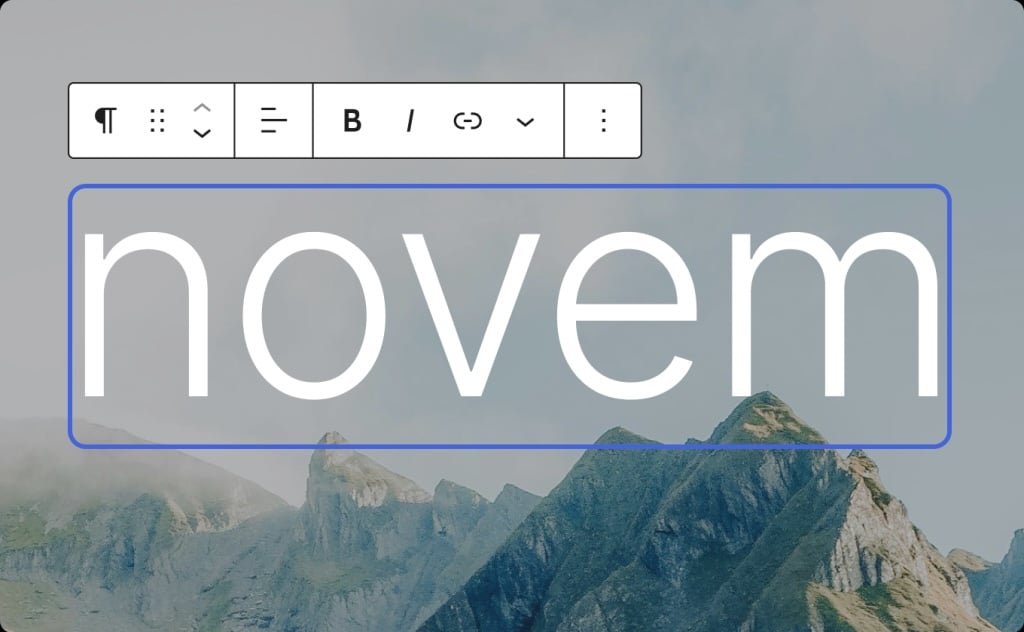
WordPress 6.9 introduces a new typography option: Fit text to container. Starting with Paragraph and Heading blocks, you can make the font size automatically adapt to the available space. It’s especially useful for banners, hero sections and call-to-action blocks where previously you had to tweak font sizes by trial and error. - Command Palette, everywhere
The Command Palette is no longer a niche feature. It’s available across the admin: from the post editor to the Site Editor to plugin screens. With a few keystrokes, you can jump to views, trigger actions and reach tools without digging through menus.
Taken together, these changes make the editing experience feel less like a collection of separate panels and more like a cohesive application.
New blocks: accordion, reading time and math formulas
The block library also grows in this release with new building blocks that many site owners previously solved with plugins.
- Accordion block
The new Accordion block lets you create collapsible sections without installing extra plugins. It’s ideal for FAQs, help sections, long menus or any content you want to keep compact, especially on mobile. - Time to read block
The Time to read block adds an automatic reading time estimate for a post. It’s a small UX detail, but it helps readers decide whether to keep scrolling now or save an article for later. It’s increasingly common in media sites and professional blogs. - Math block
WordPress 6.9 introduces a Math block for displaying formulas using MathML and LaTeX, both as a standalone block and inline inside rich text (headings, lists, tables, etc.). This is particularly useful for education, scientific publishing, technical documentation or any site where equations were previously handled as images or with complex workarounds.
There are also new blocks around comments (comment link and comment count), taxonomy and terms (term templates, terms query, term count, term name), plus refinements to existing blocks like Heading and Gallery, including support for fixed aspect ratios that keep galleries visually consistent.
Performance: better LCP, fewer blocking scripts and deeper optimisations
Performance remains a clear priority.
WordPress 6.9 ships with a series of changes aimed at reducing perceived load time, especially the Largest Contentful Paint (LCP) metric, which is key for Core Web Vitals:
- Improved loading of conditional and inline stylesheets.
- Support for
fetchpriorityon some scripts and resources. - Minified and optimised styles for block themes.
- De-prioritisation of non-critical scripts (for some interactive blocks, emoji detection and similar features) so they don’t compete with images or other LCP elements.
- Specific fixes to avoid layout shifts, for example in the Video block.
At the same time, there are optimisations for database queries, caching behaviour, WP-Cron spawning and a new template output buffer that opens the door to future performance work that wasn’t possible before.
For site owners, the message is clear: WordPress 6.9 is designed to help themes and plugins get better scores without requiring drastic changes on their side, especially on modern hosting setups.
Accessibility: over 70 improvements for a more usable experience
Accessibility continues to be a continuous effort rather than a one-off feature.
WordPress 6.9 includes more than 70 bug fixes and enhancements related to accessibility, including:
- Better screen reader announcements in key areas.
- More predictable focus management when interacting with interactive UI elements, such as autocomplete suggestions.
- Adjustments to CSS-generated content to avoid assistive technologies reading out extra decorative information.
- Semantic refinements throughout the editor and admin screens.
Most of these improvements will go unnoticed by sighted users with a mouse, but they make a real difference for people using screen readers, keyboard navigation or other assistive tools.
Under the hood: modern UTF-8 handling, query cache changes and PHP 8.5 support
On the technical side, WordPress 6.9 brings several changes that matter to developers, hosting providers and sysadmins.
- Modernised UTF-8 support
A new PHP-based fallback pipeline handles text encoding and UTF-8 processing more reliably, independent of the system environment. This makes behaviour more predictable for multilingual sites, emoji-heavy content and plugins that manipulate strings. - Updated query cache handling
The way cache keys are generated forWP_Queryhas changed, making cache behaviour more robust. New helper functions have been added so developers and hosts can take advantage of these changes in a controlled way. - “Beta” support for PHP 8.5
WordPress 6.9 addresses known incompatibilities, warnings and notices for PHP 8.5 while maintaining support for older versions (currently 7.2 and above). Full support will still evolve over time, but the direction of travel is clear: the ecosystem is being nudged toward newer PHP releases.
There are also many smaller refinements: improvements in email handling (including inline images in HTML messages), better URL escaping for HTTPS, updated menu search behaviour and assorted tweaks to media, multisite and REST API components.
The strategic piece: the Abilities API and the future of AI in WordPress
One of the most strategic changes is completely invisible to regular users: the new Abilities API.
This API allows WordPress Core, plugins and themes to register what they can do in a unified, standard, machine-readable format. In other words, it describes features and actions in a way an AI system can understand and call.
It’s part of the broader “AI Building Blocks for WordPress” initiative, which aims to give developers a native way to integrate AI, instead of relying solely on custom integrations or one-off API calls.
Alongside the Abilities API, there are two key additions:
- PHP AI Client
A new PHP SDK to integrate AI providers and models into plugins and PHP projects. It centralises credentials and supports multiple providers so extensions can share the same configuration. - MCP Adapter (Model Context Protocol)
An adapter that lets WordPress act both as an MCP server and client, exposing its abilities to AI assistants and connecting with other MCP servers. In practice, this opens the door to assistants that “know” how to interact with WordPress: reading data, performing actions and orchestrating external tools in a standard way.
For now, this won’t change how everyday users write posts or manage menus, but for the WordPress ecosystem it’s a strong signal: the CMS is preparing for a world where AI agents are first-class citizens, not just embedded widgets.
What WordPress 6.9 means for site owners and developers
For everyday users, the takeaway is simple: WordPress 6.9 makes collaboration easier, layout building smoother, sites faster and the experience more accessible.
For admins and developers, there are a few clear action points:
- Test compatibility with PHP 8.5 in staging environments if a migration is planned.
- Review any custom code or plugins that touch the editor, query caching or admin menu search.
- Start exploring the Abilities API and the PHP AI Client if you build plugins that could benefit from AI in the near future.
WordPress 6.9 is not a flashy redesign, but it is a meaningful step toward a CMS that is more collaborative, more performant and ready for a new generation of AI-powered features.
“Code is Poetry” has been the project’s motto for years. With 6.9, WordPress quietly adds a new subtext: in the future, that poetry will increasingly be written with help from intelligent assistants living inside the platform itself.
Source: WordPress 6.9