
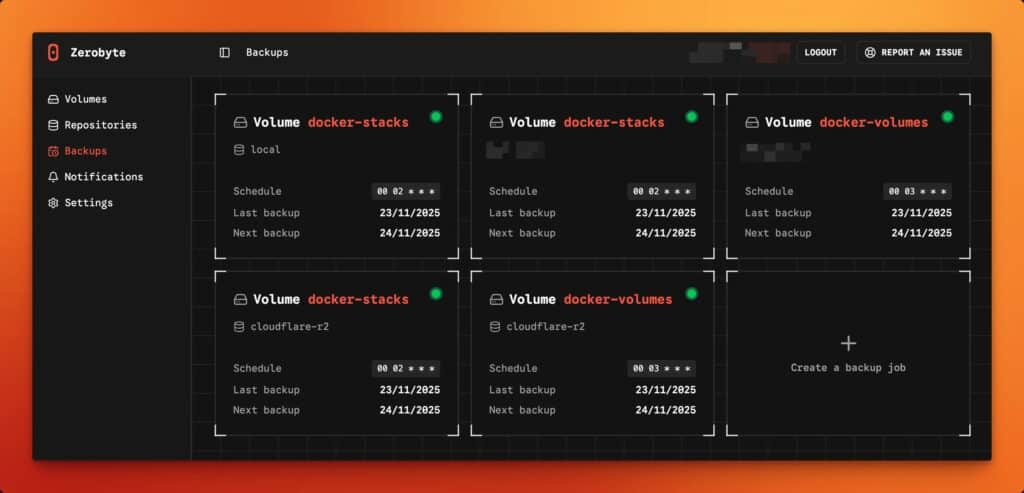
In the self-hosting and homelab world, backups often start with the best intentions… and end up as a forgotten script. Not because we lack strong tools, but because day-2 operations are hard: scheduling, monitoring, retention, repositories, and—above all—visibility. That’s the gap Zerobyte is trying to fill: a web-based backup automation tool built on top of Restic, designed to schedule, manage, and monitor encrypted backups across multiple backends.
The pitch is simple: Restic is already a modern, secure backup engine (incremental, deduplicated, encrypted, verifiable restores), but as a CLI-first tool it leaves a lot of operational glue to the administrator. Zerobyte aims to add structure: a UI, scheduled jobs, retention policies, and a consistent way to manage sources and destinations.
What Zerobyte is (and why it’s not “just another backup tool”)
Zerobyte doesn’t try to reinvent backups—it uses Restic under the hood and builds a management layer on top. In practice, that means:
- Automated backups with encryption, compression, and retention policies powered by Restic.
- Flexible scheduling for jobs and retention control from the UI.
- Multiple source types, including local directories and—if you enable the “mount” mode—remote shares like NFS/SMB/WebDAV.
- Repositories that can live on local disk or on backends like S3, GCS, Azure, or via rclone remotes.
The key point for sysadmins: this isn’t only a pretty UI. Its value is in pushing you toward an operational model—“volumes,” “repositories,” and “jobs” with schedules and retention—which is exactly what tends to break down when everything is a couple of manual commands.
Fast to deploy… with very explicit security warnings
Zerobyte is deployed via Docker/Docker Compose and exposes its web UI on port 4096. A typical example uses an image published on GHCR and a persistent volume for state:
services:
  zerobyte:
    image: ghcr.io/nicotsx/zerobyte:v0.19
    container_name: zerobyte
    restart: unless-stopped
    cap_add:
      - SYS_ADMIN
    ports:
      - "4096:4096"
    devices:
      - /dev/fuse:/dev/fuse
    environment:
      - TZ=Europe/Paris
    volumes:
      - /etc/localtime:/etc/localtime:ro
      - /var/lib/zerobyte:/var/lib/zerobyte
Code language: JavaScript (javascript)
Here’s what matters operationally: the project itself strongly discourages running Zerobyte on a host that’s directly reachable from the Internet. If you do, it recommends binding to localhost (e.g., 127.0.0.1:4096:4096) and accessing it through a secure, authenticated tunnel (SSH tunnel, Cloudflare Tunnel, etc.).
It also states: don’t put /var/lib/zerobyte on a network share, because you’ll run into permission issues and serious performance degradation.
And one more point that often triggers debate in production environments: to mount remote shares from inside the app, the container may require SYS_ADMIN and access to /dev/fuse, which increases the risk profile. Zerobyte proposes a “simplified setup” that removes those privileges if you only need to back up directories already mounted on the host.
Quick comparison: Zerobyte vs “raw” Restic
| Topic | Restic (CLI) | Zerobyte (layer on top of Restic) |
|---|---|---|
| Focus | Backup/restore engine | Orchestration + web console |
| Scheduling | Cron/systemd (you build it) | Built-in scheduler |
| Visibility | Logs/CLI output | UI-based job management & monitoring |
| Repository backends | Broad support (Restic) | Local, S3/GCS/Azure, rclone (as documented) |
| Remote shares | Handled outside (OS mounts) | Can mount via FUSE/privileges, or use pre-mounted paths |
| Attack surface | Depends on your setup | Higher if you expose the web UI and/or enable SYS_ADMIN/FUSE |
Where it fits best: serious homelabs, SMB ops, and “many moving parts” servers
Zerobyte tends to make the most sense when:
- You have multiple data sources (NAS, shares, service directories, Docker volumes) and want a consistent policy.
- You need retention rotation without maintaining scripts.
- You want a single pane of glass to confirm what ran, what failed, and when the last successful snapshot happened.
In more controlled enterprise environments, the conversation shifts: a web UI plus elevated container capabilities (if you mount shares inside) should be treated like any other admin surface—hardened, isolated, and properly access-controlled.
Practical deployment tips to avoid surprises
- Don’t publish it to the Internet. If you need remote access, bind to
127.0.0.1and use an authenticated tunnel. - Avoid privileges when you can. If you only back up local/pre-mounted directories, use the simplified setup without
SYS_ADMINand/dev/fuse. - Keep state on local storage. Store
/var/lib/zerobyteon reliable local disk—not on network shares. - Design for restore from day one. Restic emphasizes verifiable restores; carry that mindset into Zerobyte—test partial restores and validate recovery time.
FAQ
Does Zerobyte replace Restic?
No. Zerobyte uses Restic as the underlying backup engine and adds scheduling/management/monitoring on top.
Can Zerobyte back up to S3-compatible storage?
Yes. The project documents repositories for local storage, S3-compatible backends, and also options like GCS, Azure, and rclone remotes.
Is it safe to expose Zerobyte on a VPS with the port open?
The project explicitly warns against that and recommends binding to localhost and using a secure tunnel if remote access is required.
What’s the risk of using SYS_ADMIN and FUSE in the container?
Those permissions enable mounting remote shares from within Zerobyte, but they expand the container’s privilege level. If you don’t need remote mount support, the simplified setup avoids that.