
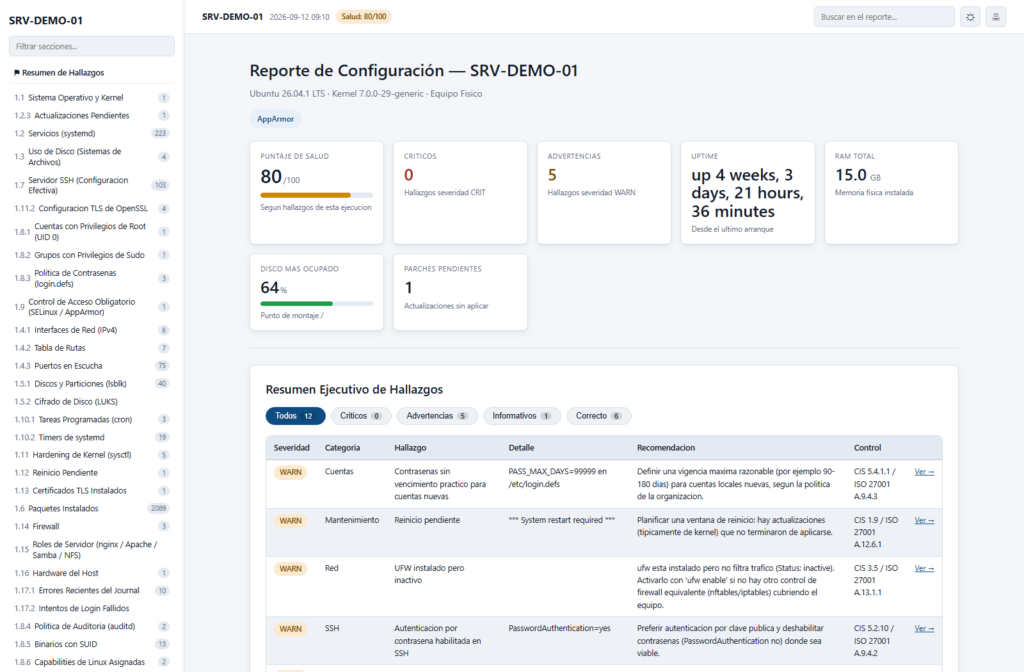
Documenting the actual state of a Linux server can mean working through lsblk, ss, systemctl, sysctl, journalctl, sshd, auditctl, and several other tools. Cat-ServerFullReport aims to bring that work together in a single Bash script: it currently collects 41 system sections, applies 14 groups of checks, and generates HTML, JSON, and Markdown reports without installing Python, jq, or additional modules. The project is distributed under the MIT license, and its author still describes it as a functional proof of concept.
The key points about Cat-ServerFullReport in 20 seconds
- The script creates an as-built inventory and health check for Linux servers.
- It collects 41 sections and applies 14 groups of rules with
CRIT,WARN,INFO, andOKresults. - It operates in read-only mode and requires neither Python nor
jq. - It produces HTML, JSON, and Markdown reports.
- It has already been tested on Ubuntu, Debian, RHEL, CentOS Stream, and openSUSE Leap.
The project was created by Kike Muller as the Linux counterpart to Get-ServerFullReport, an earlier PowerShell tool for Windows servers. Both share the same basic idea: reduce the time spent collecting information and, more importantly, prevent missing data from being turned into an incorrect conclusion.
That last design decision is particularly relevant for an auditing tool. If Cat-ServerFullReport cannot verify a parameter, it does not automatically classify it as correct or generate a finding based on information it could not read. Running it without sufficient privileges may therefore produce less information in certain sections, but that lack of access should not be turned into an OK.
From 41 sources of information to a single report
Linux administration offers powerful tools, but most of them are specialized.
lsblk can be used to inspect block devices; ss covers connections and ports; systemctl handles services; journalctl provides access to events recorded by systemd; sysctl exposes kernel parameters; and sshd -T can show the effective SSH server configuration.
The problem appears when someone needs to document an entire server.
Cat-ServerFullReport automates that collection process and currently organizes 41 sections covering the system, storage, networking, security, TLS, scheduled tasks, health, platform, and protection mechanisms.
The information it can collect includes the operating system and kernel, systemd services, installed packages, disks and partitions, storage usage, IPv4 interfaces, routes, listening ports, local users, UID 0 accounts, administrative group members, password policies, SUID binaries, capabilities, SELinux or AppArmor, firewall configuration, and kernel hardening parameters.
It also reviews certificates, OpenSSL TLS configuration, cron jobs, systemd timers, recent journal errors, failed login attempts, processes with the highest memory consumption, disk SMART information, and unexpected shutdowns.
The platform section extends the inventory with hardware information, web servers, Samba, NFS, NTP synchronization, Python interpreters, virtual environments, Git repositories, and Docker containers, as well as detecting certain antivirus, endpoint detection and response (EDR), and backup agents.
Not all of those components need to be installed. When a role does not exist, the report can record its absence rather than simply removing the section.
The report does more than dump command output
The main difference between Cat-ServerFullReport and simply executing a collection of commands and saving their output is its checking engine.
Cat-ServerFullReport currently has 14 groups of evaluation rules. Findings are classified into four levels:
| Status | Meaning |
|---|---|
CRIT | Finding considered critical by the project’s rules |
WARN | Situation requiring review |
INFO | Relevant information without a score penalty |
OK | Check successfully passed using verifiable data |
Each finding can include a category, evidence, recommendation, and a reference associated with CIS or ISO 27001 controls. This allows the report to work not only as an inventory, but also as an initial aid when reviewing server configuration.
There is an important limitation to make clear: the script’s results do not amount to CIS or ISO 27001 certification. The references link checks to relevant controls, while a formal audit has a much broader scope and additional requirements.
The project also uses a health score starting at 100 points. Each CRIT finding subtracts 12 points and each WARN subtracts four, while INFO findings do not affect the score. This is a metric created by the project to summarize its own findings, not an official CIS or ISO score.
The focus on avoiding false positives has even resulted in specific exceptions. The README explains the case of read-only Snap mounts, which can show 100% usage by design. Treating them like conventional partitions caused several false critical findings on Ubuntu, so they are now explicitly excluded from that evaluation.
Bash, a single file, and no installed agents
The project is written for Bash 4.0 or later and deliberately avoids dependencies on Python or jq.
The idea is to allow an administrator to copy a single file to a server and run it without deploying a permanent agent or preparing a separate runtime environment.
Basic usage is reduced to something like:
sudo ./cat-serverfullreport -o /tmpBy default, the result is a self-contained HTML document with its CSS and JavaScript embedded in the file itself.
All three output formats can also be requested at the same time:
sudo ./cat-serverfullreport --format HTML,JSON,MD -o /tmpCode language: JavaScript (javascript)The three formats serve different purposes. HTML is intended for human review; Markdown can be moved into documentation, wikis, tickets, or pull requests; and JSON provides structured output that can later be used for automation, inventory systems, or a configuration management database (CMDB).
The JSON schema also maintains conceptual compatibility with Get-ServerFullReport for Windows through structures such as Metadata, Capabilities, Findings, FindingsSummary, and Sections.
One technical detail is that values collected inside Data and Findings are stored as strings. This is a deliberate choice to prevent Bash from generating invalid JSON when it encounters values such as N/A, sizes with units, or empty fields.
It can run without root, but visibility is reduced
The script is read-only, although its author recommends running it with sudo.
The difference is not that it necessarily stops working without root privileges. Instead, Linux restricts access to certain sensitive information for unprivileged users.
Without sufficient permissions, for example, it may not be possible to retrieve complete firewall rules, the auditd policy, serial numbers through dmidecode, certain SMART data, or identify the process responsible for some listening ports.
The tool records those limitations instead of replacing them with apparently successful results.
That behavior follows one of the project’s central rules: do not make a claim when the information required to verify it could not be obtained.
Differences between Linux distributions have also required specific fixes. Tests documented by the project uncovered issues related to firewalld on RHEL, interpretation of dnf return codes, pending-update queries with zypper, and administrative tools located under /usr/sbin that were missing from the PATH of unprivileged users on Debian and Ubuntu.
These are precisely the kinds of details that make it difficult to build a Linux inventory tool intended to work across more than one distribution.
Tested across several Linux families, but still a PoC
The project’s current status is identified as v0.1.0-slice, and its documentation makes clear that it remains a proof of concept (PoC), rather than a finished product.
According to the documented testing, it has been run on Ubuntu 24.04 and 26.04, Debian 12, CentOS Stream 9, RHEL 10.2, and openSUSE Leap 15.6.
Rocky Linux, AlmaLinux, Fedora, SLES, and openSUSE Tumbleweed are not currently listed as directly tested. Alpine and Arch have partial compatibility, partly because checking for pending updates through apk and pacman has not yet been implemented.
Some capabilities from the Windows version also remain to be ported.
These include CSV export, comparison against previous reports to detect configuration changes or drift, running against multiple servers in a single operation, and performance counter sampling.
At present, auditing a remote server involves copying the script over SSH, executing it on the target machine, and retrieving the resulting report. There is not yet a native remote mode equivalent to centrally running the tool against multiple hosts.
--redact creates a less sensitive version for sharing
A complete server inventory can itself become sensitive information.
Internal addresses, users, ports, paths, and serial numbers provide a fairly detailed picture of a machine. Cat-ServerFullReport therefore includes a --redact option.
When enabled, it masks IPv4 and IPv6 addresses, account names, personal paths, serial numbers, MAC addresses, and certain hashes.
The tool nevertheless tries to preserve information that is necessary to interpret the report.
Addresses such as 0.0.0.0 and 127.0.0.1, for example, remain visible because they help distinguish a service exposed on all interfaces from one restricted to the local machine. System paths and kernel and package versions are not hidden either.
The project itself warns that a report generated without this option may contain sensitive information and should be handled accordingly.
The tool also makes no connections to external services during normal operation. The documented exception occurs when --include-missing-updates is explicitly requested, because the script then needs to query the repositories already configured on the server.
Cat-ServerFullReport is still at an early stage, but it takes an approach that will be familiar to anyone who has had to document inherited or long-running servers: first obtain a reproducible picture of what actually exists, then spend the time interpreting the results.
Its usefulness will depend on how its compatibility, rules, and testing across additional Linux environments evolve. Its current design also offers a practical advantage for one-off audits: it can be run as a Bash file, produce the documentation, and then be removed without leaving a permanent agent installed on the server.