
Electronic signature has gone from being an occasional tool to a routine part of everyday work. Contracts, customer onboarding documents, employment paperwork, authorizations, non-disclosure agreements and internal forms are now signed from a phone or browser. The convenience is obvious, but so is the bill once a company starts scaling users, envelopes, identity verification, integrations and support.
Docusign remains one of the best-known names in the sector. Its brand inspires trust, it has a broad integration ecosystem and it offers plans for very different needs. But its commercial model does not fit every team equally well. According to Docusign’s official US eSignature pricing page, the Personal plan costs $10 per month with annual billing and includes 5 envelopes per month. Standard costs $25 per month per user, also with annual billing, and includes 100 envelopes per user per year. Business Pro rises to $40 per month per user, with the same annual envelope limit per user in that plan family.
The figure starts to matter when multiplied. A 10-user team on Business Pro starts at $4,800 per year before taxes and possible add-ons. With 50 users, the base cost rises to $24,000 per year. If SMS delivery, identity verification, advanced workflows, support or customized limits are required, the cost changes. Docusign offers higher-tier plans and IAM products with different conditions, including unlimited web or mobile envelopes in some plans, but for many SMEs the first encounter with electronic signature still revolves around users, plans and envelopes.
What DocuSeal offers
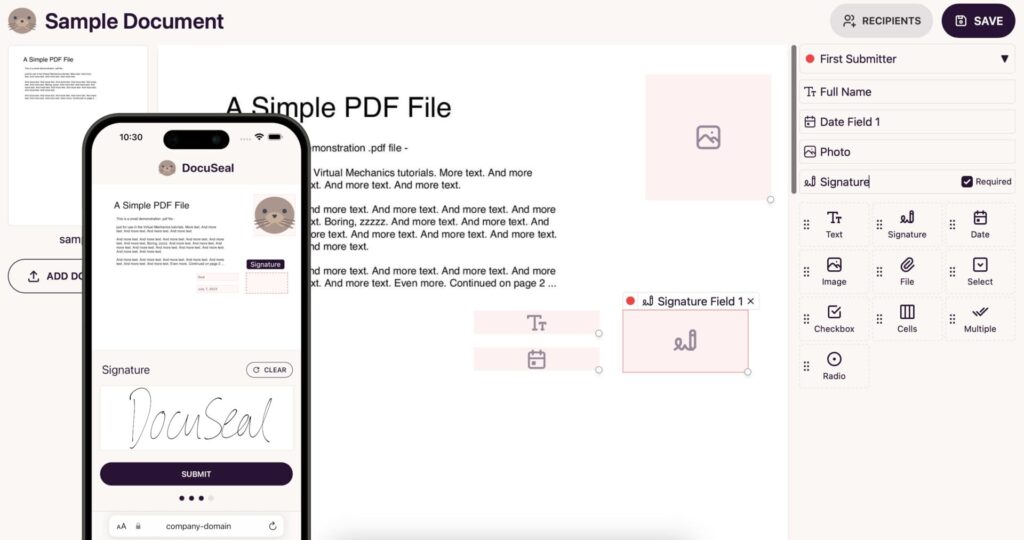
DocuSeal appears as an open alternative for creating, filling and signing digital documents. The project is published on GitHub under the AGPL-3.0 license and is presented as a platform to turn PDFs into signable forms, add fields through a visual interface, manage multiple signers, send automated emails, verify PDF signatures and deploy the tool on private servers.
Its main appeal for a technology publication is not only that it can be cheaper. It is the control model. DocuSeal can be self-hosted, meaning documents, templates, contracts and customer data can remain on the organization’s own infrastructure or in a cloud environment it chooses. For companies working with sensitive documentation, that difference can be as important as price.
The basic Docker deployment is very direct:
docker run --name docuseal \
  -p 3000:3000 \
  -v .:/data \
  docuseal/docusealCode language: JavaScript (javascript)
By default, the container uses SQLite for data and configuration, although the project allows PostgreSQL or MySQL through the DATABASE_URL variable. For an internal test, SQLite may be enough. For production, the normal approach would be to add an external database, backups, HTTPS, access control, persistent storage and a clear update policy.
DocuSeal’s open source edition includes relevant features: a visual PDF field builder, signatures, dates, checkboxes, file uploads, multiple submitters per document, SMTP-based emails, storage on disk or services such as AWS S3, Google Storage and Azure Cloud, user management, PDF signature verification, mobile web support and API/webhooks.
| Feature | Docusign | DocuSeal self-hosted |
|---|---|---|
| Basic electronic signature | Yes | Yes |
| Signable PDF forms | Yes | Yes |
| Multiple signers | Yes | Yes |
| Document audit trail | Yes | Yes |
| Self-hosting | Not in the usual SaaS model | Yes |
| Direct storage control | Limited to the provider | Yes, depending on deployment |
| API | Depending on plan | Available, with commercial nuances |
| SSO/SAML | Higher-tier plans | DocuSeal Pro |
| Bulk sending | Depending on plan | DocuSeal Pro |
| White-labeling | Depending on plan | DocuSeal Pro |
The nuance matters: DocuSeal is not “everything unlimited and free” in every scenario. The self-hosted open source version allows teams to use the platform without paying a license for basic functions, but Pro features have a cost. For on-premises deployments, DocuSeal Pro is listed at $240 per year per user, plus $0.20 per document signed through API or embedding. In the cloud, the Pro plan is presented as an upgrade at $20 per month or $200 per year, depending on the option shown by the provider.
Where the real savings are
The fairest comparison depends on usage. A small company that only needs to prepare documents, send them for signature and keep them on its own server can save a lot with DocuSeal. In that case, the main cost will be the server, maintenance and technical time. For a team with systems knowledge, the bill may be far lower than that of a per-user SaaS solution.
A company that needs SSO, white-labeling, bulk sending, conditional fields, embedded API, SMS verification or integration support enters DocuSeal Pro territory. Even then, the cost may still be attractive compared with commercial e-signature alternatives, especially if the volume is well managed and the organization values data control.
| Scenario | Practical reading |
|---|---|
| Freelancer with few documents | Docusign Personal may be convenient; DocuSeal requires running a server |
| SME with recurring documents | Self-hosted DocuSeal can reduce costs if there is internal technical support |
| SaaS product integrating signatures | DocuSeal API requires Pro and charges per signed document |
| Company with SSO and roles | Compare Docusign enterprise plans with DocuSeal Pro |
| Regulated sector | Decision depends on compliance, audit, identity verification and legal review |
| Privacy-sensitive organization | Self-hosting can be a clear advantage |
DocuSeal’s hidden cost is operations. Self-hosting means taking responsibility for security, backups, availability, monitoring, updates and incident response. This is not a minor issue. A misconfigured e-signature tool can expose contracts, personal data or internal documents. For some teams, that control is an advantage; for others, it is a responsibility they prefer to delegate.
Docusign, for its part, does not only sell signatures. It sells trust, brand recognition, support, integrations and a well-known enterprise framework. In legal, procurement or HR departments, that trust may matter more than price. There may also be customers or suppliers that already have Docusign integrated into their workflows and do not want to change.
The API as the battleground
The most interesting area for developers is the API and embedding. Many companies do not want to send documents manually from a web interface; they want to add signing directly into their own product: customer onboarding, rental contracts, medical consent forms, employment agreements, KYC, financing or internal approval processes.
DocuSeal supports this type of integration, but its pricing should not be ignored. The documentation states that production API and embedding usage requires a Pro plan and charges $0.20 per signed document. A request can include several files and several signers and still count as one completed document, which can be competitive for many use cases.
Example of creating a signing request:
curl -X POST "https://signature.yourcompany.com/api/submissions" \
  -H "X-Auth-Token: $DOCUSEAL_API_KEY" \
  -H "Content-Type: application/json" \
  -d '{
    "template_id": 123,
    "send_email": true,
    "submitters": [
      {
        "role": "Customer",
        "email": "[email protected]",
        "name": "Example Customer"
      }
    ]
  }'Code language: PHP (php)
This approach allows a custom application to generate the document, send it for signature and receive webhook events when its status changes. For technical teams, it is an attractive proposition: less dependence on a closed provider and more freedom to adapt the signing experience to the product.
The economic question changes with volume. If an application signs 200 documents per month via API, DocuSeal’s official example calculates $20 for the Pro seat plus $40 for documents, for a total of $60 per month. If it signs 10,000 documents per month, the comparison needs more care and will likely involve volume negotiation, proper infrastructure and support analysis.
Electronic signature, validity and trust
Another point that should be separated is the difference between digitally signing a PDF and meeting all evidentiary requirements for every type of contract. In Europe, the eIDAS regulation distinguishes between simple, advanced and qualified electronic signatures. In the United States, frameworks such as ESIGN and UETA apply. The fact that a platform states compatibility with these frameworks does not mean that every use case automatically has the same evidentiary value everywhere.
For internal documents, low-risk authorizations or common private contracts, an electronic signature with traceability, IP address, email, timestamp and audit trail may be enough. For regulated procedures, qualified signatures, stronger identity verification or processes subject to strict audits, each case needs legal and technical review.
This applies to both Docusign and DocuSeal. Docusign offers more enterprise layers and advanced identification options in higher-tier plans. DocuSeal offers control and integration, but the legal outcome will depend on how the process is configured, how signers are identified, what evidence is retained and which legal framework applies.
An alternative that forces a better comparison
DocuSeal is not a free Docusign clone for every situation. It is an open source alternative with a very different approach: self-hosting, control, integration and an open edition that can cover many basic needs without license cost. Its Pro features and API have a price, and that should be included in any serious calculation.
Even so, its emergence is relevant. For years, many companies assumed that electronic signature necessarily meant a closed SaaS billed by user, envelope or add-on. DocuSeal shows another path: an open platform that can be deployed on private infrastructure and adapted to internal workflows.
For a technical team, the decision should start with several questions: how many documents are signed per month, how many users need to manage templates, whether an API is required, whether SSO is needed, where documents must reside, what level of identity verification is required and who will operate the platform.
Electronic signature is no longer just an administrative feature. It is part of a company’s information system. That is why the conversation should not be limited to price per user. It should also include data sovereignty, integration, compliance, signing experience, support and the ability to switch providers without rebuilding the entire process.
Frequently asked questions
Is DocuSeal a real alternative to Docusign?
Yes, for many basic signing, self-hosting and custom integration use cases. For large companies with advanced compliance, support and identity verification requirements, the comparison must be made case by case.
Is DocuSeal completely free?
The self-hosted open source version can be used for free for basic functions. Features such as SSO, white-labeling, bulk sending, SMS, advanced roles, production API usage or embedding are part of DocuSeal Pro.
How much does Docusign Business Pro cost?
On Docusign’s official US eSignature pricing page, Business Pro is listed at $40 per month per user with annual billing, with 100 envelopes per user per year in that plan.
Can I host DocuSeal on my own server?
Yes. DocuSeal offers self-hosted deployment and can run with Docker. In production, it should be configured with HTTPS, backups, access control and persistent database storage.
Is a DocuSeal signature legally valid?
It depends on the country, document type, identity verification method and evidence retained. For sensitive or regulated documents, the process should be reviewed with legal counsel.