
Docker Desktop has become an almost invisible part of the daily workflow for many developers on macOS. It is there to spin up local databases, test APIs, run queues, build development environments, validate images, or reproduce part of production on a laptop. But it has also become a tool that consumes resources, comes with licensing conditions that do not fit every company equally, and leaves room for lighter alternatives.
This is where Dory comes in: a native macOS application presented as a free and open source alternative to Docker Desktop and OrbStack. Its proposal is clear: run Docker containers and Linux machines from a lightweight SwiftUI app, with a single shared VM for all containers, compatibility with the Docker CLI, and no account, telemetry, or per-user licence.
The project, published by Augani on GitHub under the GPL-3.0 licence, does not try to reinvent developers’ habits. Quite the opposite: it wants commands such as docker run, docker compose, and existing scripts to keep working, but using its own socket at ~/.dory/dory.sock and a Docker context called dory.
A shared VM to reduce resource usage
Dory’s most important technical idea is its execution model. Instead of launching a micro-VM per container, Dory starts a persistent shared Linux VM where all containers run. According to measurements published by the project itself, with two idle containers memory usage would be around 122 MB, compared with 574 MB in a one-VM-per-container model, a difference of roughly 4.7 times.
That figure should be read as the project’s own measurement, not as a universal guarantee across every machine and workload. Even so, it points to a real problem: on macOS, Linux containers always need a virtualization layer, and the way that layer is organized has a major impact on memory, CPU usage, battery life, and fan noise.
Dory builds on Apple’s open source container stack, which enables Linux containers to be created and run as lightweight virtual machines on Mac, is written in Swift, and is optimized for Apple silicon. The difference is that Dory tries to add an experience closer to Docker Desktop: a graphical dashboard, Docker context, Compose, Kubernetes, Linux machines, local networking, and migration from other tools.
The app also presents itself as small: around 6 MB, with a native Swift/SwiftUI interface, a menu bar agent, a full dashboard, light and dark modes, and no embedded Electron, Chromium, or Node. For many Mac users, that matters. Fatigue with heavy apps built on web stacks has created space for native tools that make less noise in the background.
Docker, Compose, Kubernetes, and Linux machines
Dory is not limited to launching basic containers. The repository describes an interface for managing containers with live stats, logs, an embedded terminal, environment variable inspection, and actions such as create, start, stop, restart, or delete.
It also includes image management, building from a context folder, pull, prune, registry sign-in, and full inspection. For volumes and networks, Dory adds a file browser, subnet inspection, gateway details, and attached-container inspection. For Compose, it supports up and down, .env variable interpolation, depends_on ordering, and waiting for healthy services through service_healthy.
Kubernetes is handled through k3s inside the shared VM. From the app, users can browse pods, deployments, services, config maps, secrets, and ingresses, with live health status, pod exec, scaling, restart, rollout controls, and applying manifests with kubectl apply.
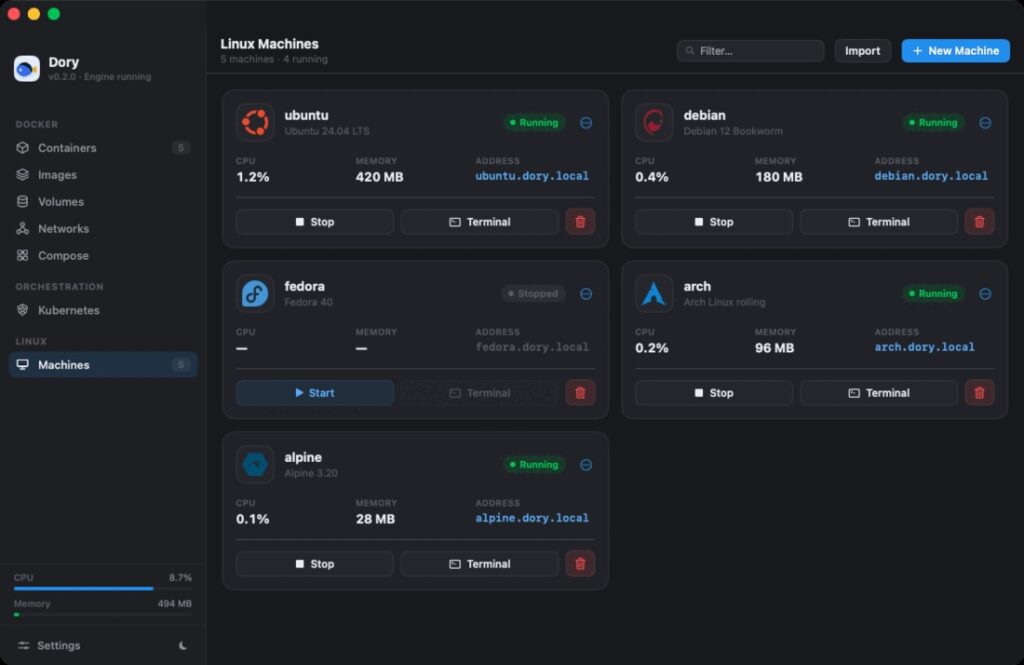
Another interesting feature is Linux machines. Dory allows users to create full Ubuntu, Debian, Fedora, Alpine, or Arch VMs, with snapshots, terminal access, and recipes for preparing development environments with Node, Python, Go, Rust, and other stacks. The user’s home directory is shared into the engine, so a mount like docker run -v ~/project:/app continues to work naturally.
This approach turns Dory into more than a GUI for containers. It looks closer to a local development environment tool, combining containers, Kubernetes, Linux machines, and integrated networking.
| Feature | What Dory offers |
|---|---|
| Docker CLI | Own socket and dory context for existing commands |
| Compose | up, down, .env, dependencies, and health waiting |
| Kubernetes | k3s inside the shared VM and resource browser |
| Linux machines | Ubuntu, Debian, Fedora, Alpine, and Arch with snapshots |
| Local networking | Ports on localhost, *.dory.local domains, and local HTTPS |
| Migration | Import from Docker Desktop or OrbStack |
Licensing also pushes the search for alternatives
The comparison with Docker Desktop is not only technical. Docker keeps Docker Desktop free for personal use, education, non-commercial open source projects, and small businesses, but it requires a paid subscription for professional use in larger organizations, government entities, or commercial uses outside the free limits.
This has led many teams to review their local tooling. Some companies pay for Docker Desktop without hesitation because they value its support, integration, security, and familiarity. Others look for alternatives such as Colima, Rancher Desktop, Podman, OrbStack, or solutions based on Apple’s runtime. Dory enters that conversation with a strong promise: free for everyone, no commercial tier, no account, and source code available under GPL-3.0.
The difference compared with Docker Desktop is that Dory is at a much younger stage. The repository shows version 0.2.0 as the latest release published on 02/07/2026 and only a few dozen commits at the time of review. That does not make it less interesting, but it does mean it should be evaluated carefully before being adopted by large teams or critical environments.
With container tools, compatibility is not measured only by starting nginx or postgres. Teams need to test networks, volumes, file permissions, DNS, certificates, amd64 images on Apple silicon, real-world Compose projects, local CI tooling, IDE integration, corporate certificates, VPNs, proxies, private registries, Kubernetes, and sustained performance.
Apple silicon first, Intel as a frontend
Dory’s small print matters. The full experience, with its own engine, shared VM, low memory usage, Kubernetes, Linux machines, and *.dory.local domains, is designed for Apple silicon. The project lists macOS 15 Sequoia or later for that complete experience, while also detailing backends that require macOS 26+ in some modes, such as shared and apple, which means the compatibility matrix should be checked before deploying it.
On Intel Macs, Dory works as a native frontend, app, CLI, and Docker context for a compatible engine installed separately, such as Colima, Docker Desktop, Rancher Desktop, Podman, or OrbStack. There is no bundled Intel engine yet, although the project places native Intel support using Virtualization.framework on its roadmap.
Dory also provides several backends selectable through DORY_RUNTIME: shared, apple, docker, and mock. The first uses a persistent dockerd inside a shared VM; the second uses Apple’s container stack with one micro-VM per container; the third acts as a proxy to an existing Docker-compatible socket; and the fourth is used for UI development with in-memory sample data.
This design can be useful because it allows the app to be tested even in scenarios where the native engine does not yet fit. But it also introduces a practical reality: not every user will have the same experience. Those with a modern Apple silicon Mac can try the full approach; those on Intel will depend on another engine.
Local networking, certificates, and consent
Networking is one of the areas where container tools on macOS often struggle. Dory tries to make it transparent with published ports on localhost, automatic *.dory.local domains for every container, and local HTTPS issued by its own local CA. The project stresses that these integrations are optional, require consent, and are not installed silently.
That is a sensible approach. Touching local DNS, certificates, or networking services requires care. It can greatly simplify web development, but it must also be auditable and reversible. The repository mentions separate scripts to enable networking and Kubernetes, both requiring explicit admin permission.
The architecture also seems designed to keep the binary small and deterministic. Dory uses a ContainerRuntime protocol, a doryd shim to expose the Docker REST API, its own Compose engine that turns YAML into a dependency graph, internal health and networking services, and lightweight hand-rolled HTTP/unix-socket transport, YAML parsing, and Docker API client/server components.
That minimalism can be a strength, but it will also be tested. Implementing enough Docker API and Compose compatibility is not trivial. Many tools look compatible until real projects surface edge cases. The community will have to validate how far that compatibility goes.
A promising tool for Mac developers
Dory appears at the right time. Apple has opened a stronger technical foundation for containers on Mac, developers continue looking for lighter alternatives to Docker Desktop, OrbStack has shown there is a market for more native experiences, and the pressure to reduce resource usage on laptops is not going away.
Its biggest appeal is the combination of several elements that rarely come together: a native app, open source code, GPL licensing, a low-memory shared VM, Docker CLI compatibility, Compose, k3s, Linux machines, local domains, and migration from familiar tools.
Its biggest risk is maturity. Docker Desktop, OrbStack, Colima, and Rancher Desktop have communities, real-world usage, and years of development behind them. Dory will have to prove stability, compatibility, and support in real projects. For a curious developer, it is a very interesting tool. For a company, the sensible approach would be to test it first in small teams, check compatibility, and document the cases it covers well.
The future hinted at by the project is also interesting: portable development machines that can be backed up and restored, remote access to the engine, and sandboxed environments for AI agents. That last point makes a lot of sense. If coding agents start executing commands, launching services, and modifying projects, lightweight, reproducible, isolated local environments may become a real need.
Dory is not yet “the new Docker Desktop”. It is a young alternative worth watching. But its approach touches a sensitive point in modern development: local environments should be fast, private, cheap to maintain, and compatible with what teams already use. If it can deliver that without breaking existing workflows, it may earn a real place on many developers’ Macs.
Frequently asked questions
What is Dory?
Dory is a native, open source macOS app that lets users run Docker containers and Linux machines as an alternative to Docker Desktop and OrbStack.
Does it work with the Docker CLI?
Yes. Dory exposes the Docker API at ~/.dory/dory.sock and registers a Docker context called dory, so existing commands and scripts can keep working.
Is it free for commercial use?
The project is released under the GPL-3.0 licence and is presented as free for everyone, with no commercial tier or per-seat licence.
Does it work on Intel Macs?
Yes, but as a frontend for a separately installed Docker-compatible engine. The full low-memory bundled engine is currently focused on Apple silicon.
Can it already replace Docker Desktop in a company?
It depends on the use case. For individual testing and development it is promising; in larger teams, compatibility with Compose, networks, volumes, private registries, Kubernetes, certificates, and internal workflows should be validated before migration.