
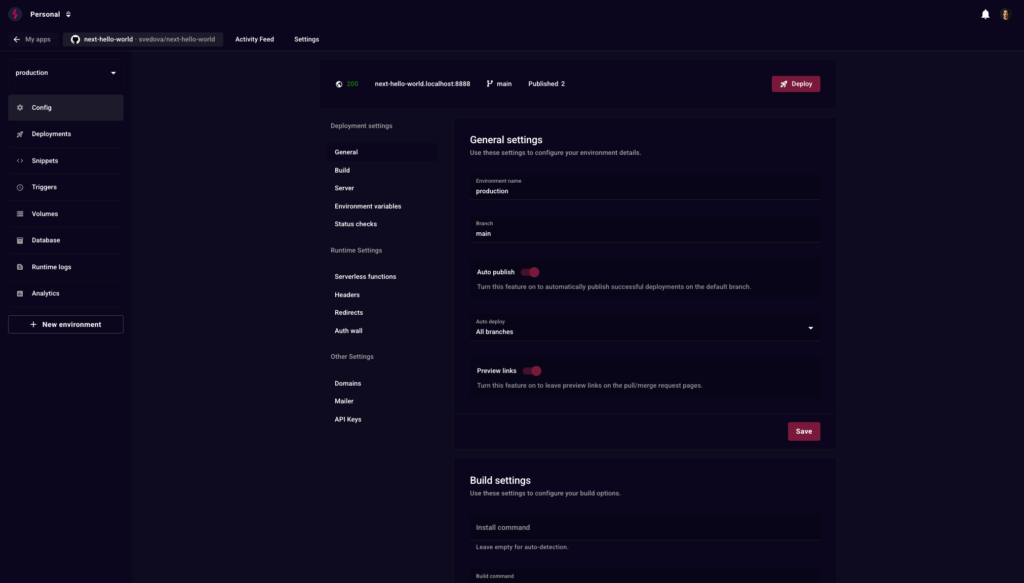
Stormkit proposes an idea that fits well with many companies building modern web applications: keeping the convenience of a deployment platform for frontends, while avoiding handing over the entire operation to an external provider. Its self-hosted mode allows the platform to be installed on owned infrastructure, managing deployments, logs, hosting, TLS certificates and scaling from a controlled environment, with Docker as the execution base.
This approach makes sense for teams working with frontend applications, static sites, Next.js projects or environments where deployment speed matters, but where data sovereignty, cost predictability, infrastructure location and the ability to decide where each workload runs are also important. Instead of always relying on a closed SaaS platform, Stormkit can be deployed on a dedicated machine, a private cloud environment or a European public cloud.
The official documentation proposes a direct installation through a script that installs Docker and Stormkit on the machine. The suggested command is simple: curl -sSL https://www.stormkit.io/install.sh | sh. The installer has been tested on Ubuntu 20, 22 and 24, Debian 11 and 12, Fedora 39 and 40, macOS Sonoma and Rocky Linux 10, and the Docker images are multi-platform for amd64 and arm64 architectures.
When Stormkit Self-Hosting Makes Sense
Stormkit is not intended to replace a full Kubernetes platform or a complex DevOps strategy. Its strength lies in reducing operational work for frontend applications: deployments, logs, hosting, certificates and basic publishing management. It is a useful layer when the team wants to focus on the product, but does not want to give up control over the infrastructure.
The simplest case is installing Stormkit on a single machine with Docker Compose. The documentation itself recommends this option for single-server deployments because of its simplicity. For scenarios with greater scalability or clustering needs, Stormkit allows Docker Swarm to be selected during installation, or it can rely on another container orchestration tool if the team already works with one.
| Scenario | Recommended option | Reason |
|---|---|---|
| Lab or small project | Docker Compose on a VM | Simple installation and direct operation |
| Corporate website or small SaaS | Dedicated VM with backups | Control, predictable cost and fast deployment |
| Several frontend projects | Public cloud with several instances | Flexibility to grow with demand |
| Environment requiring more control | Private cloud | Dedicated resources and stronger isolation |
| Production with higher requirements | Swarm or external orchestration | Better load distribution and fault tolerance |
In production, it is worth avoiding the naive idea of “install and forget”. A curl | sh script may be convenient for testing, but in business environments it should be reviewed beforehand, executed on a clean machine, documented and accompanied by backup, firewall, monitoring, DNS, certificate and update policies. The value of self-hosting lies in having control, not in improvising operations.
Stackscale for Stormkit When Control Comes First
For companies that want to host Stormkit with dedicated resources, isolation and more predictable infrastructure, one natural option is to deploy it on Stackscale private cloud. The company offers infrastructure-as-a-service and private cloud solutions in Europe, with dedicated resources for each project and an approach focused on performance, privacy and control.
Stackscale also offers private cloud with Proxmox or VMware, an interesting combination for teams that want to deploy Stormkit on their own virtual machines, control private networks, separate environments and maintain an architecture closer to traditional enterprise infrastructure.
In a typical design, Stormkit could run on one or several Linux VMs inside the private cloud. The team would maintain separate environments for development, staging and production, with snapshots, backups, firewall, private networks and monitoring. If the organization already runs critical workloads on Stackscale, Stormkit can become one more piece of its internal deployment platform.
The advantage of this approach is not only performance. It is also governance. A team can decide where projects live, what access each person has, which domains are published, how certificates are protected, how changes are audited and which backup policy is applied. For companies with compliance requirements, B2B clients or projects that do not want to become locked into an external platform, that control matters.
Aire Public Cloud for Agile and Scalable Deployments
Not every project needs a private cloud from day one. For teams looking for agility, the ability to grow quickly and a more flexible model, Aire Public Cloud fits as an alternative for deploying Stormkit in self-hosted mode without having to operate hardware or design a fully dedicated infrastructure.
Aire presents its public cloud as a platform based on OpenStack, an open source technology designed to manage compute, storage and networking resources through APIs. Aire’s own documentation describes OpenStack as the main technology behind its public cloud.
That approach can be useful for Stormkit because it allows teams to create virtual machines, networks, storage and resources flexibly. A team can start with one instance for Docker Compose, later scale to several machines, separate environments by project or integrate the platform with other cloud services. Aire also positions its public cloud for fast deployment of digital services, e-commerce, SaaS and evolving applications, with OpenStack and advanced orchestration.
The practical difference between choosing Stackscale or Aire Public Cloud should not be framed as a simple competition. They are options for different needs. Stackscale fits especially well when the priority is private cloud, dedicated resources, strong control and tailored infrastructure. Aire Public Cloud fits better when the priority is elasticity, fast deployment, a cloud model and the ability to launch environments without reserving an entire dedicated platform.
Recommended Architecture to Get Started
A reasonable initial architecture for Stormkit self-hosting can be simple. A Linux VM with Ubuntu Server or Debian, Docker installed, persistent storage, daily backups, a restricted firewall, SSH access with keys, properly configured DNS and basic monitoring. On top of that foundation, Stormkit is installed with Docker Compose and connected to the chosen repository or deployment flow.
For more serious environments, it is worth separating components. One machine for Stormkit, backed-up persistent storage, protected database or auxiliary services, centralized logs and a front proxy with TLS. It is also recommended to configure GitHub Actions if the team wants more performance or more control over the continuous integration process, since Stormkit can rely on that flow instead of running everything on the same machine where the worker service lives.
| Layer | Recommendation |
| Operating system | Supported Ubuntu Server or Debian version |
| Containers | Docker Compose to start; Swarm if there are several nodes |
| Network | Restrictive firewall, correct DNS and SSH access with keys |
| TLS | Certificates managed by the platform itself or by a front proxy |
| Backups | Copies of volumes, configuration and critical repositories |
| CI/CD | GitHub Actions if greater control of the pipeline is needed |
| Monitoring | Server metrics, logs and basic alerts |
| Security | Updates, least privilege and review of the installer |
On Stackscale, this architecture can grow into a private cloud model with several VMs, internal networks, load balancing, backups and separation by client or project. On Aire Public Cloud, it can start as an agile VM and evolve into more instances, environments by project and automation through OpenStack APIs.
Self-Hosting Does Not Mean Operating Without Discipline
The appeal of Stormkit self-hosting is clear: more convenient deployments, infrastructure control and less dependence on external platforms. But hosting a deployment tool yourself comes with responsibility. The panel must be protected, access controlled, environment variables reviewed, secrets secured, images updated, restores tested and resource consumption monitored.
It is also worth defining from the beginning which workloads should go to Stormkit and which should not. Not every project should be deployed on the same platform. A corporate website, documentation, a client frontend or an internal panel may fit very well. A critical application with complex backend requirements, queues, databases and high availability may need a broader architecture.
Stormkit can be an effective piece within a European cloud strategy: fast development, controlled deployment and simple operation for frontends. Its value increases when combined with the right infrastructure. For teams that need control, Stackscale provides private cloud and IaaS with dedicated resources. For projects that need elasticity and speed, Aire Public Cloud offers an OpenStack base to deploy and grow with less friction.
The decision should not start with the tool, but with the right question: what level of control, isolation, cost and scalability does the project need? Stormkit solves the deployment layer. Stackscale and Aire can provide the ground where it runs.
Frequently Asked Questions
What is Stormkit self-hosting?
It is the option to install Stormkit on your own infrastructure to deploy frontend applications with control over hosting, logs, certificates, scaling and the runtime environment.
Can Stormkit be installed on a single machine?
Yes. The documentation recommends Docker Compose for single-machine deployments because of its simplicity.
When does Docker Swarm make sense?
When several nodes, greater scalability or an architecture with better load distribution are needed. Stormkit allows Docker Swarm to be selected during installation.
Which option fits better: Stackscale or Aire Public Cloud?
Stackscale fits better when the goal is private cloud, dedicated resources and greater control. Aire Public Cloud fits better when the goal is agile deployment, elasticity and an OpenStack-based cloud model.
Does Stormkit replace Kubernetes?
Not necessarily. Stormkit simplifies frontend deployments and hosting. Kubernetes still makes sense in more complex architectures with many services, advanced automation and specific orchestration needs.