
For years, running your own personal server has been either a niche hobby for very technical people or a weekend project that quietly dies the moment DNS, certificates, or port forwarding enter the chat. Debian is trying to change that story with FreedomBox — a Pure Blend (an official Debian-curated bundle of packages and configuration aimed at a specific purpose) built around a simple idea: bringing real control of your data back home.
The pitch is straightforward: take a standard Debian system and turn it into a personal services box — for a home, a family, or a small organization — with a web dashboard and “enable-able” modules. Instead of assembling everything from scratch, FreedomBox aims to make common self-hosted needs approachable: file sharing, syncing, communication tools, secure remote access, and privacy-oriented services.
A Blend with a clear goal: less sysadmin, more autonomy
In Debian terms, a Blend isn’t marketing — it’s a structured way to ship a complete solution for a real-world use case. FreedomBox exists to reduce the friction that usually keeps self-hosting out of reach for normal users.
Who is it really for?
- People tired of centralized cloud accounts for everything (photos, files, contacts).
- Families who want a “smart NAS” without getting locked into a vendor ecosystem.
- Small teams, nonprofits, and local groups who need basic collaboration tools without per-user SaaS fees.
- Anyone who cares about privacy, sovereignty, or simply owning their digital life end-to-end.
This isn’t about beating Big Cloud at scale. It’s about having an option that doesn’t depend on them.
Plinth: the piece that makes it usable
FreedomBox revolves around Plinth, a web-based admin interface that acts like a control panel for the whole system. The key difference is operational: instead of living in the terminal for every setup and change, you can enable, configure, and maintain services through a guided interface.
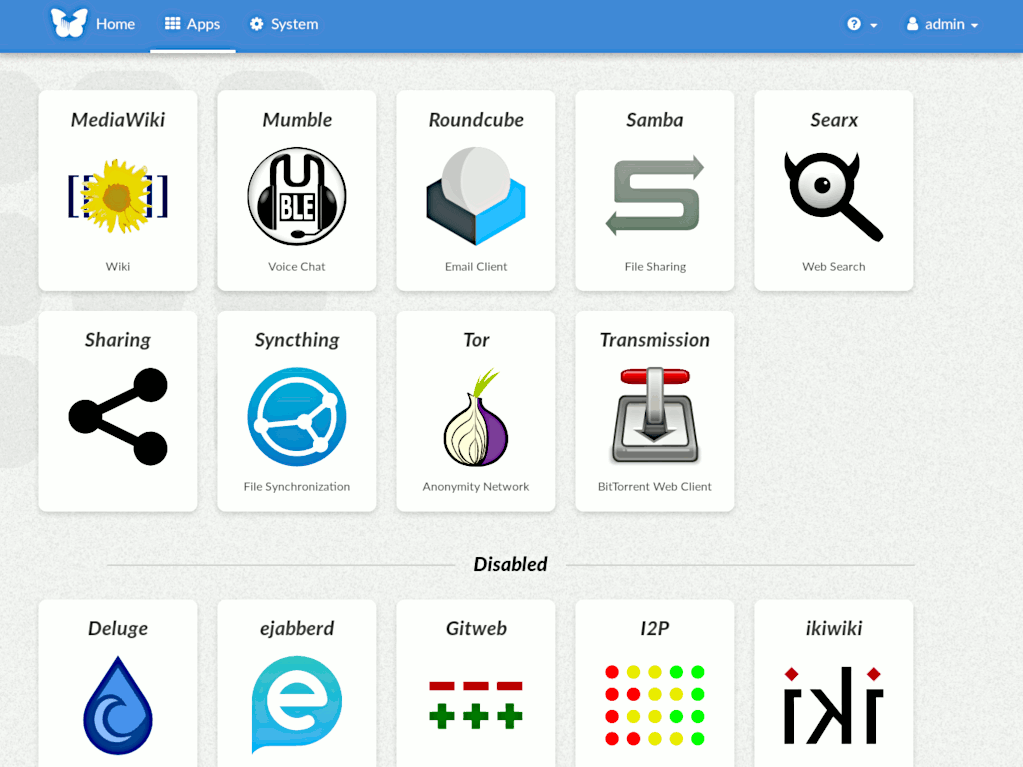
That matters because self-hosting rarely fails due to a lack of software — it fails due to friction. A friendly control plane, sane defaults, and integrated updates are often the difference between something you keep running for years and something you abandon after two weeks.
What you can host — and why it’s relevant now
FreedomBox is less “one app” and more “a toolbox.” The value comes from combining services to cover real needs, such as:
- Secure remote access (often via VPN-style setups) so you can reach your home services without exposing everything publicly.
- Personal cloud functions like file sync and sharing, without handing your metadata to third parties.
- Small-scale collaboration (calendars, contacts, notes, wikis) for families or teams that want independence.
- Privacy-first tools that reduce tracking and reliance on centralized platforms.
And yes, there’s a broader context here: in a moment where governments, companies, and everyday users are increasingly wary of centralized clouds — especially those tied to a handful of jurisdictions — a Debian-backed “server at home made practical” lands at exactly the right time.
The honest caveat: independence still requires care
FreedomBox lowers the entry barrier, but it doesn’t eliminate responsibility. Self-hosting means you’re the operator — even if the system is friendlier than most. In practice, that means:
- Keeping updates enabled and timely.
- Using strong authentication habits (unique passwords, 2FA where relevant, SSH keys when appropriate).
- Planning backups from day one.
- Being careful about exposure: opening ports casually is the fastest way to turn a good idea into a security headache.
In short: FreedomBox makes the path realistic — it doesn’t make security effortless.
FAQ
Is FreedomBox “better” than Google Drive, iCloud, or Dropbox?
It depends on your priority. If you want maximum convenience, big cloud wins. If you want control, sovereignty, and fewer third-party dependencies, FreedomBox is the point.
What hardware do you need to start?
A modest machine can be enough for basic use. A small PC or ARM board with reliable storage and stable networking matters more than raw CPU power.
Is it hard to access it from outside your home safely?
It doesn’t have to be, but you should start conservatively: secure remote access first (VPN-style), then expand. Avoid exposing services directly until you’re confident in your setup.
What should you enable first to keep it simple?
A practical order is: updates + basic security → backups → remote access → files/sync → collaboration → messaging and privacy extras.