
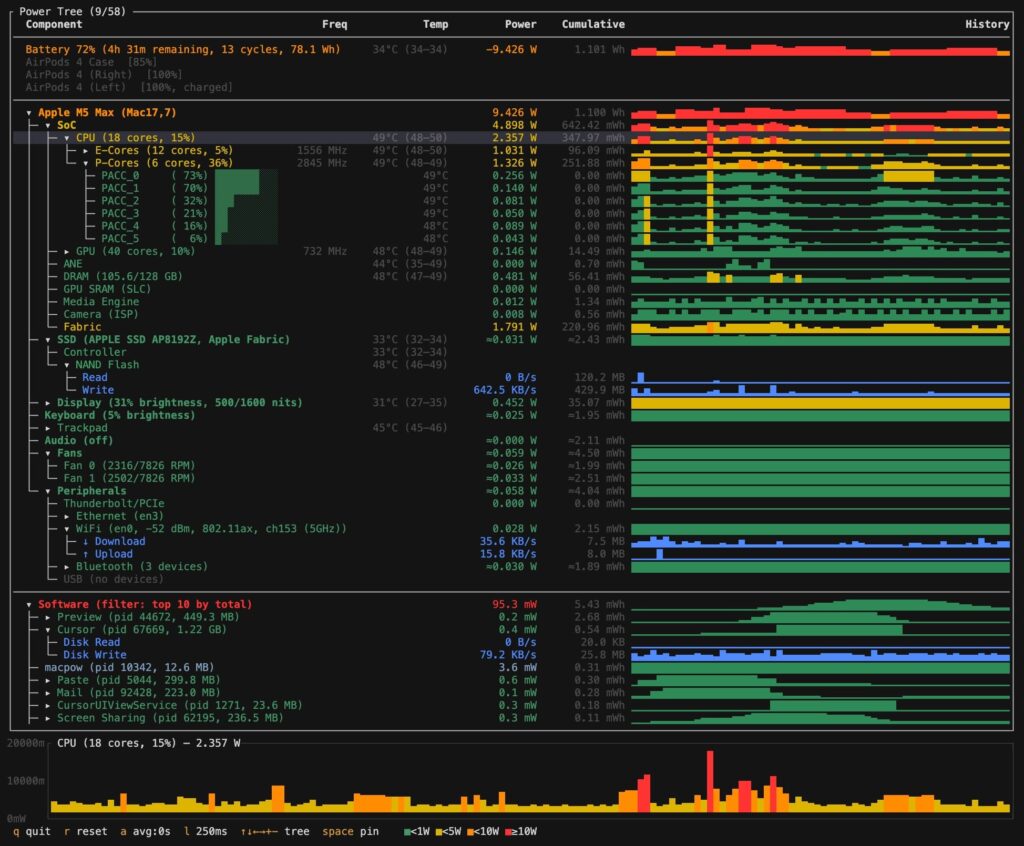
Apple Silicon Macs are getting a new open-source utility worth watching. Called macpow, it is a Rust-based terminal tool that gives users a live view of power consumption across an Apple Silicon Mac with far more detail than most standard monitoring apps. Instead of only showing CPU load or temperatures, macpow builds a real-time power tree that breaks down energy usage across the SoC, CPU, GPU, memory, SSD, display, battery, fans, Wi-Fi, Bluetooth, and even individual processes.
What makes the project stand out is how deep it goes without requiring elevated privileges. According to its documentation, macpow reads from macOS hardware interfaces and system APIs such as IOReport, SMC, IORegistry, CoreAudio, and Mach/kernel APIs to display measured or estimated power draw, temperatures, clock speeds, utilization, and session-level process energy attribution. It runs at user level, with no need for sudo, which makes it much easier to test on a daily machine.
The project is aimed squarely at power users, developers, and performance enthusiasts. Someone compiling code, running AI workloads locally, exporting video, or trying to understand why battery life drops under certain workflows can use macpow to see exactly where the system is spending energy. The sample interface published by the developer shows a highly detailed live view on an Apple M5 Max Mac, including SoC-level power, per-core CPU activity, GPU load, battery drain, display power, SSD activity, fan speed, and a ranked process list.
It also goes beyond simple monitoring. Users can pin sparkline charts, switch smoothing windows, change the refresh interval, dump diagnostic channel data, and export everything in JSON for dashboards or scripts. In that sense, macpow is not just a nice-looking terminal app. It is also a serious observability tool for Apple Silicon.
The timing is good. As Apple’s M-series chips become more powerful and more widely used for professional workloads, interest in detailed telemetry is rising as well. macpow fills a real gap by exposing the sort of component-level energy insight that macOS does not present in one unified view by default.
What macpow offers
| Capability | What it shows |
|---|---|
| SoC power breakdown | CPU, GPU, ANE, DRAM, GPU SRAM, Media Engine, Camera, Fabric |
| CPU monitoring | Per-core utilization, E-core/P-core split, real frequencies in MHz |
| Temperature monitoring | CPU, GPU, ANE, DRAM, SSD, battery, and per-core temperature readings |
| Memory view | Used and total memory in GB |
| Battery telemetry | Charge level, voltage, amperage, time remaining, drain/charge rate, temperature |
| Display data | Brightness estimate and display-related power metrics |
| SSD activity | Model, interconnect, estimated power, read/write activity |
| Peripheral monitoring | Thunderbolt/PCIe, Ethernet, Wi-Fi, Bluetooth devices, USB devices |
| Process energy view | Per-process energy attribution, RAM footprint, disk I/O, network traffic |
| Fans | RPM plus estimated power model |
| Charts and history | Inline sparklines and pinned resource history |
| JSON mode | Structured output for automation, dashboards, and scripts |
| No admin rights required | Runs without sudo |
How to install it on a Mac
| Method | Command |
|---|---|
| Homebrew | brew tap k06a/tap |
brew install macpow | |
| Cargo | cargo install macpow |
| From source | git clone https://github.com/k06a/macpow.git |
cd macpow | |
cargo build --release | |
./target/release/macpow |
Requirements
| Requirement | Details |
|---|---|
| Operating system | macOS 12 or later |
| Hardware | Apple Silicon Mac |
| Supported chip families | M1, M2, M3, M4, M5 and later variants |
| Rust version | Rust 1.70+ for source builds |
Basic usage on macOS
| Command | Function |
|---|---|
macpow | Launch the TUI interface |
macpow --json | Output structured JSON to stdout |
macpow --interval 500 | Set the sampling interval in milliseconds |
macpow --dump | Dump IOReport channel names for diagnostics |
For Mac users who want a clearer picture of how Apple Silicon behaves under real workloads, macpow looks like one of the most promising terminal utilities to appear this year. It is lightweight, transparent, technically ambitious, and built for exactly the sort of users who want to know not just that their Mac is working hard, but where the watts are actually going.