
A dozen free utilities can change the way you work in the Linux terminal without switching distribution, shell or machine: fzf, zoxide, fd, ripgrep, bat, eza, btop, dust, duf, tmux, tldr and jq replace or complement classic commands such as find, grep, cat, ls, top, du and df with faster searches, more readable output and fewer flags to memorize. None of them replaces knowing the traditional tools, which are still the ones you will find on any server, but in daily work they save a lot of time.
Key points on modern terminal tools in 30 seconds
- fzf, zoxide and fd speed up finding files, directories and commands.
- ripgrep, bat and eza improve grep, cat and ls with colors, line numbers and Git status.
- btop, dust and duf show CPU, memory and disk usage visually.
- tmux keeps sessions alive; tldr and jq simplify help pages and JSON.
- All are in the repositories of major distributions, with a couple of different names on Debian and Ubuntu.
Installing them on each distribution
On Debian, Ubuntu, Kali and derivatives, everything installs in one go with apt:
sudo apt update
sudo apt install -y fzf zoxide fd-find ripgrep bat eza btop duf tmux tealdeer jq
# dust: package du-dust on releases that include it
sudo apt install -y du-dustCode language: PHP (php)
On Fedora and Arch Linux the package names almost always match the program names, and on macOS they can be installed with Homebrew:
# Fedora
sudo dnf install fzf zoxide fd-find ripgrep bat eza btop du-dust duf tmux tealdeer jq

# Arch Linux
sudo pacman -S fzf zoxide fd ripgrep bat eza btop dust duf tmux tealdeer jq

# macOS with Homebrew
brew install fzf zoxide fd ripgrep bat eza btop dust duf tmux tealdeer jqCode language: PHP (php)
If a package is missing on an older release, that is fine: these tools are independent and the rest will work the same. Many also ship prebuilt binaries on their GitHub pages.
There is one important detail on Debian and Ubuntu. To avoid clashing with older packages that already used those names, fd is installed as fdfind and bat as batcat. Two aliases in your shell configuration file (~/.bashrc or ~/.zshrc) fix it:
alias fd='fdfind'
alias bat='batcat'Code language: JavaScript (javascript)
To try the examples without touching real projects, create a test directory with a few fake files:
mkdir -p ~/termlab/{src,config,logs} && cd ~/termlab
printf 'import osn# TODO: remove hardcoded keynAPI_KEY = "demo_123"n' > src/app.py
printf 'port=8080ndebug=truen' > config/app.conf
printf 'API_KEY=demo_123n' > .env
for i in $(seq 1 30); do echo "line $i ok" >> logs/server.log; done
echo "line 31 ERROR disk full" >> logs/server.logCode language: PHP (php)
Moving around and searching: fzf, zoxide, fd and ripgrep
fzf adds a fuzzy finder to any list piped into it. Type a few letters to filter in real time and press Enter to pick. Its biggest gain comes from shell integration: Ctrl+R searches your command history and Ctrl+T inserts a file path into the current command line.
fd --type f | fzf

# Shell integration (fzf 0.48 or later)
eval "$(fzf --bash)"      # in ~/.bashrc
source <(fzf --zsh)       # in ~/.zshrcCode language: PHP (php)
If the shell returns an error with --zsh or --bash, the installed version is older than 0.48. You can then load the key bindings from the examples shipped with the package, usually under /usr/share/doc/fzf/examples/, or install a newer release from the project repository.
zoxide is a cd that learns. It records the directories you visit and ranks them by frequency and recency, so z conf jumps to ~/termlab/config without typing the full path. zi opens an interactive picker powered by fzf.
eval "$(zoxide init bash)"   # or: eval "$(zoxide init zsh)"
z conf
ziCode language: PHP (php)
fd is an alternative to find with much shorter syntax. By default it skips hidden files and anything excluded by .gitignore, so results come out clean. The -H and -I flags turn those filters off, which is handy for spotting forgotten .env files.
fd conf          # names containing "conf"
fd -e py         # files with the .py extension
fd -H -I env     # include hidden and ignored filesCode language: PHP (php)
ripgrep (rg) searches text recursively, with colors and line numbers, and also respects .gitignore. It is the search engine behind Visual Studio Code. It is particularly useful to scan a repository for hardcoded credentials:
rg TODO
rg -i "password|api_key|secret"
rg -c ok logs/Code language: JavaScript (javascript)
Reading and listing: bat and eza
bat is a cat with syntax highlighting, line numbers and Git markers on changed lines. With -p it prints plain output for copying, and combined with fzf it works as a file preview:
bat src/app.py
bat -p src/app.py
fzf --preview 'bat --color=always {}'Code language: JavaScript (javascript)
eza replaces ls with colors by file type, human-readable sizes, a Git status column and a tree view. It is the community continuation of exa, which is no longer maintained. If icons show up as boxes, your terminal font lacks them: drop --icons or install a Nerd Font.
eza -la --git
eza --tree --level=2
eza -la --icons
Watching the system: btop, dust and duf
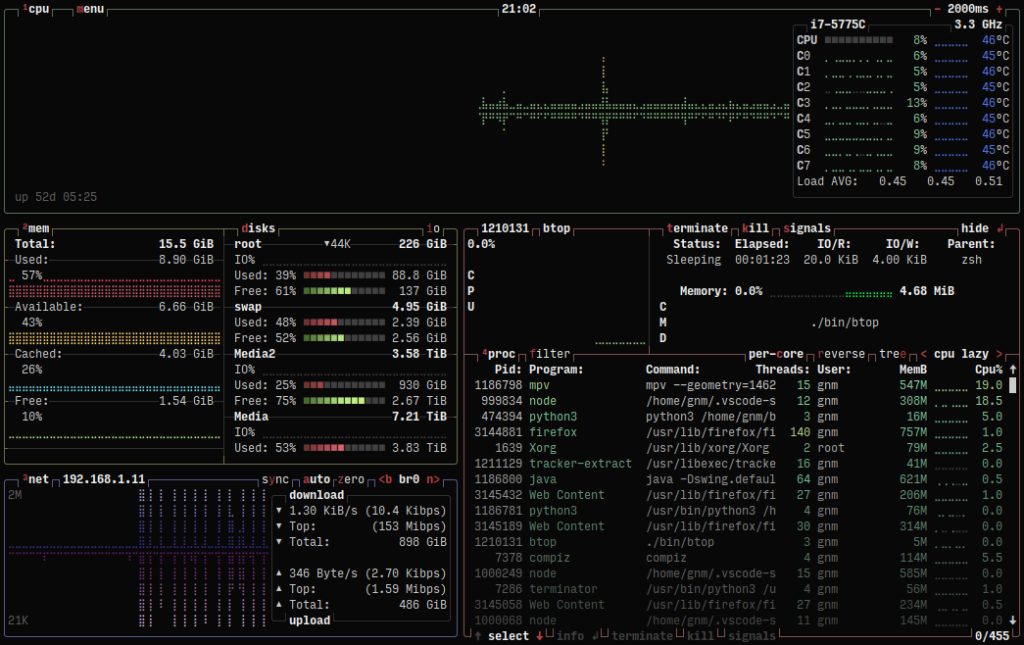
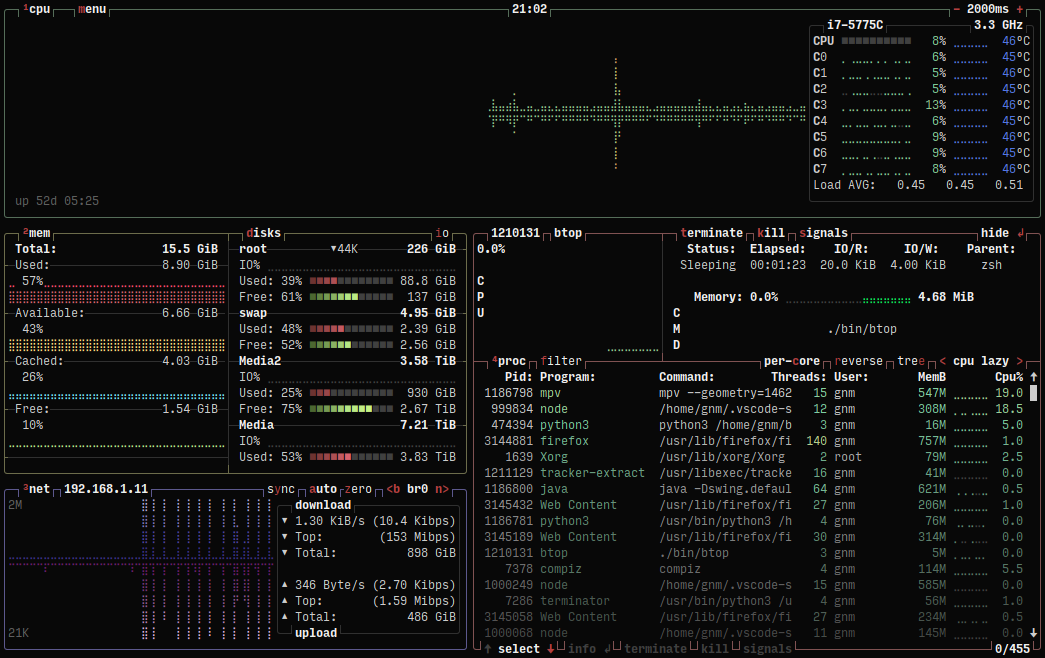
btop shows CPU, memory, disks, network and processes in real time with graphs, and lets you filter, sort and signal processes. It is the third generation of the same author’s idea: it started as bashtop in Bash, moved to bpytop in Python and was rewritten in C++ for performance. Press q to quit.
dust, whose name combines du and Rust, the language it is written in, shows which directories take up the most space, sorted from largest to smallest with proportional bars. It is what many people do with du -sh and sort, in a single command. duf is a readable df: it groups disks by type in a table with usage bars that change color as they fill up.
dust -d 1 ~
duf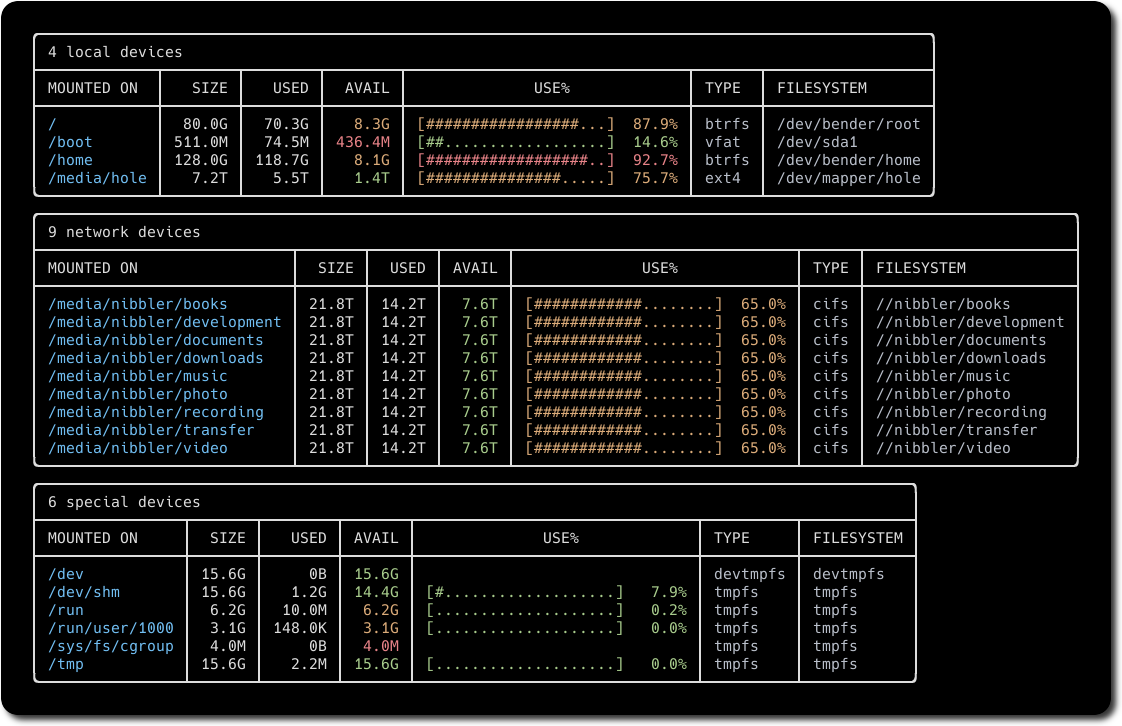
Sessions, help and JSON: tmux, tldr and jq
tmux keeps terminal sessions alive even if you close the window or the SSH connection drops, which makes it essential for long jobs on remote servers. Inside a session, Ctrl+b followed by % splits the screen vertically, Ctrl+b and " splits it horizontally, and Ctrl+b and d detaches it to the background.
tmux new -s work
tmux ls
tmux attach -t workCode language: JavaScript (javascript)
tldr provides short, community-written help pages with the most common uses of each command. On Debian and Ubuntu it comes from the tealdeer client, which needs to download the page cache the first time. It does not replace man, but it is usually enough to remember the syntax of tar or rsync.
tldr --update
tldr tar
jq formats, filters and transforms JSON from the command line. Since almost every API, cloud tool and security scanner returns JSON, it is one of the most rewarding utilities to learn. This example pulls three fields from the public GitHub API:
curl -s https://api.github.com/repos/junegunn/fzf | jq '{name, stars: .stargazers_count, language}'Code language: JavaScript (javascript)Frequently asked questions
Why are fd and bat called fdfind and batcat on Ubuntu?
Because Debian and its derivatives already had older packages with those names. Adding the aliases fd=’fdfind’ and bat=’batcat’ to your shell configuration fixes it.
Do these tools replace find, grep or ls?
For daily use they can, but the classic commands are still the ones available on every server, so it is worth keeping them in mind, especially for scripts.
Do they work on macOS?
Yes. All of them can be installed with Homebrew, and the fzf and zoxide setup is the same in bash and zsh.
Sources: