
Finding an SSH client that combines power, simplicity, and a polished user experience isn’t always easy. There are well-established options such as MobaXterm, SecureCRT, Tabby, or even Visual Studio Code with Remote SSH, but each comes with its own strengths—and limitations.
That’s where Muxus comes in. We discovered this new open-source SSH client thanks to Florian Schwarz, a cNPI Engineer and the creator of the project. Rather than reinventing SSH, Muxus aims to bring together many of the features that system administrators, DevOps engineers, and developers rely on every day in a single application.
Muxus in 20 seconds
- Free and open-source SSH, Telnet, and serial client released under the MIT license.
- Available for Windows, macOS, and Linux.
- Features split panes, integrated SFTP, remote file editing, persistent SSH tunnels, and reusable workspaces.
- Reads and updates the existing
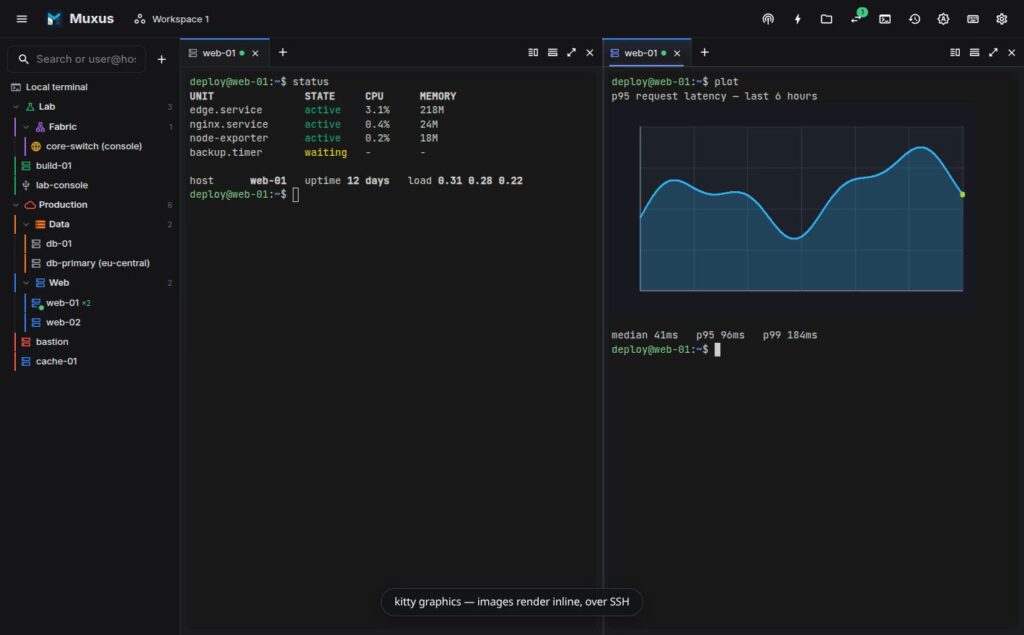
~/.ssh/configfile instead of maintaining a separate host database. - Supports Kitty Graphics Protocol for rendering images directly inside the terminal.
For years, MobaXterm has been the go-to SSH client for many Windows administrators. More recently, Visual Studio Code has become the default environment for many developers, but using Remote SSH often means launching an entire development environment when all you really need is a terminal.
That was exactly the motivation behind Muxus. As Florian Schwarz explains, he simply wanted a fast way to open an SSH session without starting a VS Code server, installing extensions, or spinning up a full IDE. After trying several existing solutions, he decided to build the tool he wished already existed.
Built Around the Session, Not Just the Terminal
One of Muxus’ most interesting design choices is that it focuses on the SSH session rather than treating each terminal as an isolated window.
Once connected to a remote host, users can:
- split the interface into multiple panes;
- open additional tabs while reusing the same SSH connection;
- browse remote files through an integrated SFTP client;
- edit files directly using Monaco Editor, the same editor that powers Visual Studio Code;
- create persistent SSH tunnels;
- save the entire layout as a workspace and restore it later.
This approach eliminates the need to establish multiple SSH connections to the same server simply to perform different tasks.
A Modern Terminal Experience
Muxus also embraces modern terminal capabilities that are becoming increasingly popular across Linux and developer ecosystems.
It supports:
- Kitty Graphics Protocol for displaying images directly inside terminal sessions;
- Kitty Keyboard Protocol;
- Sixel graphics;
- iTerm2 image support;
- built-in Nerd Fonts;
- fifteen bundled color themes.
As a result, applications such as yazi, matplotlib, timg, and kitten icat can display previews and graphics directly over SSH, making terminal workflows far more visual than traditional text-only sessions.
No Proprietary Host Database
One feature that will likely appeal to Linux administrators is Muxus’ decision to use the existing OpenSSH configuration.
Instead of asking users to recreate all their servers inside another database, Muxus reads directly from:
~/.ssh/config
Every configured host—including those imported via Include directives—appears automatically inside the application.
When changes are made, Muxus writes them back to the same configuration file while automatically creating a .muxus.bak backup.
This avoids one of the biggest frustrations with many graphical SSH clients: maintaining two separate host inventories that eventually fall out of sync.
More Than Just an SSH Client
Beyond terminal access, Muxus includes several productivity features aimed at day-to-day infrastructure management.
Among them are:
- persistent local, remote, and SOCKS SSH tunnels;
- integrated SFTP browsing;
- remote file editing without opening a second connection;
- full support for ProxyJump and ProxyCommand;
- authentication via SSH agent, certificates, private keys, keyboard-interactive authentication, and passwords;
- Telnet and serial console support;
- a universal Ctrl+K launcher for quickly searching hosts, tunnels, workspaces, files, commands, and session history.
Particularly useful is its Workspace feature, which allows users to save an entire desktop layout—including terminals, panes, SSH sessions, Telnet connections, and serial consoles—and reopen everything exactly as it was.
A Promising Young Project
Muxus is still an early-stage project (currently v0.2.0), so it has plenty of room to grow before it can fully compete with long-established commercial products like SecureCRT or MobaXterm.
Even so, its approach is compelling. It offers modern SSH workflows without requiring a full IDE, while combining many capabilities that are usually spread across several different applications.
Released under the MIT License, Muxus is available for Windows, macOS, and Linux, with all development taking place in the open.
As infrastructure management becomes increasingly complex, tools like Muxus show there’s still room for innovation in an area that many people consider “solved.” Rather than replacing the shell, it enhances the way professionals interact with remote systems, making SSH sessions more integrated, visual, and productive.
Frequently Asked Questions
What is Muxus?
Muxus is a free and open-source SSH, Telnet, and serial client that includes integrated SFTP, remote editing, persistent SSH tunnels, split panes, and reusable workspaces.
Is Muxus free?
Yes. It is released under the MIT License, and its complete source code is available as open source.
Does it require its own host database?
No. Muxus uses the standard OpenSSH ~/.ssh/config file, allowing users to keep a single source of truth for their SSH hosts.
Which operating systems does it support?
Muxus is available for Windows, macOS, and Linux.