
Managing backups in Proxmox environments often means moving between several layers: Proxmox VE for virtual machines and containers, Proxmox Backup Server for repositories, scheduled tasks, verification jobs, restore operations, auxiliary scripts and, quite often, manual checks to make sure everything has actually worked. In small infrastructures, that may be manageable. In environments with several hosts, datastores and retention policies, the day-to-day operation becomes heavier.
PBI, short for Backup Interface for Proxmox, was created precisely to simplify that work. It is a free, self-hosted, bilingual web interface, available in Spanish and English, designed to centralize Proxmox Backup Server management from a single panel. The project is independent, is not affiliated with Proxmox, and is released under the GPLv3 licence.
The idea is straightforward: bring into a more comfortable interface many of the tasks that administrators already perform, but usually spread across different consoles, panels and custom tools. PBI allows users to review backup status, browse snapshots, restore complete machines or specific files, schedule jobs, generate reports, detect orphaned backups and receive email notifications.
One Panel for Backups, Restores and Reports
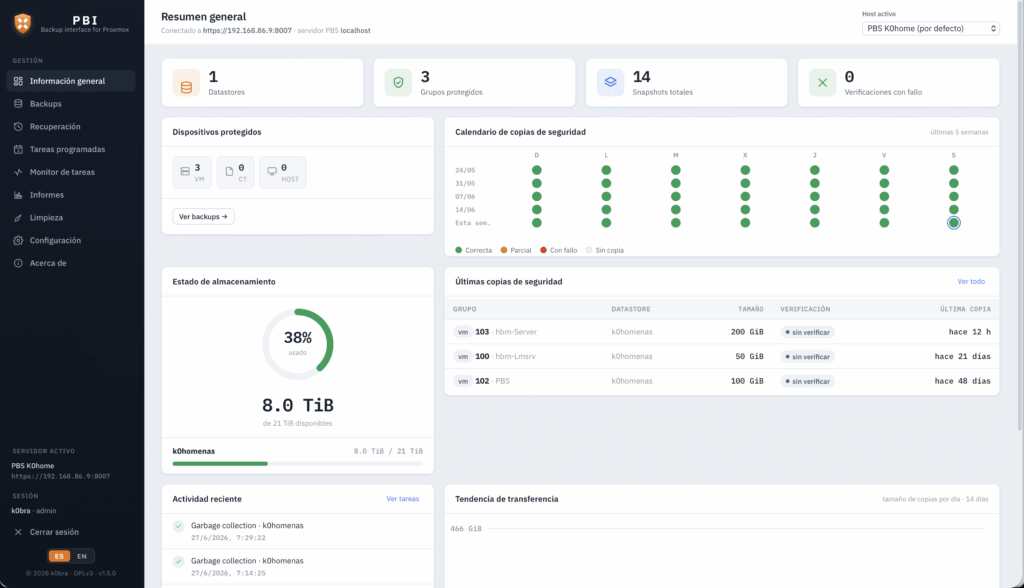
One of PBI’s most useful features is visibility. The dashboard shows storage usage by datastore, number of snapshots, protected groups, failed verifications, protected devices by type, recent activity, daily transfer trends and a backup calendar for the last few weeks with color-coded status. For an administrator, that quick overview can save a lot of time compared with checking tasks one by one.
The tool also includes a snapshot explorer by datastore, with filters by ID, owner, comment, verification status and size. It also supports CSV export, which can be useful for internal audits, capacity reviews or operational documentation.
For restore operations, PBI relies on Proxmox VE to recover virtual machines and containers through a guided workflow. The user can choose the machine, restore point, target node, destination storage and VMID, with options to overwrite or start the machine after restore. It also includes live log tracking. For more granular recovery, it allows users to browse inside a backup and download specific files or folders as a ZIP file.
| Area | What PBI Adds |
|---|---|
| Dashboard | General backup status, storage, calendar and trends |
| Backups | Snapshot explorer and CSV export |
| Restore | Guided VM/CT and file-level recovery |
| Scheduling | Backups, prune, verify, sync and restore tests |
| Reports | Evidence reports for ISO 27001 / ENS and PDF exports |
| Cleanup | Orphaned backup detection and garbage collection |
| Security | Users, roles, 2FA and encrypted secrets |
The reporting module is especially relevant for companies that need to prove control over their backups. PBI can generate executive summaries and evidence reports aimed at ISO 27001 and ENS requirements, including scope, policy per machine, RPO, retention, encryption status, off-site copy status, calendar and declaration. It can also schedule periodic reports by email, with an HTML version and PDF attachment.
Automating Not Only the Backup, but Also the Restore Test
A backup is only valuable if it can be restored. This idea is repeated often in system administration, but it is not always translated into real processes. PBI includes scheduled restore jobs for recurring tests, for example restoring the latest backup of a VM to a test VMID and verifying that the process completes correctly.
This changes the focus. It is not just about knowing whether the backup ran. It is about regularly checking whether that backup can actually be recovered. In environments where business continuity matters, that difference is important. A successful backup report can provide reassurance, but a tested restore provides much more confidence.
The tool also allows users to manage Proxmox VE jobs, such as vzdump backups, and native PBS jobs such as prune, verify and sync. The task monitor provides history with automatic refresh, a filter for running tasks, progress percentage and a live log viewer.
There is also a cleanup function aimed at detecting orphaned backups, meaning backup copies of machines that no longer exist in Proxmox VE. In infrastructures with frequent changes, these backups can consume storage for months without anyone reviewing them. PBI allows deletion by group or by snapshot, highlights older copies in cases where VMIDs have been reused, and can launch garbage collection by datastore to reclaim physical disk space.
Security, Roles and Updates from the Interface
PBI acts as a secure proxy in front of the Proxmox Backup Server and Proxmox VE APIs. According to the project documentation, credentials are stored encrypted on the server and are never returned to the browser. It supports PBS authentication through API tokens or username and password, while access to the panel is protected with username, password and optional 2FA.
User management is organized into three roles: administrator, operator and viewer. The administrator has full control over users, configuration and auditing. The operator can work with backups, jobs, restores and cleanup. The viewer has read-only access to the dashboard, backups, task monitor and reports, without permissions for sensitive operations.
PBI also includes action auditing, with a persistent log of access, user changes, job launches and cleanup operations. In a business environment, that record can be useful for both internal control and compliance evidence.
One of the latest highlighted improvements is the update module inside the GUI. PBI can check whether a new GitHub release is available, verify the package’s SHA-256 checksum and offer one-click installation. According to the project, the process does not ask for the root password, but for the PBI password, and delegates the update to a systemd service with limited privileges. For users who prefer a manual process, the interface displays the download, verification and installation commands to run over SSH.
The recommended installation method is a .deb package, designed for Debian or Ubuntu. It includes the Node runtime, a systemd service and HTTPS with a self-signed certificate. It can be installed on the PBS server itself or on another machine. On first launch, it allows the administrator account to be created and the first host to be configured.
A Useful Tool for More Professional Proxmox Environments
PBI does not replace Proxmox Backup Server. It is not intended to do so. Its value lies in adding a more convenient operational layer for teams that want to manage backups with greater clarity, less console usage and more evidence. In small labs, it may be a convenience. In companies with audit requirements, multiple machines and retention policies, it can become an interesting tool.
The project also reflects a broader trend within the Proxmox ecosystem. As more companies adopt Proxmox VE and PBS as real alternatives for virtualization and backup, the need for complementary tools grows: dashboards, automation, reports, restore validation, clearer alerts and multi-user control.
These layers are not minor. Virtualization does not end with starting virtual machines. Daily operations include protecting them, testing recoveries, cleaning repositories, documenting policies and proving that the infrastructure can survive a failure. PBI tries to cover precisely that area, where administrators need less friction and more control.
Its GPLv3 open source model also fits well with many Proxmox users: technical teams that value transparency, self-hosting and the ability to review or adapt the tool. As with any independent project, it is advisable to test it first in controlled environments and carefully validate permissions before using it in production, especially for destructive operations such as cleanup or restore with overwrite.
The idea is strong. If Proxmox Backup Server already solves the technical side of backup, an interface like PBI can help solve the operational side: view, schedule, restore, report, audit and keep the repository clean from one place.
Frequently Asked Questions
What is PBI for Proxmox?
PBI, Backup Interface for Proxmox, is a free, self-hosted web interface for managing Proxmox Backup Server from a single panel.
Does it replace Proxmox Backup Server?
No. PBI relies on the PBS and Proxmox VE APIs to make management, restore, reporting, cleanup and monitoring tasks easier.
Can it restore machines and files?
Yes. It can restore complete VM/CT instances through Proxmox VE and recover specific files or folders from backups.
What does it add for compliance and auditing?
It generates executive reports and evidence reports aimed at ISO 27001 and ENS, with PDF download and scheduled email delivery.
Is it open source?
Yes. The project is released under the GPLv3 licence and is presented as independent, with no affiliation to Proxmox.