
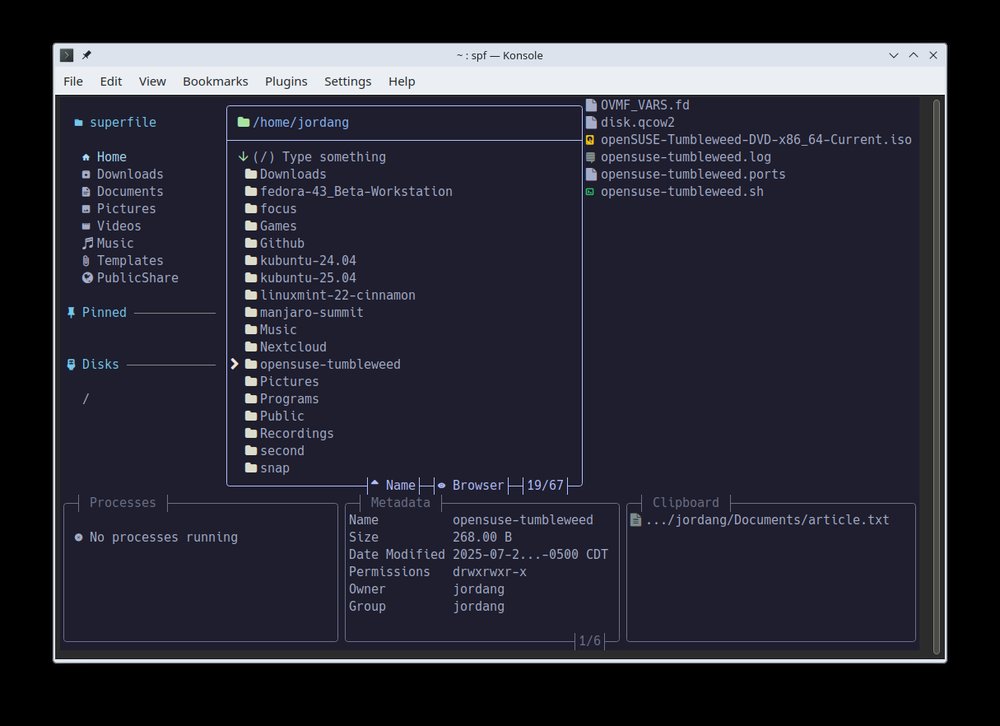
In an era dominated by graphical desktops full of windows and icons, a small open-source project is quietly reminding everyone that the command line is far from dead. It’s called Superfile, a terminal-based file manager with a clear ambition: deliver a modern, visually appealing and productive experience, without sacrificing the speed and simplicity of the console.
Unlike classic text-mode file managers, Superfile opts for a more polished interface. It keeps everything inside the terminal, but adds design touches and usability improvements that feel closer to a lightweight GUI than to an old-school TUI. The target audience is clear: system administrators, developers and power users who live in the terminal and want to move, copy, delete and inspect files quickly — all from the keyboard.
Easy installation on Linux, macOS and Windows
The project is hosted on GitHub and offers straightforward installation methods for the main operating systems.
On Linux and macOS, users can install Superfile by running a simple shell script downloaded from the official site. On Windows, it can be installed via PowerShell or using popular package managers like Winget and Scoop.
For those who prefer to build from source, Superfile is written in Go. The process is simple: clone the repository, run the provided build script and add the resulting spf binary to your system PATH. Once installed, launching the file manager is as easy as typing spf in the terminal.
Support for Linux and macOS is already mature. On Windows, the developers warn that some features are still not fully supported, a common situation for cross-platform tools that prioritize Unix-like systems first.
A file manager designed to grow
Superfile aims to be more than a basic file browser. According to its documentation, it supports plugins, themes and configurable hotkeys, turning it into a kind of control hub inside the terminal.
- Plugins allow users to extend functionality without touching the core.
- Themes change the look and feel to match dark, light or custom color schemes.
- Hotkeys are fully configurable, and Vim/Neovim users are explicitly encouraged to switch to a “Vim-style” keymap for a more familiar workflow.
Another notable feature is the built-in auto-update check. Superfile periodically queries GitHub for new releases and notifies the user if an update is available. For those who prefer full manual control, this behaviour can be disabled in the configuration file.
For admins, developers… and curious users
Superfile fits naturally into the toolbox of sysadmins, SREs, DevOps teams and developers who already spend much of their day in a terminal window. It’s especially useful when navigating large directory trees, inspecting project structures, working on remote servers via SSH or managing files inside virtual machines and containers.
But it can also appeal to intermediate users who are comfortable with the command line and want something more powerful and ergonomic than the classic graphical file explorer, without adding heavyweight dependencies.
The project is open source, released under the MIT license, and actively welcomes contributions. The maintainers encourage participation not only through code, but also with documentation improvements, bug reports and user feedback. They even invite interested contributors to step up as core maintainers as the project grows.
The terminal is evolving, not disappearing
Superfile is part of a broader trend: a new generation of terminal tools that blend traditional CLI power with modern UX ideas. Far from being a relic, the command line is becoming a richer environment, where productivity-focused tools compete to make keyboard-centric workflows faster and more pleasant.
For users who feel at home in a shell and want a faster way to manage files without leaving the terminal, Superfile positions itself as a compelling option: a “pretty, fancy and modern” file manager that tries to bring the best of both worlds — minimalism and visual comfort — to the console.