
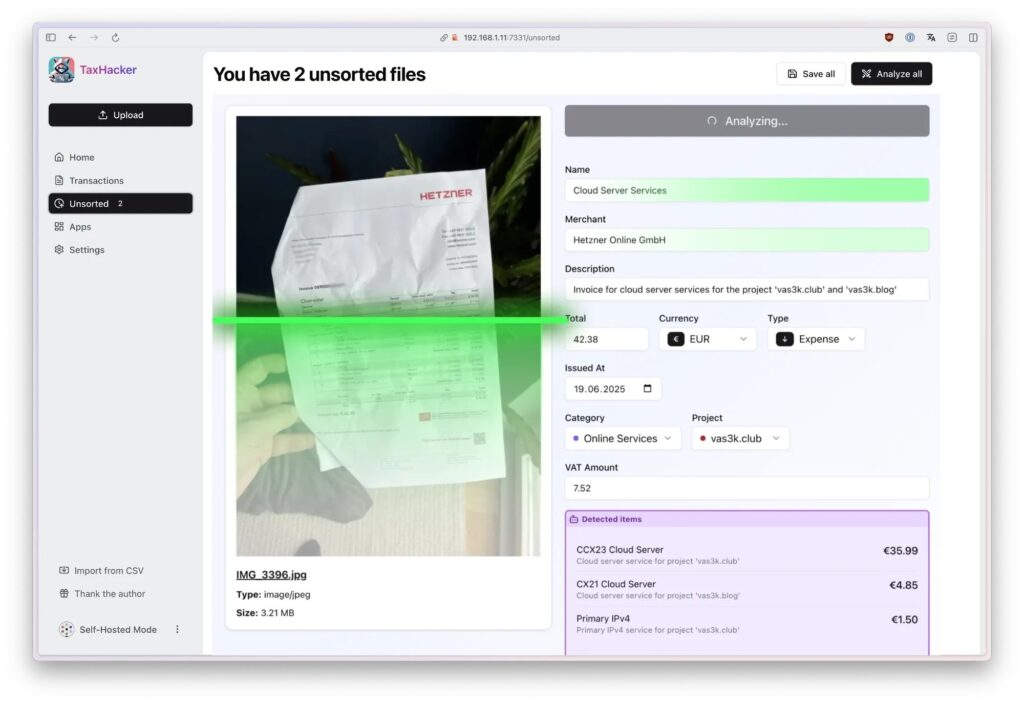
Digitizing expenses is still one of those small tasks that takes far too many hours. Restaurant receipts, PDF invoices, handwritten notes, bank statements, purchases in foreign currencies, expenses across several projects, and documents that appear just when it is time to prepare tax filings. For freelancers, indie hackers, and small businesses, the problem is often not sophisticated accounting, but organizing the minimum information needed to file correctly and on time.
TaxHacker fits exactly into that gap. It is a self-hosted, open source accounting app that uses AI models to read receipts, invoices, PDFs, and other documents, extract the relevant data, and store it in a structured database similar to a spreadsheet. The project is published by vas3k on GitHub under the MIT license and is presented as still being in early development, so its author recommends using it with caution.
The proposal is attractive because it combines three ideas that work very well together: OCR and AI-based analysis, local control of financial documents, and prompt-based customization. Instead of manually entering every expense into a template, the user can upload a photo or PDF and let the system identify the date, merchant, amounts, taxes, line items, categories, and currencies.
AI for reading receipts, invoices, and messy documents
TaxHacker is designed to work with a wide range of documents: store receipts, restaurant bills, handwritten receipts, bank statements, letters, and PDFs. According to the project description, it can handle different languages and currencies, and it allows users to process documents in bulk or leave them first in an “unsorted” area until they are reviewed.
The workflow is simple: the user uploads the document, the AI extracts the main fields, classifies the transaction, and saves it in a structured database. From there, transactions can be filtered, categories reviewed, data corrected, and exports prepared.
The most interesting part is that it is not limited to fixed fields. TaxHacker allows users to create custom fields with their own prompts. For example, a freelancer could ask it to extract the invoice number, the supplier’s tax ID, the related project, the type of expense, the issuing country, or any specific data their accountant needs. In practice, each additional column becomes a small instruction for the model.
This can be especially useful in businesses where documents do not always follow the same format. A software invoice, a travel receipt, a fuel receipt, and a supplier invoice do not present information in the same way. A rigid system often fails there. A prompt-based system can adapt better, although it still requires human review.
Automatic currency conversion, including crypto
Another strong point of TaxHacker is automatic currency conversion. The project detects foreign currencies and converts them into the base currency using historical exchange rates from the transaction date. It also mentions support for more than 170 currencies and 14 popular cryptocurrencies, including BTC, ETH, LTC, and DOT.
For people who work with international clients, travel frequently, or pay for tools in dollars, pounds, francs, or crypto, this detail can save a lot of work. Manually entering an expense in USD is one thing; recording the correct exchange rate for the transaction date is another.
Historical conversion is especially relevant for tax preparation or internal reports, because the fiscal or accounting value of a transaction should not always be calculated using the current exchange rate. Even so, it should be treated as an operational aid, not as a substitute for professional accounting or tax judgment. Each country may have different rules on acceptable exchange rates, cryptoasset treatment, deductibility, and supporting documentation.
Self-hosted, but privacy depends on the model used
TaxHacker is presented as a self-hosted application. It can be deployed on your own infrastructure using Docker and Docker Compose, with PostgreSQL as the database and local file storage. The goal is for financial documents to remain under the user’s control and not become trapped in a closed platform.
The basic deployment is based on a docker-compose.yml, an application container, PostgreSQL, automatic migrations, persistent volumes, and environment variables such as UPLOAD_PATH, DATABASE_URL, BETTER_AUTH_SECRET, and SELF_HOSTED_MODE.
Privacy, however, has an important nuance. TaxHacker can use OpenAI, Google Gemini, Mistral, or a local LLM compatible with an OpenAI-style API, such as Ollama, LM Studio, vLLM, or LocalAI. If the user processes documents through a cloud provider, the data may leave their server and be sent to that external model. If they use a local model, they gain more control, but OCR and extraction quality will depend heavily on the model chosen.
This distinction is key. “Self-hosted” does not automatically mean “everything stays local” if external APIs are connected. It means the application and data can remain under the user’s control, but AI processing depends on configuration. For sensitive documents, client invoices, or tax information, it is worth checking carefully which model is being used and where each file is processed.
Categories, projects, and export for tax filing
TaxHacker also includes organization by categories, projects, and custom fields. This makes it possible to separate expenses by client, business line, country, activity type, or any internal structure that makes sense. It also includes full-text search across recognized document content, advanced filters by date, amount, category, project, or custom fields, and bulk operations.
Export is oriented toward tax reports or accountant-ready files. The project allows filtered transactions to be exported to CSV and associated files to be downloaded. This does not turn TaxHacker into an official tax filing tool, but it can greatly reduce the work that comes before filing: collecting, classifying, reviewing, and delivering information in a usable format.
For a freelancer or small business, the value lies in reaching quarterly or annual closing with less chaos. Instead of searching for receipts across folders, emails, and phone photos, everything is stored in a searchable database, with attached documents and extracted data.
A promising tool, but still young
TaxHacker has a powerful proposal, but it should not be presented as a mature enterprise accounting solution. The repository itself states that it is in early development and should be used at the user’s own risk. In taxation, that matters a lot: an incorrect extraction, a wrongly assigned category, or a bad conversion can create problems if nobody reviews the result.
Its greatest value is in automating the most mechanical part of the work: reading documents, extracting data, suggesting categories, converting currencies, and preparing everything for review. The final decision on what is filed, what is deductible, and how it is justified remains human.
For technical users, the project is interesting because it is auditable, modifiable, and deployable on private infrastructure. For freelancers and small businesses, it can reduce the hours lost before sending documentation to an accountant. For tax advisors, it could become a base for more customized workflows, provided data quality is properly controlled.
TaxHacker does not promise to make accounting disappear. It promises something more realistic: turning a pile of messy documents into a useful table. And for many freelancers, that is already a major improvement.
Frequently asked questions
What is TaxHacker?
TaxHacker is an open source, self-hosted app that uses AI to analyze receipts, invoices, PDFs, and financial documents, extracting structured data for accounting and tax preparation.
Can it read handwritten receipts?
The project states that it can work with handwritten receipts, documents in different languages, and multiple currencies, although quality will depend on the AI model and the original document.
Does it only work with cloud models?
No. It can use OpenAI, Google Gemini, or Mistral, but also local models compatible with an OpenAI-style API through tools such as Ollama, LM Studio, vLLM, or LocalAI.
Does it convert currencies automatically?
Yes. It detects currencies and converts amounts into the base currency using historical exchange rates from the transaction date, with support for traditional currencies and several cryptocurrencies.
Does it replace a tax advisor?
No. It helps organize and extract information, but the data must be reviewed and tax decisions must follow the applicable regulations and professional criteria.