
Caddy has earned a place among administrators and technical teams for one very specific reason: it simplifies secure web service publishing without sacrificing powerful configuration. Its automatic HTTPS support and cleaner approach compared with more traditional setups have made it a common choice for exposing applications, APIs and internal services. But managing the modern edge is no longer just about running a reverse proxy.
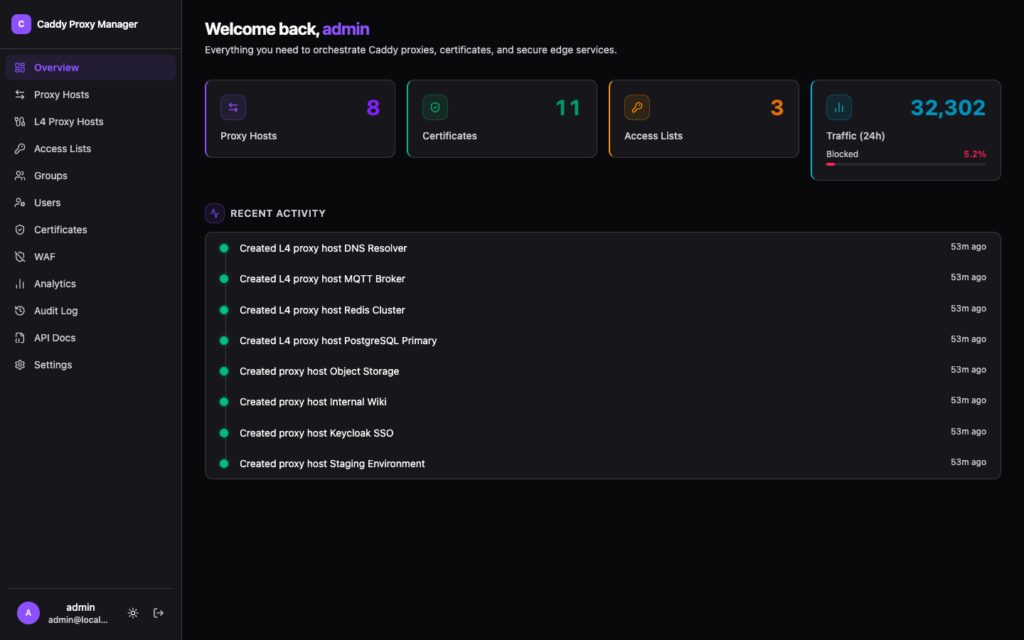
That is where Caddy Proxy Manager comes in: an open source web interface designed to manage Caddy Server from a visual panel. The project combines reverse proxy management, automatic HTTPS, WAF, authentication, access control, geo blocking, traffic analytics, a REST API and full change auditing. It is deployed with Docker, built with Next.js and shadcn/ui, and released under the MIT licence.
The proposal is clear: bring many common edge, security and application publishing tasks into a single interface, without forcing administrators to edit configuration files for every change. It does not remove the need to understand Caddy or architectural decisions, but it can save time in environments where many hosts, certificates, rules and access policies need to be managed.
One Panel for Reverse Proxy, Certificates and Access Control
The most recognizable feature of Caddy Proxy Manager is reverse proxy management. From the interface, users can create and manage hosts, configure multiple upstreams, apply load balancing, enable health checks, add custom headers, define location rules, redirects, rewrites and upstream DNS pinning.
This brings it close to well-known tools for visual proxy management, but with a broader approach. The project is not limited to classic HTTP. It also includes L4 proxying for TCP and UDP traffic, with support for TLS SNI matching, proxy protocol, health checks and geo blocking at the transport layer. For teams that publish not only web applications but also more varied network services, this layer can make a real difference.
TLS also plays a central role. Caddy already stands out for automatic certificate management, and Caddy Proxy Manager adds visibility through a dedicated certificates page: issuer, expiry, status, imported certificates and use of a built-in CA to issue internal client certificates. It also supports automatic HTTPS through ACME with Let’s Encrypt and Cloudflare DNS-01, along with mTLS and role-based path access rules.
| Area | Key features |
|---|---|
| Reverse proxy | Upstreams, load balancing, health checks, headers, redirects and rewrites |
| L4 TCP/UDP | Transport proxying, TLS SNI, proxy protocol and geo blocking |
| TLS | ACME, Let’s Encrypt, Cloudflare DNS-01, imported certificates and internal CA |
| mTLS | Client certificates and path-based access control |
| Access | Basic auth, forward auth, OAuth/OIDC and roles |
| Security | WAF with Coraza and OWASP Core Rule Set |
| Analytics | Real-time metrics, country maps and blocked request logs |
| Automation | Full REST API and OpenAPI documentation |
Access control is another strong point. The tool includes HTTP basic auth, forward auth with user groups, mTLS with path-based rules and three user roles: Viewer, User and Admin. It also supports OAuth2/OIDC with compliant providers such as Authentik, Keycloak or Auth0, plus account linking from the profile page.
WAF, Geo Blocking and Real-Time Analytics
Caddy Proxy Manager includes a WAF powered by Coraza with the OWASP Core Rule Set. According to the project, it can block common attacks such as SQL injection, XSS, LFI or RCE, with per-host control, suppression of noisy rules and custom SecLang directives. The interface allows users to enable protection, review blocked or detected events and adjust behavior without working directly with more complex configuration files.
Geo blocking is also part of the design. It allows traffic to be blocked or allowed by country, continent, ASN, CIDR or exact IP per host. It also includes priority rules for exceptions and a fail-closed mode, a relevant option when the goal is to prevent a geolocation failure from allowing traffic that should be blocked.
Analytics are powered by ClickHouse, with 90-day retention according to the project information. The panel provides live request charts, protocol breakdowns, country maps, top user agents and a paginated blocked-request log. For teams that want to understand what is reaching their applications, this layer provides immediate operational insight.
These features should not be confused with a complete security strategy. A WAF, an authentication system and visual analytics help, but they do not replace application hardening, secret management, patching, network segmentation or a broader observability policy. The advantage lies in bringing several useful pieces together in a single management point.
A Complete API, Not Just a Visual Interface
Although the project places a strong focus on the visual experience, Caddy Proxy Manager is not limited to the panel. It includes a REST API under /api/v1/ with Bearer token authentication, API token management and interactive OpenAPI 3.1.0 documentation available at /api-docs.
This matters in professional environments. An interface can be convenient for operations, but infrastructure needs automation. Being able to manage resources through an API makes it possible to integrate changes with internal processes, scripts, deployment tools or CI/CD workflows.
The tool also includes instance synchronization through a master/slave model. Configuration can be pushed to replicas whenever changes occur, including proxy hosts, certificates and settings. In multi-instance deployments, this function can help maintain consistency across nodes, although high availability, rollback and synchronization failure scenarios should always be tested carefully before production use.
Full auditing is another feature designed for teams. Every configuration change is tracked with user attribution and full-text search. In edge operations, where a bad change can take an application offline or expose something unintentionally, knowing who changed what and when is far from a minor detail.
Fast Docker Deployment with a Practical Focus
The proposed deployment is simple. The project suggests starting with docker compose: clone the repository, copy .env.example to .env, adjust environment variables and launch the services. The application is then accessible at http://localhost:3000, with data persisted in Docker volumes.
This approach fits labs, infrastructure teams, internal platforms and administrators looking for a quick way to bring order to several published services. It may also be interesting for environments that already value Caddy but miss a visual layer similar to other proxy management tools.
The key will be how the project evolves. Combining reverse proxy, WAF, analytics, identity, mTLS, geo blocking, API and auditing is ambitious. The more functions an edge tool concentrates, the more important stability, security, documentation and update processes become. In production, this type of component should be tested carefully, especially if it sits in front of critical applications.
Caddy Proxy Manager addresses a real need: managing the edge of infrastructure from a modern interface with less manual work. For those already using Caddy, or for teams that want to get closer to it without living inside configuration files, it is a project worth watching.
Frequently Asked Questions
What is Caddy Proxy Manager?
It is an open source web interface for managing Caddy Server, with reverse proxy, automatic HTTPS, WAF, authentication, analytics, REST API and auditing.
Does it replace Caddy Server?
No. It acts as a visual management layer on top of Caddy, making configuration and operation easier from a web panel.
Can it manage HTTPS certificates?
Yes. It supports automatic HTTPS through ACME, Let’s Encrypt and Cloudflare DNS-01, as well as imported certificates and a built-in CA.
Does it include security features?
Yes. It offers a WAF with Coraza and OWASP CRS, geo blocking, forward auth, OAuth/OIDC, mTLS and role-based access control.
How is it installed?
The project proposes deployment through Docker Compose, with configuration through a .env file and data persistence in Docker volumes.