
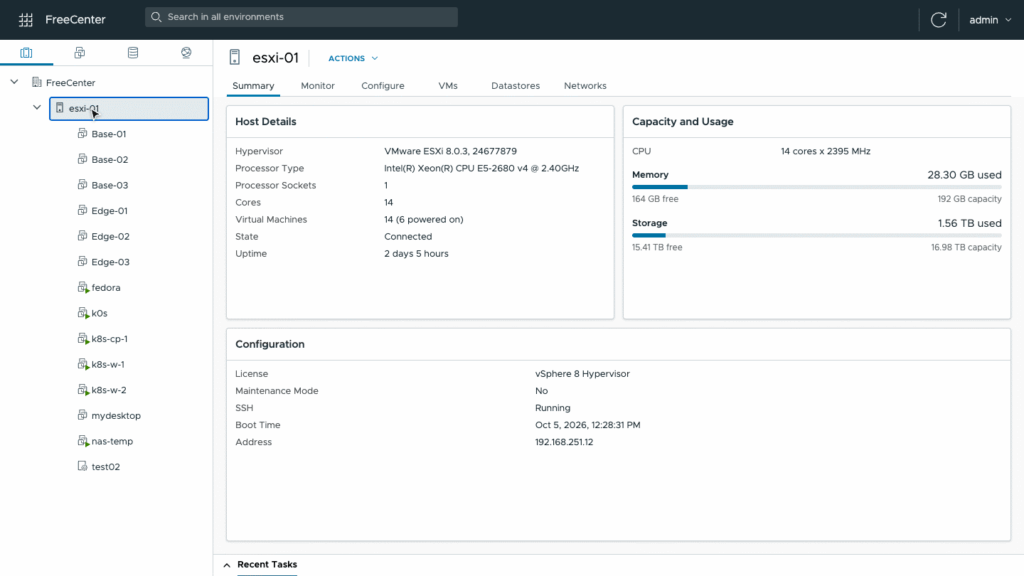
FreeCenter is an independent project designed to address one of the best-known limitations of the free edition of VMware ESXi: the inability to use its management API to perform changes through automation. The tool adds a centralized web console, a REST API, and a Terraform provider for managing virtual machines, storage, networking, backups, and host migrations without requiring vCenter.
The key points about FreeCenter for ESXi Free in 30 seconds
- FreeCenter lets administrators manage multiple ESXi hosts from a single web console.
- Its REST API exposes the operations available through the interface for scripts and automation.
- The Terraform provider lets users define virtual machines, networks, templates, snapshots, backups, and migrations as code.
- The tool uses the standard vSphere API to read inventory and SSH to perform changes on the hosts.
- It requires ESXi 8, SSH enabled on the hosts, and a machine from which FreeCenter can run, for example through Docker.
The project is primarily aimed at home labs, small office environments, and test systems. FreeCenter does not replace vCenter in every respect, nor does it turn ESXi Free into a fully featured VMware infrastructure platform. Its goal is to cover some of the management operations that are unavailable when running a standalone ESXi host.
ESXi Free’s problem is automation
The free edition of ESXi can run virtual machines, but its management model is considerably more limited than an installation managed through vCenter. Each host is managed separately through its own Host Client, while the management API available under the free license is read-only for operations that modify state.
That becomes a problem when using Infrastructure as Code (IaC). Tools such as Terraform, Ansible, or PowerCLI need to be able to create and modify resources to automate an environment. With the restrictions imposed by ESXi Free, many of those operations cannot be performed directly through the standard API.
FreeCenter takes a different approach. According to the project’s documentation, it uses the vSphere API to read inventory and performs changes over SSH, using tools already available on the ESXi host. From the outside, the result is intended to work like a small centralized management console similar to vCenter, but without installing additional components on the hosts.
The tool can register multiple hosts and bring their virtual machines, datastores, and networks into a single interface. It also includes a recent tasks panel, global search, and disk-health alarms.
This changes the experience considerably for a homelab with several ESXi hosts. Instead of opening each Host Client separately, FreeCenter provides a common inventory from which operations can be performed across different servers.
Terraform turns virtual machines into reproducible configuration
The most interesting part for infrastructure administrators and developers is the Terraform provider. FreeCenter exposes resources for describing hosts, networks, virtual machines, templates, snapshots, backups, and scheduled tasks as code.
A virtual machine can be defined with parameters including the host, datastore, name, operating system, CPU count, memory, network, and system image. It can also include cloud-init configuration to set the server hostname, SSH keys, or packages to install during the first boot.
One particularly interesting detail is migration. The project allows a VM’s host_id to be specified through Terraform. If that attribute changes, FreeCenter can use it to migrate the VM to the new host, meaning that moving a virtual machine can also become part of the declarative configuration.
The tool also includes a catalog of Linux images such as Rocky Linux, Ubuntu, Fedora, and Debian. Starting from a prepared image and using cloud-init, FreeCenter says it can have a new Linux server ready in about a minute. That figure comes from the project’s documentation and will depend on the specific environment.
The web console can also create VMs from scratch, modify CPU and memory, add disks and network adapters, manage snapshots, clone machines, and convert them into templates. Users can also open a VM’s console directly from the browser.
Migration and backups without vCenter
FreeCenter also attempts to address another limitation of managing standalone ESXi hosts: moving virtual machines between servers.
The project includes a migration function that first checks factors such as CPU compatibility, available storage, and networks. A powered-off VM can simply be moved. If it is running and the processors are compatible, FreeCenter can suspend it, move it, and resume it on the second host.
There is also a mode in which the disks of a running VM can be copied while the machine continues operating, leaving a shorter interruption for the final step. If the hosts share the same datastore, the documentation states that no data needs to be copied.
There is an important distinction compared with vMotion: these migrations are not full live migrations. The project itself acknowledges that there is a brief interruption while the VM is suspended or restarted. vMotion capabilities require vCenter.
Backups follow a similar approach. FreeCenter can back up running virtual machines to a datastore or another host, restore them as new VMs, and schedule backups and snapshots hourly, daily, or weekly. It can also apply a retention policy to automatically remove older backups.
What FreeCenter can do and where its limits remain
The project is particularly interesting for homelabs because it brings together many operations that would otherwise require a combination of the ESXi interface, scripts, and external tools.
It also includes monitoring for CPU, memory, disk, and network activity, host and VM event logs, and disk-health checks using SMART and NVMe data. Problematic results can appear as alarms in the main overview.
The administration section covers virtual switches, port groups and VLANs, host services, NTP, maintenance mode, reboots, and shutdowns. It also includes a datastore browser for moving files, uploading content, and downloading ISO images directly from a URL.
On the security side, FreeCenter supports local authentication and OpenID Connect (OIDC), along with roles that separate permissions for virtual machines, hosts, storage, users, and console access. Host credentials are stored encrypted and are not returned through the API.
There are, however, limits worth keeping in mind. FreeCenter does not add clustering, High Availability (HA), Distributed Resource Scheduler (DRS), or distributed switches. It also cannot currently move a VM between two datastores on the same host.
VM hardware changes require the machine to be powered off, although FreeCenter can handle the shutdown and startup cycle. Disks can be expanded but not shrunk, and they cannot be expanded while the VM has snapshots, according to the documentation.
The project is designed for ESXi 8 and has been tested with ESXi 8.0 Update 3 using the free license, although it can also work with licensed hosts. To use it, SSH must be enabled on the hosts, and a machine must be able to communicate with them over ports 443 and 22. It can be run through Docker or built from source.
FreeCenter is released under the Apache 2.0 license and explicitly describes itself as an independent project with no affiliation with, endorsement from, or support by VMware or Broadcom. For that reason, anyone considering it for production infrastructure should test it first in systems that can be recovered easily after a failure.
Its strongest use case is more specific: administrators who want to keep using ESXi Free while gaining automation capabilities for their homelab. In that scenario, the combination of a REST API and Terraform makes it possible to move from a collection of manually managed hosts to infrastructure that can be described, reproduced, and changed through code.
Frequently asked questions
What is FreeCenter?
FreeCenter is an independent management console for VMware ESXi hosts, with a web interface, REST API, automation capabilities, and a Terraform provider. It is primarily aimed at home labs, small environments, and test systems.
Does FreeCenter replace vCenter?
No. It adds many management features to standalone hosts, but it does not provide the clustering, HA, DRS, Distributed Switch, or vMotion capabilities provided by vCenter.
Can Terraform be used with ESXi Free through FreeCenter?
Yes. The project includes a Terraform provider that lets users define hosts, networks, virtual machines, templates, snapshots, backups, and scheduled tasks as code.
What does FreeCenter need to run?
The documentation states that it requires one or more ESXi 8 hosts, SSH enabled, and a machine with access to the hosts over ports 443 and 22. It can be run through Docker or built from source.